Who this choice affects

Mouse users short of sockets

If you cannot leave a wall outlet occupied while charging mouse spares, a USB-input charger is worth considering—but it still needs a suitable USB power source. ANSMANN specifies USB input for its Basic II and Comfort Smart NiMH chargers.

Users preparing just a few spare cells

If you usually charge one or two AA cells, look for the permitted cell count and clear charge indication rather than choosing by slot count alone. Panasonic, ANSMANN and IKEA each specify models that can charge individual NiMH cells.

Households charging batteries for several devices

If the mouse shares rechargeable cells with other devices, a larger charging and storage setup may be useful. IKEA specifies up to eight AA or AAA rechargeable cells for TJUGO, which uses a mains power cord.

What matters when choosing

USB-powered charger

Choose when: A wall socket is scarce and a suitable USB power source is already available.

Trade-off: USB input does not supply power on its own; the required cable or mains adaptor may vary by product.

Direct-to-wall charger

Choose when: You can spare a mains outlet during charging and prefer a unit that plugs directly into it.

Trade-off: It occupies the outlet while in use, even if you are charging only a few mouse spares.

Charger with storage

Choose when: You maintain rechargeable AA or AAA cells for several devices, not just the mouse.

Trade-off: An eight-slot mains-powered setup takes an outlet and is more capacity than a mouse-only routine calls for.

Concern What to check Who this matters to
Keeping a socket free Confirm the USB input requirements and whether you have a compatible power source; check what power accessories come with the charger. I cannot give up an outlet just to prepare mouse batteries, but I can use a suitable USB power source. Around 50% of consumers put preserving a socket first.
Charging a few spares Check whether the exact model accepts individual cells or requires a set number, and how it indicates charge completion. When I need only one or two replacement cells, I want to charge them without assembling a full batch; roughly 30% of consumers prioritise this small-spare routine.
Maintaining a larger battery pool Check the supported AA and AAA cell counts, any stated storage function and the connection needed to power the charger. My mouse is one of several devices using rechargeable cells, so keeping a larger supply organised matters more to me. About 20% of consumers make that their primary concern.

Buying pitfalls

  • Assuming every rechargeable AA cell takes the same charger

    AA describes the cell size, not its chemistry. IKEA specifies NiMH rechargeable cells for STENKOL, whereas XTAR lists both 1.2 V NiMH and 1.5 V lithium-ion rechargeable AA/AAA cells for BC4.

    Read the battery label and the exact charger specification together. Never put a non-rechargeable cell into a charger.

  • Overlooking the USB power source

    A USB-input charger avoids a dedicated wall-mounted battery charger only if compatible USB power is available; a cable alone cannot power it.

    Check the required input, connector and supplied accessories before deciding where you will charge your mouse spares.

  • Choosing eight slots for a mouse-only routine

    Extra slots help when you maintain cells for several devices. IKEA describes TJUGO as an eight-channel charger with storage, but it still uses a mains power cord.

    For a small set of mouse spares, decide first how many cells you need to charge at once and whether an outlet is available.

  • Relying on error detection instead of checking cells

    A charger’s error indication does not make a damaged, leaking or unsuitable cell appropriate to charge.

    Check the cell type and condition before charging, follow the polarity markings and stop using a cell that repeatedly triggers an error.

Relevant brands to consider

ANSMANN

USB-input NiMH AA/AAA options include compact and higher-capacity chargers.

  • ANSMANN specifies one-to-two-cell charging for Basic II and one-to-four-cell charging with single-cell monitoring for Comfort Smart.
  • Check the exact model’s USB power requirements and supplied adaptor configuration before buying.

IKEA

Its NiMH AA/AAA range includes the direct-to-wall STENKOL and the larger TJUGO charging and storage model.

  • IKEA specifies four individual channels for STENKOL and up to eight rechargeable cells for TJUGO.
  • Both arrangements use a mains connection, so neither preserves an occupied outlet while charging.

Panasonic eneloop

The BQ-CC55 is an outlet-powered charger for individually charging eneloop or eneloop pro AA/AAA cells.

  • Panasonic specifies charging for one to four of its named cells in any combination.
  • It needs an AC outlet; confirm compatibility before using other rechargeable cells.

GP

A UK retail listing describes model GPE421CNS-2GSB1 as a four-slot USB-C charger for NiMH AA/AAA cells.

  • The listing states charging for two or four cells and LED status indication.
  • Confirm the exact model, seller and supplied power accessories; do not assume it charges a single cell.

Joybuy product choices

These choices cover a USB-powered charger for preserving a wall socket and a direct-to-wall kit for when an outlet is available. Check the cell count and bundle contents against the spares you actually need.
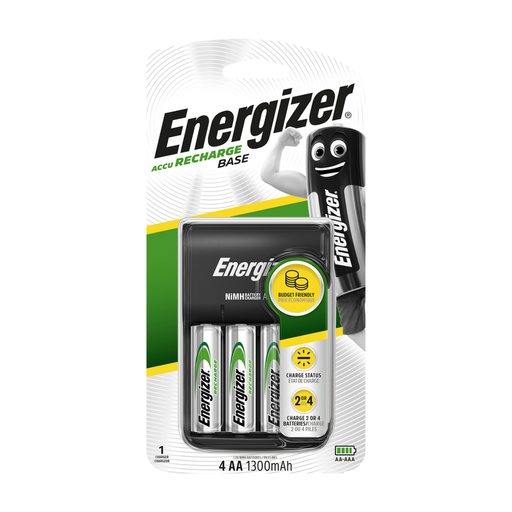
Energizer USB charger with four AA 1300mAh rechargeable batteries

Energizer USB Charger with 4 AA 1300mAh batteries

A USB-powered option for preparing two NiMH AA mouse spares when suitable USB power is available.

The kit includes four AA 1300mAh rechargeable batteries. Plan around charging two or four cells rather than a single cell, and check whether the required USB cable and power adaptor are included.

View on Joybuy
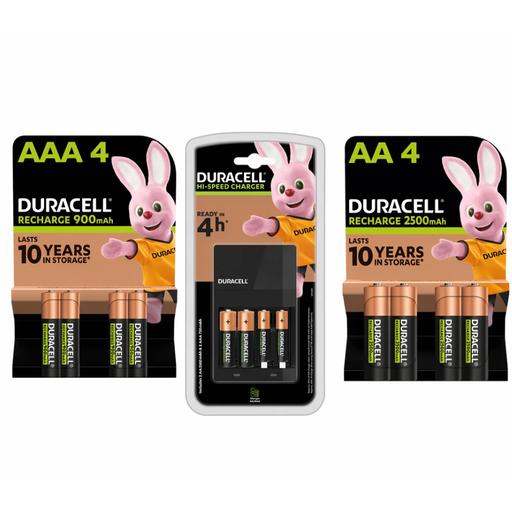
Duracell 4-Hour Charger bundle with four AA and four AAA rechargeable batteries

Duracell 4-Hour Charger with 4 AA 2500mAh and 4 AAA 900mAh batteries

A direct-to-wall NiMH charging kit to consider if you can spare a UK mains outlet and also want rechargeable cells for devices beyond the mouse.

The bundle contains four AA 2500mAh and four AAA 900mAh rechargeable batteries. Its mains connection does not address a shortage of free sockets.

View on Joybuy

Frequently asked questions

Will a USB AA charger free up a wall socket?

It can avoid using a dedicated wall-mounted battery charger if you have a compatible USB power source available. Check the charger’s input requirements and whether its cable or a mains USB adaptor comes in the box.

Can I put any AA battery in an AA charger?

No: use only rechargeable cells of a chemistry explicitly supported by that charger. IKEA specifies NiMH cells for STENKOL; XTAR states that BC4 supports both 1.2 V NiMH and 1.5 V lithium-ion rechargeable AA/AAA cells. Never charge non-rechargeable batteries.

Can a four-slot charger charge just one mouse spare?

Some can, but four slots alone do not establish single-cell charging. Panasonic specifies individual charging for one to four eneloop or eneloop pro cells with BQ-CC55, while ANSMANN specifies single-cell monitoring for Comfort Smart; check the permitted cell count for the exact charger you choose.

Is an eight-slot charger worthwhile for one wireless mouse?

It is more relevant if you also maintain rechargeable batteries for other devices. IKEA specifies up to eight AA or AAA rechargeable cells for TJUGO, but its mains power cord will still occupy an outlet while the charger is in use.

What should I check before charging mouse batteries?

Check that the cells are rechargeable and compatible with the charger, inspect them for damage or leaks, and insert them according to the polarity markings. Do not charge a damaged or non-rechargeable cell, and follow the charger’s instructions if it repeatedly shows an error.