Start with the reading, writing, device-control or communication task that is difficult, and try the relevant accessibility settings on an existing phone, tablet or computer. Keep that device if its supported features and connections work for the task; consider a compatible peripheral or software for a specific remaining barrier. Before choosing a dedicated augmentative and alternative communication (AAC) aid, seek a comprehensive speech-and-language assessment and, where possible, try the proposed setup.
Who these tools may suit
People who need spoken or enlarged text
If messages, websites or documents are difficult to read, screen reading, magnification or display settings may help with the specific material you use. RNIB advises checking an existing computer’s built-in features before replacing it; a separate text reader is worth considering when printed material is the main task.
People who need another way to write or control a device
If typing, pointing or touch gestures are the obstacle, test voice input or a compatible keyboard, mouse alternative or switch with the apps you need. AbilityNet notes that alternative peripherals use different connections, including Bluetooth and USB receivers.
People considering a communication aid
An AAC app or dedicated device needs to fit how the person selects and expresses messages, not just the device they already own. AbilityNet recommends a comprehensive assessment by a speech and language therapist when choosing a communication aid.
What to check before buying
Try the intended activity on the existing device first, then check whether a different input method, software tool or dedicated device addresses the barrier that remains.
| Concern |
What to check |
Who this matters to |
| Reading digital or printed text |
Try actual documents and apps with screen reading, enlargement or contrast controls. For paper, assess the text reader’s workflow. |
When a letter or web page is difficult to read, hearing or enlarging the text may be the priority. Around 31% of consumers would put reading access first. |
| Writing and device control |
Check the operating-system version and the intended app’s input options; for peripherals, check ports, pairing and physical positioning. |
Someone who can plan a message but struggles to type or point needs an input method they can use for that task. About 25% of consumers would make alternative input their primary concern. |
| Communication and AAC |
Seek a comprehensive speech-and-language assessment for a dedicated aid; try how messages are selected and updated where possible. |
If expressing or selecting messages is the main barrier, the communication setup must fit the person’s abilities and daily interactions. Roughly 25% of consumers would place communication first. |
| Remembering and recording |
Try the recording and playback controls or reminder workflow, including how information is found later. |
When spoken information needs capturing for later review, straightforward recording and retrieval matter more than extra functions. Around 19% of consumers would prioritise memory or recording support. |
Buying pitfalls
-
Choosing AAC hardware before assessing access
A communication aid may use an app on a general-purpose device or dedicated hardware, but the person still needs a workable way to select and express messages. AbilityNet also highlights the importance of training and ongoing support.
Seek a speech-and-language assessment and, where possible, try the proposed setup with the people who will support its everyday use.
Allow for the time needed to set up the aid and learn to use it.
-
Assuming accessibility features work alike on every device
Apple says iPhone feature availability varies by country, region and language. Microsoft documents Voice Access for Windows 11 version 22H2 and later, while Google notes that Android setup varies by manufacturer and version.
Check the exact device, software version and required apps, then demonstrate the activity the person needs to complete.
-
Assuming a wireless peripheral will connect
AbilityNet explains that some wireless keyboards and mice use Bluetooth, while others need a USB receiver. Connection alone does not show whether the controls are comfortable to reach and use.
Confirm the host device’s ports or wireless support, then try the peripheral in its intended position.
Depending on the connection, an adapter, receiver, batteries or charging equipment may also be needed.
-
Adding software before trying built-in tools
GOV.UK notes that phones, computers and tablets often include accessibility features, and RNIB advises checking an existing computer before buying a replacement.
Try its screen reading, display and voice options with the websites, documents and communication tasks that matter before choosing separate software.
Brands to consider
Apple
iPhone accessibility settings are relevant when reading, display adaptation, voice commands or an external input device is part of the task.
- Apple documents built-in screen reading, display controls and support for external keyboards and assistive devices on iPhone.
- Apple says not every feature is available in every country, region or language; check the required feature on the intended device.
Microsoft
Windows Voice Access is relevant to people considering voice-led PC control and text entry.
- Microsoft documents voice control and text authoring without an internet connection after setup.
- Voice Access requires Windows 11 version 22H2 or later; check the PC and the software used for the intended task.
Google / Android
Android phones and tablets offer routes to spoken screen access, display adjustments and alternative device control.
- Google documents features including TalkBack, Select to Speak, Voice Access and Switch Access.
- Google notes variation by Android version and manufacturer; confirm the feature and accessory combination on the exact device.
Voice recorders for spoken notes
These Joybuy recorders are options for capturing spoken information when writing notes immediately is difficult. A recorder serves that narrower task; it does not replace screen-reading tools or an AAC communication setup. Try the recording and playback controls with the intended user before choosing one.
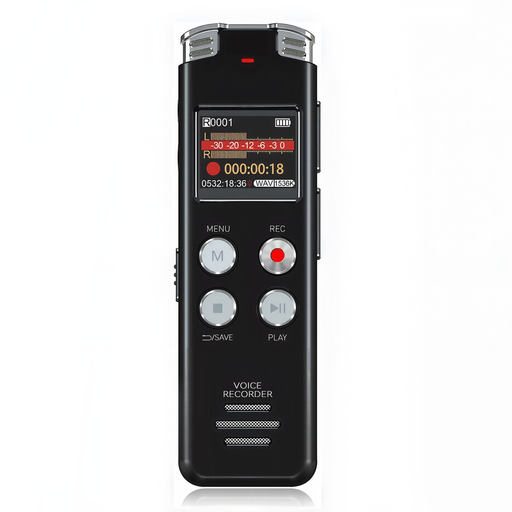 Image unavailable
Rexsun L357 128GB digital voice recorder with LCD screen
For capturing spoken notes to review later. The listed configuration has 128GB and an LCD screen; try its recording and playback controls, and confirm how recordings will transfer to the device you use.
View on Joybuy
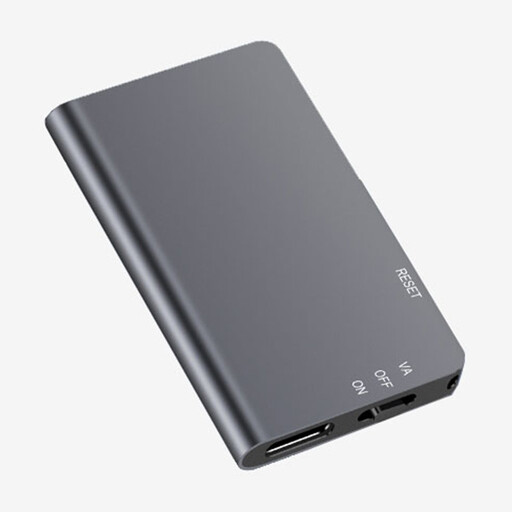 Image unavailable
Rexsun L810 64GB digital voice recorder with one-touch recording
For someone who wants to start capturing a spoken note with one control. Check that the recording and listening steps are manageable for the intended user, and that files can be used with their chosen device.
View on Joybuy
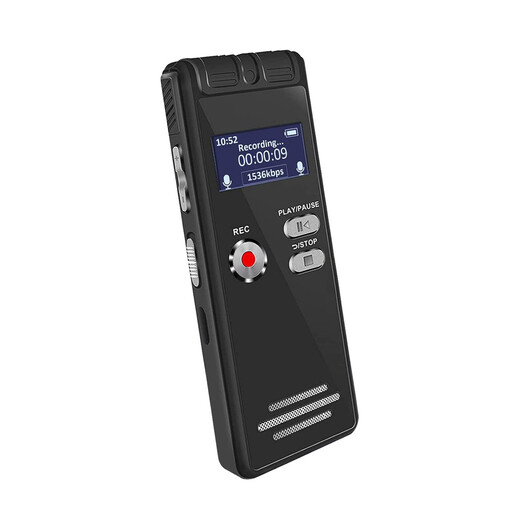 Image unavailable
Rexsun L15 portable digital voice recorder, 64GB listed
For capturing spoken information rather than making immediate written notes. It is listed with an LCD screen, but the 64GB storage is described both as internal and as a detachable card; confirm the configuration and try the playback and file-review controls before buying.
View on Joybuy
Common questions
Should I replace my phone or computer before trying its accessibility settings?
Try the settings on your existing device first. GOV.UK notes that phones, tablets and computers often have built-in accessibility features, while RNIB advises checking an existing computer before replacing it. Use the actual reading, writing or communication task to decide whether a different feature or connection is needed.
When should I seek an assessment before choosing a communication aid?
Seek a comprehensive speech-and-language assessment before committing to a dedicated AAC aid, particularly when the person’s motor, visual, cognitive, language or communication needs affect how they will use it. AbilityNet recommends assessment by a speech and language therapist; try the proposed communication setup where possible.
How do I check whether an alternative keyboard or mouse will connect?
Match the peripheral’s connection method to the exact phone, tablet or computer. AbilityNet explains that some wireless peripherals use Bluetooth and others use a USB receiver; check available ports, pairing and power requirements, then try the controls in their intended position.


