What to consider before buying
Identify the task that is hardest first, then compare the relevant control, display or audio option with your computer, workspace and preferred way of using it.
| Concern |
What to check when buying |
Who this matters to |
| Pointer control and mouse fit |
Compare hand size and handedness with the exact mouse; check the control method, connection and available ports. |
If moving or gripping a conventional mouse is the main difficulty, I would compare shape and control before extra features. Consumers who put pointer control first account for around 33%. |
| Typing layout and alternative controls |
Check the keyboard layout, space for the keyboard or separate keypad, connection, and any components needed for adaptive controls. |
If reaching keys or using a conventional layout is the main obstacle, I would prioritise the arrangement that fits my way of entering commands. Consumers who prioritise typing or alternative key input make up around 25%. |
| Readable content and screen position |
Try your preferred text size or magnification; check display connections or, for an arm, its desk attachment, VESA pattern and supported monitor weight. |
When screen placement or enlarged content is the main concern, I would assess the settings and position I actually use before choosing hardware. Around 25% of consumers put display readability or positioning first. |
| Call audio and microphone use |
Check the connector, operating-system detection, microphone selection and mute controls; consider whether the wearing style suits you. |
If calls or voice input are the priority, I would check that the microphone connects and can be selected on my computer. Consumers who prioritise calls or voice input account for around 17%. |
Joybuy product options
These options cover pointer control, display positioning and audio for calls; check each item’s stated fit and computer requirements against your own setup.
 No image available
HP 920 Ergonomic Wireless Mouse, Black, with Detachable Wrist Rest
Consider it if you want to compare a wireless mouse with a detachable wrist rest for repeated pointing.
The listed connections are Bluetooth and a 2.4 GHz USB dongle. The description lists six buttons, five programmable through HP Accessory Center.
Joybuy
 No image available
Philips Evnia 6000 34M2C6500 34-inch WQHD Monitor
Consider it when comparing a larger display and adjustable positioning for your usual screen settings.
The listed resolution is 3440 × 1440, with height, swivel and tilt adjustment. Check the DisplayPort or HDMI connection against your computer.
Joybuy
 No image available
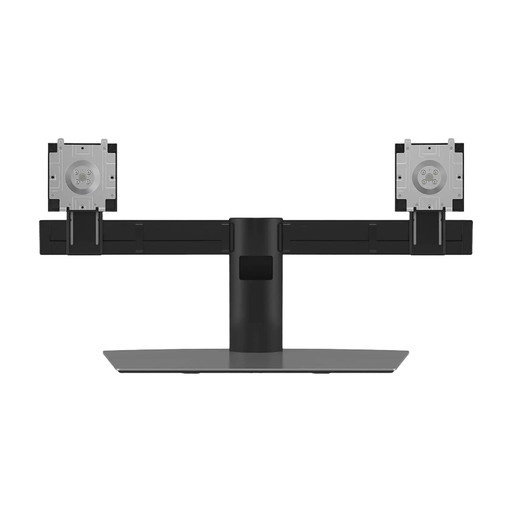
DELL Pro Dual Monitor Stand MDS19
Consider it if you want to reposition two existing monitors independently on a desk.
The stated fit is for two 19–27-inch monitors, up to 6 kg each, with VESA compatibility up to 100 × 100 mm. Compatible Dell Quick Release monitors are also specified; check your exact monitors and desk.
Joybuy
 No image available
ASUS ProArt Display PA32UCGK 32-inch 4K Monitor
Consider it when comparing a 32-inch display and adjustable positioning for your workspace.
The title lists a 4K display; the description lists height, tilt, swivel and pivot adjustments. Check the stated HDMI 2.1 and Thunderbolt 3 connections against your computer.
Joybuy
 No image available
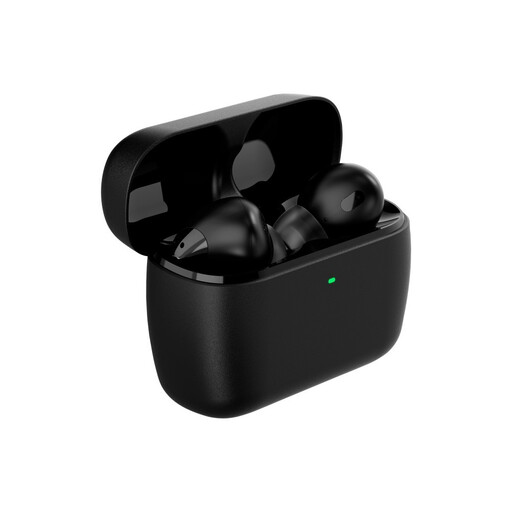
HyperX Cloud MIX Buds 2 Gaming Earbuds with Mic
Consider them if you need a built-in microphone for calls and want to compare wireless connection options.
The listed options are Bluetooth and a 2.4 GHz wireless connection using a USB-C dongle. Check that the connector works with your device and that the earbuds suit your use.
Joybuy
Frequently asked questions
Should I buy a bigger monitor before trying magnification?
Not necessarily: Windows Magnifier can enlarge part or all of the screen. Try your intended text size and magnification first, then consider whether you also need different display space or positioning. Check a monitor’s connections before buying.
Will a USB headset automatically work for voice input?
No; the connected microphone must be detected and selected. Microsoft provides a Windows microphone test, so check the headset connector, your operating-system version and the voice feature you intend to use. A headset specification alone does not verify dictation results.
What should I check before fitting a monitor arm?
Match the monitor’s mounting pattern and weight to the exact arm’s stated limits. For Ergotron LX part 45-241-224, the specified patterns are 75 × 75 mm or 100 × 100 mm and the capacity is 3.2–11.3 kg; also check whether the clamp or grommet mount fits your desk.
Can I return an online-bought mouse if its shape does not suit me?
For a qualifying UK distance purchase, GOV.UK guidance says you can notify the seller of cancellation within 14 days of receiving the goods and have another 14 days to return them. This is not an unrestricted trial: check applicable exceptions and the seller’s process. Handling beyond what is necessary to establish the item’s nature, characteristics and functioning can affect the refund.
Does being disabled make every ergonomic accessory VAT-free?
No. HM Revenue & Customs says VAT relief applies to a limited range of goods and services; products that may be useful to disabled people do not necessarily qualify. Eligibility depends on the goods and the purchaser’s circumstances, so do not assume an ordinary ergonomic peripheral is eligible.


