What matters when choosing
Identify the task first, try the relevant feature on your current device, then compare separate software or accessories for the part that remains difficult.
| Concern | What to check | Who this matters to |
|---|
| Task and device fit |
Test the relevant built-in feature on the actual device; confirm its operating-system version before considering another product. |
I want to know whether my current device can handle the difficult task before adding another tool. Around 31% of consumers might make that task-and-device match their primary concern. |
| Reading and navigation |
Try a screen reader with the documents, websites and apps you use; check which screen reader works on your device. |
If I struggle to follow on-screen text and controls, I need a way to read and navigate them. Around 23% of consumers might put reading access first. |
| Writing and physical input |
Compare voice input with the particular keyboard or pointing change you need; check microphone setup or peripheral connections. |
Typing or moving a standard mouse is my main difficulty, so I need an input method I can use for those tasks. Around 31% of consumers might prioritise an alternative way to write or control the device. |
| Planning and reminders |
Check whether reminders can be entered, reviewed and acted on using your existing device or a separate planner. |
I can use the device, but keeping track of tasks and appointments is the harder part. Around 15% of consumers might make accessible planning their primary concern. |
Joybuy products to compare
These products relate to physical mouse and keyboard input or digital planning. Compare each with the task you identified and the accessibility features on your current device; they do not replace a screen-reader or speech-input comparison.
 No image available
V7 MW500BT Bluetooth vertical mouse
Consider this alternative mouse shape if operating a standard mouse is your main input difficulty; the shape alone does not establish personal comfort.
Bluetooth and 2.4GHz dual-mode connection; six buttons and an adjustable sensor specified up to 1600 DPI. Check connection and compatibility with your device.
Joybuy
 No image available
HP 960 split-layout wireless keyboard with wrist rest
Compare its layout with your current keyboard if key arrangement or typing position is the particular difficulty; a split layout will not address every cause of difficult input.
Split-layout wireless keyboard with a padded wrist rest. Check device compatibility and any software requirements for the functions you intend to use.
Joybuy
 No image available
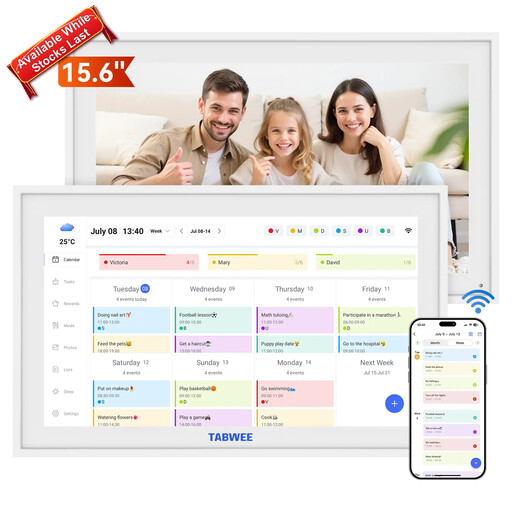
TABWEE P15 Wi-Fi digital calendar, 15.6-inch touchscreen
Consider a separate calendar if reviewing household plans and appointments on your current device does not meet your needs.
The title lists a 15.6-inch touchscreen wall calendar with family-planning, meal-planning and appointment-scheduling functions. Check whether entering events, reviewing the display and receiving any needed reminders are usable for you.
Purchase link unavailable
Questions before you buy
Should I check my current device before buying an accessibility accessory?
Yes: test the built-in feature against the reading, writing, planning or input task you find difficult. GOV.UK notes that phones, computers and tablets often include accessibility features, while RNIB advises checking those on an existing computer before buying another device.
Can voice input replace a keyboard?
Voice input can provide another way to enter text and, on compatible systems, control a device, but whether it covers your tasks needs checking. Microsoft says Voice access is available in Windows 11 version 22H2 and later; also consider microphone setup and whether speaking commands is practical where you use the device.
What should I check before buying an alternative keyboard or mouse?
Identify the input action that is difficult, then check the accessory’s layout, connection method and compatibility with your device. AbilityNet notes that some peripherals use USB receivers; a different shape or layout does not by itself establish that it will be comfortable for you.
Should I order equipment before a Disabled Students’ Allowance assessment?
If you expect reimbursement through the GOV.UK Disabled Students’ Allowance route, do not buy equipment before assessment: GOV.UK says equipment bought beforehand will not be reimbursed. Arrangements differ across UK nations, so check the funding body for your nation and course before ordering; Student Finance Wales publishes a separate route.
Do I need to consider training as well as the product?
Yes, particularly if you are learning screen-reader controls or a voice-command workflow. Scope advises checking what training and support are available; ask about setup help and accessible instructions before choosing a tool.


