Buying priorities
Start with the activity that creates the barrier, then check whether the physical controls and technical setup work with the person's existing device and support arrangements.
| Priority |
What to check |
Your needs |
| Input method |
Compare keyboard layout, key visibility, reach, pointer movement, ball size, button placement and scrolling controls. Check whether configurable buttons, switches or profiles are needed for a particular task. |
I want to identify whether typing, gripping, moving a mouse, reaching buttons or pressing controls is the actual difficulty before choosing an alternative input device. |
| Compatibility |
Confirm the exact ports, Bluetooth or receiver method, operating-system version, processor compatibility and required configuration software. Check interaction with any assistive software already in use. |
The peripheral needs to work with my existing computer or tablet rather than simply look compatible with its product family. |
| Remote communication |
Match headset connections, controls and microphone arrangement to the call platform. For webcams, check the USB requirement, operating-system support and mounting arrangement for the exact model. |
I need to distinguish between difficulty hearing call audio, being heard, being seen, using controls or connecting to the work or study platform. |
| Assessment and support |
Consider whether a workstation or needs assessment should identify the equipment first. Check employer arrangements, Access to Work eligibility or the relevant student-support process before ordering specialist equipment. |
Where the equipment is part of a regular workstation or an individual support plan, I want to check whether an assessment or funding route should come before a personal purchase. |
Joybuy product options
These Joybuy options cover alternative pointing devices, webcams and headsets for work or study setups. Check the stated connection, operating-system support, controls and physical fit against the individual setup.
 No image available
HP 920 Ergonomic Wireless Mouse, Black
A vertical mouse option for work or study where conventional mouse movement or grip is difficult, provided the person can use its grip and controls.
Stated features include Bluetooth 5.3 or an included 2.4 GHz dongle, a detachable wrist rest and Windows 10/11, ChromeOS and macOS 10.13+ support. Its programmable-button functions require HP Accessory Center, so confirm software compatibility and hand fit.
Joybuy
 No image available
Targus 2K Webcam with Auto Focus
An external camera option where camera positioning or focus affects remote work or study calls.
It states auto-focus, a rotating monitor or laptop clip, tripod thread and USB-C connection with included adapters, plus Windows, macOS, Android and Chrome OS compatibility. Confirm the native resolution, call software, ports and mounting surface for the intended setup.
Joybuy
 No image available
V7 MW500BT Vertical Ergonomic Mouse
A vertical pointer option for someone who finds a conventional palm-down grip or mouse movement difficult and can operate side buttons and a wheel.
Its stated features include Bluetooth or 2.4 GHz wireless connection, six buttons, a thumb rest and 800/1200/1600 dpi settings. It is stated to support Windows 10/11 and macOS 13.6+, so check grip size, button placement and operating-system version.
Joybuy
 No image available
EMEET All-in-One 4K Webcam with Sony Sensor
An all-in-one webcam and audio option for a fixed desk or small shared meeting setup needing external camera framing.
It states 4K video, fixed focus, an adjustable 98° field of view, four microphones, dual speakers and compatibility with Windows, macOS, Android TV and Linux. Confirm the USB connector, mounting arrangement and whether a wide view or integrated speakers suit the setting.
Joybuy
 No image available
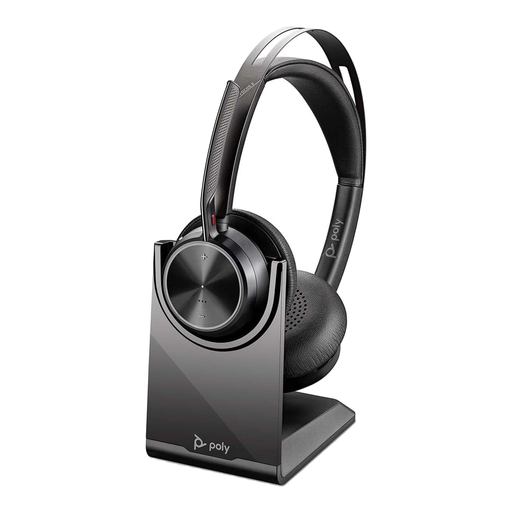
Poly Voyager Focus 2-M USB-C Headset
A wireless headset option for frequent remote calls where microphone placement, physical controls and flexible device connection matter.
It states Bluetooth 5.1, a BT700 USB-C dongle, USB-A adapter, charging stand, microphone boom, adjustable active noise cancellation and two-device multipoint connection. Confirm operating-system and meeting-platform support, control accessibility and charging needs.
Joybuy
Frequently asked questions
Should I choose a peripheral by diagnosis or by the task that is difficult?
Choose by the specific activity and setup, such as reaching keys, holding and moving a mouse, pressing buttons, hearing call audio, being heard or positioning a screen. AbilityNet identifies many keyboard, mouse and pointing-device alternatives, so a product category alone does not establish suitability.
What should I check before ordering a keyboard, mouse, headset or webcam?
Check the exact ports, operating-system version, Bluetooth or receiver requirements, configuration software, existing assistive software and whether the person can operate the controls. Product pages can include model-specific restrictions, so do not rely on a product family name alone.
When should a worker ask for a workstation assessment rather than buying independently?
For workers who use display screen equipment daily for continuous periods of an hour or more as part of normal work, the Health and Safety Executive says employers must carry out a workstation assessment. The assessment should consider the workstation, job and individual requirements, including relevant home-working arrangements.
Can Access to Work help with accessibility equipment?
Potentially. GOV.UK states that Access to Work may help eligible people get or stay in work and can provide a grant for practical work support, including specialist equipment and assistive software. Support depends on individual needs and does not pay for reasonable adjustments that an employer is legally required to make.
Should a student buy specialist equipment before a Disabled Students' Allowance assessment?
If applying through the GOV.UK Disabled Students' Allowance route, do not buy equipment before the assessment: GOV.UK says equipment bought beforehand will not be reimbursed. A needs assessment determines the recommended support for that route.


