What to check when buying
Choose the access method around the task that matters most, then try it with the actual software, documents and equipment used for work or study.
| Concern |
What to check |
Who this matters to |
| Reading and screen navigation |
Try the needed screen reader, magnification or braille setup with essential documents, browsers and services. |
If I rely on spoken feedback or enlarged content, I need to navigate the materials I actually use, not just the device settings. About 31% of consumers put reading and screen navigation first. |
| Alternative input |
Check operating-system support and the full connection chain for a keyboard, pointer, switch or interface. |
When a standard mouse, keyboard or touchscreen is difficult to use, changing the control method is my first priority. About 31% of consumers put alternative input first. |
| Speech-supported writing and communication |
Confirm feature and language support on the exact operating-system version; try the microphone and required apps in the usual setting. |
If speaking is my more dependable way to write or control an app, voice tools need to work during my normal tasks. Speech-supported writing and communication come first for about 23% of consumers. |
| Notes and organisation |
Check the needed recording, reminder and file-sharing functions, plus any workplace or course rules on recording. |
When keeping track of information is the main obstacle, I need notes or reminders that fit my daily workflow. For about 15% of consumers, capturing and organising information is the primary concern. |
Joybuy products for these routes
These computers and tablets are options for trying built-in accessibility tools; the digital notebook addresses note-taking and organisation. Choose by the access method and workflow you need, rather than treating the devices as interchangeable.
 Image unavailable
Apple MacBook Air 13-inch (2026), M5, 24GB, 1TB SSD, Midnight
Consider this Mac laptop if you want to try Apple’s built-in access options for computer-based work or study. Apple documents Mac VoiceOver and keyboard access, but check the features you need against your apps, documents and connected equipment.
View on Joybuy
 Image unavailable
Xiaomi Pad 8, 8GB RAM, 128GB, Wi-Fi, grey
This tablet is a route to consider if tablet-based reading or control fits your tasks. Google documents Android accessibility tools, but confirm which tools work on the exact tablet and with the apps and peripherals you intend to use.
View on Joybuy
 Image unavailable
HP OmniBook X Flip 16-as0004na, 16-inch touchscreen, 16GB, 512GB SSD
Consider this Windows 11 convertible if touchscreen interaction alongside laptop use is relevant to your setup. If voice control matters, check its installed Windows version and language against Microsoft’s Voice Access requirements, then try your essential apps in the intended mode.
View on Joybuy
 Image unavailable
iFLYTEK AINOTE 2, 10.65-inch E-Ink notebook with protective case
Consider this supporting device when capturing and organising notes is the main task, rather than replacing a computer needed for other work. The listing advertises handwriting and voice-to-text functions; check the required connectivity, file-sharing workflow and recording rules before relying on them.
View on Joybuy
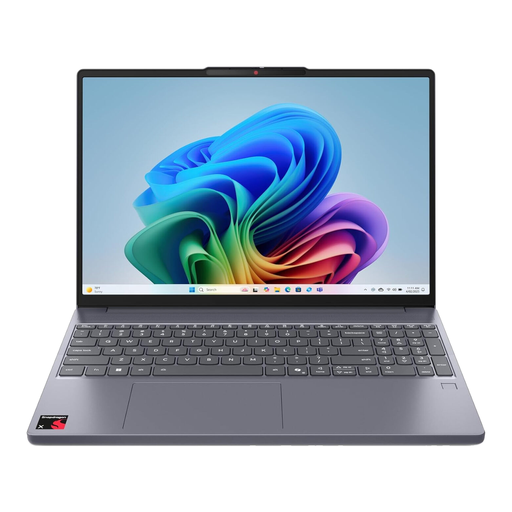 Image unavailable
Lenovo IdeaPad Slim 3 15Q8X10, 83N30029UK, 16GB, 256GB SSD
This 15.3-inch Qualcomm Snapdragon laptop is an option for computer-based work or study if its software fits your access setup. Check essential applications for compatibility with its ARM-based configuration and try the intended accessibility tools with your normal tasks.
View on Joybuy
Common questions
Should I try built-in accessibility settings before specialist equipment?
Try them on the exact device and in your essential apps first. GOV.UK notes that computers and tablets often include accessibility features; add specialist hardware or software when the built-in route does not provide dependable access for your tasks.
What should I check for a screen-reader setup?
Check the device, operating-system version, browser, documents, essential services and any braille hardware together. GOV.UK recommends testing with the actual device or assistive technology where possible, because an operating-system feature alone does not establish that a particular service works well with it.
Can a specialist switch connect directly to a computer?
Not always. Pretorian Technologies says a standard switch with a 3.5 mm jack will, in most cases, need a compatible interface to connect to a computer; check the connection method for the exact computer or tablet.
Should I speak to my employer before buying work equipment?
Yes, if the equipment is intended to address an access need at work. GOV.UK gives changing equipment as an example of a possible reasonable adjustment in Great Britain and describes Access to Work as a separate potential source of support; ask your employer which equipment and purchasing process applies to your situation.
Should I buy study equipment before a Disabled Students’ Allowance assessment?
If you are using the process in England, GOV.UK says not to buy equipment before assessment because it will not be reimbursed. Scotland, Wales and Northern Ireland administer their own routes, so check the process that applies to you with the relevant funding body or disability adviser before ordering.


