Start with the task that is hardest for you: reading, writing, following speech or operating a device without standard controls. Try the built-in accessibility features on the exact phone, tablet or computer you intend to use; consider specialist software or hardware when those features do not meet your needs. Before buying an accessory, check its compatibility with your device, essential apps and preferred access method, and seek a trial or specialist advice for a complex setup.
Who this guide is for
Readers who need spoken or enlarged digital content
If web pages, messages, documents or on-screen controls are difficult to read in their standard form, you may need screen reading, magnification, adjusted contrast or text-to-speech. GOV.UK and the platform makers describe these as accessibility routes, but the useful starting point is your own essential content and apps.
Writers who need voice-first text entry
If prolonged keyboard or mouse use makes notes, messages or documents difficult, dictation or voice control may be worth trying. Microsoft and Apple describe built-in voice tools; test them with the language, vocabulary and applications you actually use.
People who need alternative physical access or communication support
You may need a specialist keyboard, microphone, switch or braille device to operate a computer, or captions and transcription to follow speech. GOV.UK identifies specialist input equipment as assistive technology; the connection method and the tasks it must support matter when choosing an accessory.
What matters when choosing
Choose the access method around your most important task, then try that task on the intended device before committing to an additional product.
Built-in device tools
Consider when: Screen reading, enlarged text, captions, dictation or voice control could meet your needs on a phone, tablet or computer.
Trade-off: Apple, Microsoft and Google describe different tools across their platforms; a feature's presence does not establish that it works with your essential app or accessory.
Specialist software or hardware
Consider when: Built-in settings do not provide the reading, communication or physical access method you need.
Trade-off: A screen reader or adaptive input device may call for compatible apps, connections and individual setup; try the complete arrangement where possible.
| Concern |
What to check |
Who this matters to |
| Reading and navigation |
Try screen reading or magnification with your essential documents, websites and apps; check the intended operating system and display settings. |
I need to read messages and navigate controls without relying on the standard display, so the content I use every day must remain workable. Around 29% of consumers put accessible reading and navigation first. |
| Writing and voice control |
Test dictation or voice commands with your language, vocabulary, microphone and required apps. |
If sustained typing is difficult, I need to create text and complete common actions by voice in a setting where speaking is practical. For around 29% of consumers, voice-first writing or control is the primary need. |
| Captions and transcription |
Check the languages and audio sources supported by the captioning or transcription feature, including the communication service you use. |
I need to follow a meeting or conversation in text when spoken audio alone is difficult to use. Communication access comes first for around 21% of consumers. |
| Alternative physical input |
Confirm the accessory's exact device and operating-system compatibility, connection method and any required app or driver. |
When touch, keyboard or mouse controls do not suit my access method, I need an alternative that operates my essential tasks. Around 21% of consumers primarily need specialist physical input. |
Purchasing pitfalls
-
Assuming a feature works identically across a platform
A demonstration on one device cannot establish how the same task will work on another model or in a different app. Google notes that Android accessibility features can vary by device and market, while platform tools also depend on the software being used.
List the tasks you cannot compromise on, such as reading a particular document or dictating in a required app. Try them on the intended model, operating-system version and language settings.
-
Buying specialist input hardware before testing the connection
An adaptive keyboard, switch or microphone must work with both your device and your access method. Some routes have additional hardware requirements: Microsoft's Windows eye-control feature, for example, requires an eye-tracking-enabled camera.
Check the full accessory model, connection, operating-system support and any app or driver requirements. For a complex physical-access setup, arrange a trial or assessment before committing.
An adapter, mounting arrangement or help with setup may also be needed for the chosen configuration.
-
Treating speech tools as dependable in every setting
Dictation, captions and transcription need to fit the language, audio source and environment in which you will use them. A tool that works for one task may not cover an essential call, meeting or offline situation.
Try your usual vocabulary, app and microphone in realistic surroundings, and check offline requirements before relying on one feature as your only communication route.
-
Ordering workplace equipment before discussing the task
The device or accessory needs to work with the systems used for the job. GOV.UK says Access to Work may provide support that includes specialist equipment and assistive software, depending on eligibility and individual circumstances.
Discuss the work barrier and required tasks with your employer, then check Access to Work eligibility and the proposed model's compatibility before ordering.
Brands to consider
Compare the tools available on the platform you intend to use with the apps and accessories your tasks require.
Apple
Apple's iPhone, iPad and Mac platforms offer built-in accessibility routes for readers and people considering voice-based device control.
- Apple describes VoiceOver for screen reading and Voice Control for navigating by voice.
- Check the intended model, operating-system version, language, third-party apps and any assistive accessory before choosing an Apple device.
Microsoft
Windows is relevant when the computer must run particular documents, workplace applications or input hardware.
- Microsoft describes Windows 11 tools including Narrator, Magnifier, Live Captions, Voice Access and voice typing.
- Availability and suitability can depend on the Windows version, hardware, language and app; try the complete workflow rather than relying on the feature name.
Google
Android devices and Chromebooks offer routes to spoken content, display adaptations, dictation and transcription.
- Google describes Android Live Transcribe and Chromebook screen reading, Select-to-speak and dictation.
- Google notes that Android features can vary by device and market. Check the exact model, software version, language and accessory support.
Joybuy device options
These laptops represent the computer route for trying built-in accessibility tools. Choose by the operating system, apps and access method you need; a laptop listing alone cannot establish that a specialist accessory or individual workflow will suit you.
 No image available
Microsoft Surface Laptop 7 15-inch Copilot+ PC, Snapdragon X Elite, 16GB RAM, 256GB SSD, Maya Color
For computer-based reading or writing, try your essential apps with the accessibility tools and input method you intend to use on this laptop.
The listed configuration includes a PixelSense touchscreen. Check the exact Windows setup and any assistive accessory before purchase.
Joybuy
 No image available
MSI Stealth 18 AI Studio A1VGG-001UK, 18-inch, Intel Core Ultra 9, RTX 4070, 2TB SSD
If you want an 18-inch laptop for a computer-based reading setup, try your required display settings and apps on the intended configuration.
Check the Windows accessibility workflow, microphone connection and handling needs before choosing it for daily use.
Joybuy
 No image available
Apple 13-inch MacBook Air (2026) M5, 10-core CPU, 10-core GPU, 24GB, 1TB SSD, Midnight
For reading and navigating on a Mac, try VoiceOver with your essential documents and apps on the intended setup.
Check the macOS version, language and compatibility of any external access device before purchase.
Joybuy
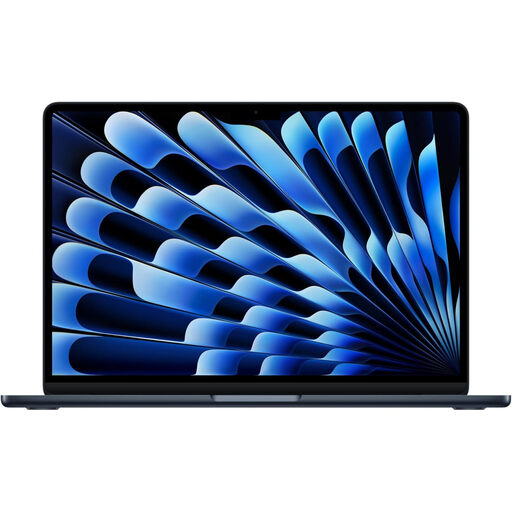 No image available
Apple 13-inch MacBook Air (2026) M5, 10-core CPU, 8-core GPU, 16GB, 512GB SSD, Midnight
If a Mac is your preferred computer route, test VoiceOver or Voice Control with the apps and language needed for your daily tasks.
Confirm the intended macOS version and any assistive accessory compatibility; the built-in keyboard and trackpad may not match every physical-access method.
Joybuy
Frequently asked questions
When should I try a device or seek specialist support before buying?
Arrange a trial or consider an assessment when your choice depends on individual physical access, a specialist accessory or an essential work or education system. GOV.UK describes assistive technology as ranging from simpler aids to specialist software, so test the particular task and complete setup rather than assuming that a similar product will work for you.
Can Access to Work help with equipment I need for my job?
Access to Work may help eligible people with support that includes specialist equipment and assistive software, according to GOV.UK. Discuss the tasks and proposed equipment with your employer and check eligibility and the arrangements for your circumstances before purchasing.
How can I check whether an external keyboard, microphone or switch will work?
Match the accessory's exact model against the intended device, operating-system version and connection method, then check any required app, driver or power supply. A general claim of platform compatibility is not enough for a task that depends on a particular program or access method.
Can I return an online device if it does not suit me?
For eligible distance purchases in England, Citizens Advice describes a 14-day cooling-off period, but check whether an exception applies to the particular item; its guidance directs consumers in the other UK nations to their relevant advice. Check the seller's cancellation and return arrangements before ordering, especially for a personalised item. Change-of-mind cancellation is distinct from remedies for goods that are faulty, damaged or misdescribed.


