What to prioritise when choosing
Try the task and accessibility settings on your current device first; consider a different format or accessory if the barrier remains. Ofcom's UK research describes fatigue and discomfort when devices are unsuitable, and RNIB guidance recommends checking accessibility features already available on a computer.
| Concern |
What to check when buying |
Who this matters to |
| Seeing and navigating content |
Try text size, magnification and spoken navigation on the websites or apps you need. |
When small text or visual navigation interrupts messages or forms, I would prioritise readable settings and navigation I can use; around 22% of consumers put seeing and navigating content first. |
| Controlling the device |
Test the input method, hand position, handedness and connection with your usual tasks. |
If touch, typing or pointing is difficult, I would compare controls I can use for my regular tasks; around 22% of consumers prioritise easier device control. |
| Fatigue and physical comfort |
Try a complete task with the device held or positioned as you would use it, including any separate input device. |
For recurring tasks that take time, I would pay attention to how the setup feels in use; around 21% of consumers put less tiring sustained use first. |
| Confidence with online tasks |
Try reading and display adjustments, and check whether you can get help to set up and practise the task. |
If unfamiliar controls or setup make a task harder to repeat, I would prioritise options I can learn and use confidently; around 21% of consumers prioritise simpler task completion. |
| Hearing calls, media and alerts |
Test captions and visual alerts in the services you use; check hearing-device compatibility for audio streaming. |
When calls or media need captions, visual alerts or compatible audio, I would check those specific features; around 14% of consumers put hearing access first. |
Relevant brands and options
These examples relate to particular products or software options; a brand name does not establish that a device will suit your tasks or assistive technology.
Apple
Consider iPad options when comparing touch interaction, display size and built-in accessibility settings.
- Apple lists VoiceOver, Zoom, Voice Control and Switch Control for the iPad 11-inch (A16).
- Check your required apps and preferred interaction on the exact device; listed features do not establish that each service will work for you.
Samsung
A Galaxy smartphone can be considered when mobile tasks and a larger phone display are part of the need.
- Samsung's UK specifications identify the Galaxy S25 Ultra 256GB variant.
- Google notes that Android accessibility features and navigation can vary by device and market. Check the exact model and services you use.
Microsoft
Windows laptops may be relevant for document tasks and keyboard-based navigation.
- Microsoft documents Narrator, a Windows screen reader, and lists 13.8-inch Surface Laptop (7th Edition) models.
- For a Snapdragon-based configuration, check that your applications and peripherals work with the Arm-based setup you intend to use.
Logitech
Lift is a vertical-mouse option to compare with your current pointer for desktop tasks.
- Logitech describes Lift as an option for small-to-medium hands and offers a left-handed version.
- Hand fit and workstation position matter; the manufacturer's description does not establish comfort for every user.
Google
Android accessibility tools are relevant when assessing a compatible Android phone or tablet.
- Google's Android accessibility guidance covers TalkBack, magnification, captions, alternative input and reading adjustments.
- Feature names and navigation can vary by device and market, so check the chosen model and the services you need.
Joybuy product choices
The products below are laptops and Android tablets. Compare those formats against your tasks, then test the accessibility features, applications and services you need on the exact model.
 No image available
Apple 13-inch MacBook Air (2026), M5, 16GB, 1TB SSD, Midnight
A laptop format to consider for computer-based tasks; check the accessibility features and software you need on this configuration.
The product name specifies an M5 chip, 16GB memory and a 1TB SSD.
View on Joybuy
 No image available
Microsoft Surface Laptop 7, 15-inch, Snapdragon X Elite, 16GB RAM, 256GB SSD, touchscreen, Maya
A touchscreen laptop option for tasks where you want to compare touch and keyboard input; test the accessibility features and applications required for your tasks.
The product details specify a 15-inch touchscreen, 16GB RAM and a 256GB SSD. For this Snapdragon-based Windows laptop, check that required applications and peripherals are compatible with the Arm-based configuration.
View on Joybuy
 No image available
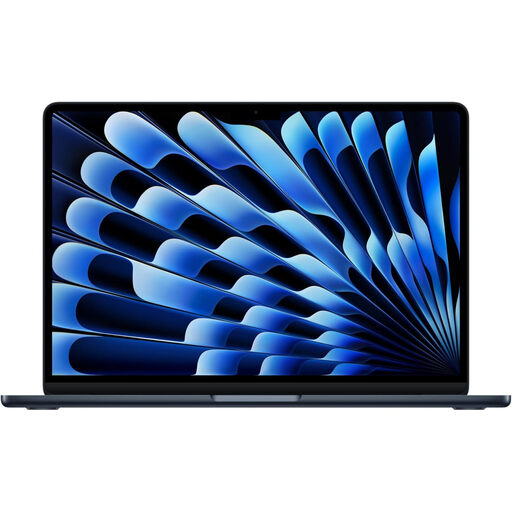
Apple 15-inch MacBook Air (2026), M5, 16GB, 512GB SSD, Midnight
A laptop format to consider when computer-based tasks are central; check the display and input setup against the way you use required services.
The product name specifies an M5 chip, 16GB memory and a 512GB SSD.
View on Joybuy
 No image available
DOOGEE Tab E3, Android 15, 11-inch FHD+, 90Hz, dual SIM
A tablet format to consider if you want to compare a larger touch display with your current device; try the required tasks and accessibility settings on the exact model.
The product name specifies Android 15, an 11-inch FHD+ display, a 90Hz refresh rate and dual SIM slots. Google notes that Android accessibility features can vary by device, so check the features you need on this model.
View on Joybuy
 No image available
DOOGEE Tab E3+, Android 15, 12-inch FHD+, SIM slot, 32GB RAM, 256GB ROM
A tablet format to consider when comparing a larger touch display with a laptop or your current device; test the tasks and accessibility tools you rely on.
The product name specifies a 12-inch FHD+ display, a SIM slot, 32GB RAM and 256GB ROM. Check the required Android accessibility features on this exact model.
View on Joybuy
Frequently asked questions
Should I replace my computer to get a screen reader?
Not necessarily: RNIB advises checking your existing computer's built-in accessibility features before buying another device. Try the screen reader on the apps and services you need, and consider a change of device only if the task remains difficult.
Which accessibility options should I try in person?
Where possible, try the actual device and input method with a realistic task, including hand fit, handedness and reach. If you need audio streaming to a hearing device, RNID advises checking the manufacturers' instructions or asking an audiologist when compatibility is uncertain.
Where can I get help setting up a device in the UK?
AbilityNet offers free technology support to older and disabled people in the UK. Its support can help with technology and online tasks, but it does not establish that a particular device or service will suit you.
What if an online device purchase does not suit my needs?
For covered UK distance sales, GOV.UK guidance says you can notify the seller that you wish to cancel within 14 days of receiving the goods, then have another 14 days to return them. Check applicable exceptions and the seller's terms; statutory rights concerning faulty or misdescribed goods are separate.
Is an accessible phone, tablet or mouse automatically VAT-free in the UK?
No: HMRC says VAT relief applies to a limited range of eligible goods and customers. An accessibility feature or a buyer's disability alone does not establish that a particular device qualifies, so check with the supplier.


