What to check before choosing
Try your current device with the websites, documents and services you use. If the setup still does not meet your needs, identify whether the main barrier is software compatibility, input, reading or communication before choosing hardware.
| Concern |
What to check when buying |
Who this matters to |
| Software and service compatibility |
Check the exact operating-system version against your required assistive software and online service; confirm that peripherals connect to the proposed device. |
If I rely on a particular screen reader, app or communication service, I need to know it works with the exact setup; around 29% of consumers prioritise software and service compatibility. |
| Input effort and physical comfort |
Try the intended typing and pointing tasks, hand position and control reach. Confirm the required wired, Bluetooth or receiver connection. |
When ordinary typing, pointing or holding a device is difficult, I want input that suits the task and my hand; around 23% of consumers put easier physical input first. |
| Readable information and navigable controls |
Test text scaling, contrast, magnification or screen reading on the forms and sites you use before buying a larger display. |
If reading small text or finding controls is the main barrier, I need settings and navigation I can use on real tasks; around 18% of consumers prioritise reading and navigation. |
| Calls, audio and spoken input |
Try the actual call or online interaction. Check microphone and headset connections, caption availability and the required operating-system version. |
For consumers who need calls, audio or spoken input to be manageable, the device and service need to work together; around 18% prioritise accessible communication. |
| Affordability and ongoing support |
Consider any needed accessories and, for refurbished goods, inspect condition, seller terms and the installed operating system's support status. |
If I want to keep a usable device without losing software support, I need to check the whole setup before replacing it; around 12% of consumers prioritise affordable, supported ownership. |
Joybuy products for these access needs
These Joybuy options cover a smartphone, computer, monitor and input devices. Match each item to the task it is meant to support, then check its compatibility with your required software, services and accessories.
 No image available
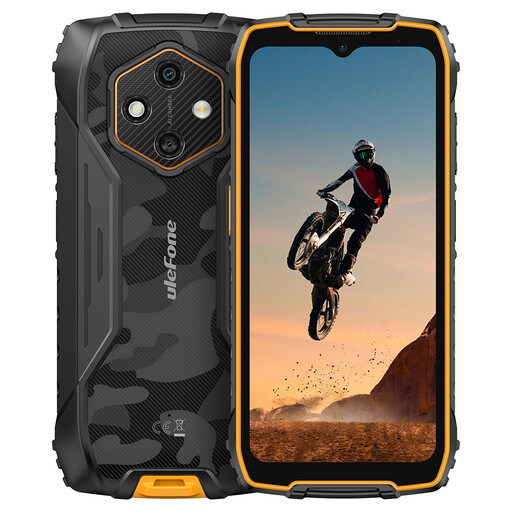
Ulefone RugKing 4 Pro Android 16 Smartphone, 16GB+256GB
For consumers considering a portable device for communication and online tasks, check the handset's accessibility settings against the services you use.
The product name specifies Android 16, 16GB+256GB and a 6.56-inch 120Hz display. Android screen-reader setup can vary by manufacturer and software version, so confirm the features on this handset.
View on Joybuy
 No image available
HP 960 Ergonomic Split Layout Wireless Keyboard
For consumers looking to change their typing setup, compare the keyboard layout and connection with the way they use their computer.
The listing describes a split-zone layout, negative tilt, finger-fit keycaps and a padded wrist rest. It specifies Bluetooth or a 2.4 GHz dongle connection and a separate numeric keypad; using the dongle requires an available USB port.
View on Joybuy
 No image available
AOC Q32V4 31.5-inch QHD IPS Monitor
For consumers considering a larger desktop display, check the computer connection and test the display with the text and settings they use.
The listing specifies a 31.5-inch QHD IPS display, a matte screen surface, HDMI and DisplayPort connections, 4ms response time and built-in speakers. It connects to a computer using HDMI or DisplayPort.
View on Joybuy
 No image available
Acer Chromebook 311 CBOA311-1H, 11.6-inch HD
For consumers whose tasks are browser-based, check that the required websites and software work with this computer's operating system.
The listing specifies Chrome OS, an Intel Celeron N4500 processor, 4GB RAM and 64GB eMMC. It describes compatibility with Google Workspace and Microsoft 365 Online, plus USB-A, USB-C, HDMI and a headphone/microphone combo jack.
View on Joybuy
 No image available
V7 MW500BT Bluetooth Vertical Mouse
For consumers looking to change their pointing setup, check whether the shape, hand position and connection suit the intended use.
The listing describes a vertical design with a handshake grip, six buttons and adjustable DPI. It specifies Bluetooth or 2.4 GHz connectivity and compatibility with Windows 10, Windows 11 and macOS 13.6 and above.
View on Joybuy
Questions about accessible devices
Do I need new hardware before trying accessibility features?
Not necessarily. Try the built-in screen reader, magnification and display adjustments on your current device with the tasks you need to do; consider replacing hardware if the complete setup still does not meet your access or compatibility needs. RNIB also recommends checking existing computer features before buying.
Will a screen reader I already use work on any new computer or tablet?
No; the words “screen reader” do not establish universal compatibility. For example, the JAWS publisher lists Windows operating-system and hardware recommendations, while Apple documents VoiceOver on its iPad. Check your particular software version, device and required service together.
What should I check when setting up a keyboard, pointer or voice-input accessory?
Check the connection and the accessory's layout or hand fit, then try a real task. Microsoft says Windows 11 voice access needs a microphone and an internet connection for initial setup; English–UK is among the supported voice-access languages.
Is a refurbished Windows 10 PC still a straightforward choice for online services?
Ordinary Windows 10 support ended on 14 October 2025. Microsoft describes a consumer extended-security-updates option through 12 October 2027 with separate conditions, so check the particular PC's eligibility or choose a supported operating system before relying on it.
What UK protections apply if an online device purchase is faulty or simply unsuitable?
GOV.UK guidance says a trader must provide a remedy when goods are faulty or not as described. For most distance purchases, a customer can notify the seller of cancellation within 14 days of receiving the item and then has another 14 days to return it; exceptions and the seller's procedure may apply. A change of mind and a faulty item are different grounds.


