Buying priorities
Start with the tasks that must work independently, then check the access method, device shape and any required accessory on the exact model.
| Priority |
What to check |
Your needs |
| Reliable access method |
Check spoken feedback, magnification, captions, voice, keyboard, braille or switch settings on the exact operating-system version. Test unlocking, signing in, text entry and form controls in essential apps and websites. |
I need to receive information and enter commands using an established access method, not only the default touchscreen or mouse. |
| Device form factor |
Compare screen size, touch interaction, portability, physical keyboard access and workspace for several open tasks. A tablet has a larger screen than a smartphone, but check whether mobile use away from Wi-Fi is needed. |
I need to balance reading comfort and on-screen controls against carrying the device, making calls or using it away from home. |
| Sustainable input |
Check Bluetooth pairing or USB connection, available ports, keyboard layout, key visibility, reach, grip and cursor control. Test a trackball or alternative pointer for the user’s movement pattern rather than assuming it will suit. |
Longer typing or pointer use should not depend on difficult reach, grip, repeated movement or a setup that increases fatigue. |
| Setup and ongoing support |
Check how key settings can be found again, whether help is available for initial setup, and how account recovery will work. Test the internet connection and priority websites or apps, not only operating-system settings. |
I need a workable route for connection, account access, confidence-building support and the online services I use most. |
Joybuy product options
These Joybuy options cover external keyboard and mouse input, a larger Android tablet and portable Android smartphones for everyday online tasks. Check each exact model against the user’s required access method and priority services.
 No image available
Targus EcoSmart Full Size Wireless Keyboard (UK)
Consider this for longer text entry where a full-size keyboard layout is preferred.
Stated features include 104 UK-layout keys, quiet scissor switches, an adjustable kickstand, Bluetooth BLE 5.0 and a USB-A receiver. Listed compatibility includes Windows, macOS, ChromeOS, Android and iOS/iPadOS.
Check key spacing, key force and height for the user’s reach and fatigue needs. The 2.4 GHz connection uses USB-A, so confirm that a suitable port is available or that Bluetooth pairing is manageable.
Joybuy
 No image available
Logitech MX Master 3S Black Mouse
Consider this for cursor control during forms, browsing and desktop tasks where a conventional mouse remains workable.
Stated features include seven programmable buttons, Bluetooth Low Energy, an included Logi Bolt receiver, USB-C charging and an 8K-DPI sensor.
Check its shape, size and button placement against the user’s grip, movement range and fatigue pattern. It is a standard mouse, not a trackball, switch device or specialist alternative pointer.
Joybuy
 No image available
DOOGEE U11 PRO 11-inch Android Tablet
This tablet may suit reading, video calls and browser-based services on a larger portable touch display.
The listing states Android 15, an 11-inch 1280×800 IPS display, Bluetooth 5.0, USB-C, a 3.5 mm audio jack and expandable storage.
Verify TalkBack, magnification, voice control, Switch Access and any required peripheral on this exact configuration. Check whether the display resolution and handheld weight suit the user’s reading and comfort needs.
Joybuy
 No image available
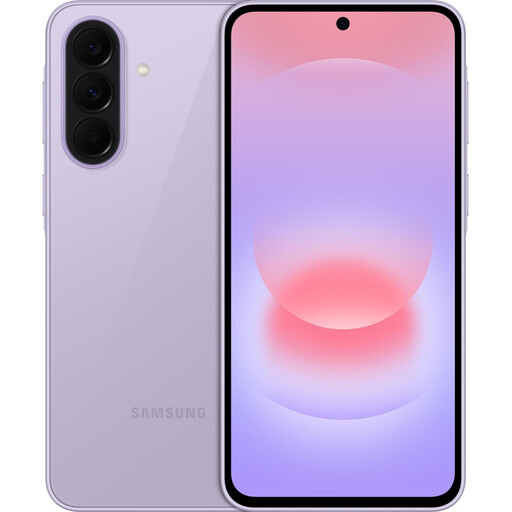
Samsung Galaxy A376 5G (A37) 6/128GB
This is a portable Android phone option for calls, messages, authentication and everyday online services.
The listing states Android 16, dual SIM/eSIM, a 6.7-inch FHD+ Super AMOLED display, Bluetooth 5.3, Wi-Fi 6, NFC and USB-C.
Check the required Android access method and priority apps on this model before buying. A 6.7-inch touchscreen may not suit users who need physical keys, a smaller reach span or non-touch input; the charger is stated as sold separately.
Joybuy
 No image available
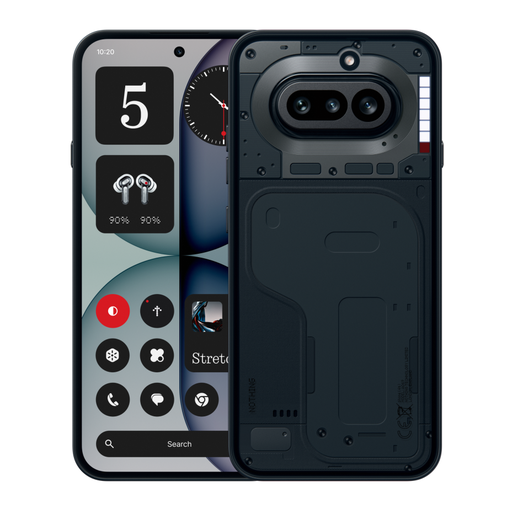
Nothing Phone (4a) 8+128GB Black
This smartphone is an option for portable messages, web services and two-factor authentication on Android.
The listing states Nothing OS 4.1 over Android 16, a 6.78-inch 2720×1224 AMOLED display, Bluetooth 5.3, USB-C, NFC, 5G and Wi-Fi 6.
Verify TalkBack, magnification, Voice Access, Switch Access, required apps and assistive peripherals on this exact configuration. The visual Glyph light interface should not replace any needed spoken, caption, vibration or other notification method.
Joybuy
Frequently asked questions
Should I start with a phone, tablet or laptop?
Start with the task and access method. Choose a smartphone for portable calling, messages and online access on the move; consider a tablet where a larger touchscreen would help; and consider a laptop where sustained typing, several windows, desktop software or external input hardware matter. RNIB notes that tablets have larger screens than smartphones, but Ofcom and UK government evidence also show that a device alone does not remove barriers around confidence, connection, skills or service design.
How can I check whether a screen reader, magnifier, braille display or switch will work?
Check the exact device model, operating-system version and current manufacturer accessibility documentation, then test or seek confirmation for the specific peripheral and essential tasks. Apple documents VoiceOver and Bluetooth refreshable braille support, Android documents TalkBack, braille-related options and Switch Access, and Windows documents Narrator support for supported braille devices. A feature name does not guarantee compatibility with every accessory or third-party app.
Is a standard keyboard and mouse always the right input setup?
No. AbilityNet says standard keyboards and mice can pose difficulties for people with physical, sensory or cognitive challenges, and describes alternative keyboards and pointing devices. Choose according to reach, grip, movement, key visibility, fatigue and cursor-control needs, then check Bluetooth or USB requirements and whether pairing is manageable.
What should I ask a retailer before ordering online?
Ask for the exact model number, operating system and version where relevant, port and Bluetooth details, supplied accessories, UK plug and warranty terms, return process and return-postage arrangements. Keep the product description and written compatibility confirmation: GOV.UK states that goods must be as described, of satisfactory quality and fit for purpose.
What are my UK cancellation rights for an online device purchase?
For most online, mail or telephone orders, you can cancel by telling the trader within 14 days of receiving the item and then have another 14 days to return it. GOV.UK states that exclusions and deductions can apply in particular circumstances, including use or damage, so check the retailer’s practical return method before opening or extensively configuring specialist equipment.


