Choose around the communication task you need to complete: a simple handset may suit ordinary calls and texts with physical controls, while a smartphone is the route to check for screen reading, captions, braille support or communication apps. If voice calling itself is a barrier, consider text or video relay alongside a suitable device and provider support. Check the exact handset, software, hearing-aid pairing method and service conditions before committing.
Who needs which kind of support?
People who need another way to make calls
If hearing or speech makes an ordinary voice call difficult, the choice may involve a particular hearing aid, captions, Relay UK or BSL video relay. Ofcom describes text relay as a way to communicate through a relay assistant; the right device still depends on the calling method you intend to use.
People who need help reading or navigating a screen
Screen reading, braille-display support, magnification, larger text and contrast controls can matter when making calls, writing messages or using online account services. Apple and Google describe such tools for compatible devices, with availability dependent on the device and software.
People who need simpler controls or account support
Physical keys, distinct alerts and a manageable charging routine may matter more than a wide range of apps. Separately, accessible bills or help from a trusted person may be important for managing a service; Ofcom advises checking whether provider support requires registration or proof of need.
What matters when choosing?
Decide whether your essential tasks work with a simple handset or require smartphone software; then check the calling arrangement and provider support separately.
Simple handset
Consider it when: Physical controls and straightforward calls and texts are the priority.
Trade-off: Check any essential relay, captioning or video task before choosing a handset primarily for simpler operation.
Accessibility-configured smartphone
Consider it when: You need compatible screen-reading, display, hearing-device or communication-app features.
Trade-off: The features you need may depend on the model and software version, and require setup.
| Concern |
What to check |
Who this matters to |
| Accessible calls |
Confirm the intended relay or hearing-aid calling method on the exact device. For video relay, check internet access. |
If ordinary voice calls are difficult, I need a calling method I can use with my hearing or speech requirements. Around 31% of consumers would make accessible calling their primary concern. |
| Reading and navigation |
Try the screen reader or braille display you need, plus text and display controls, on the intended model. |
I need to read, navigate and reply to messages without relying on someone else to operate the screen. For around 25% of consumers, independent navigation would come first. |
| Physical interaction |
Try the keys or touch controls, alerts and charging routine needed for everyday calls and texts. |
Dense menus or hard-to-use controls can get in the way of routine communication. Around 25% of consumers would prioritise simpler physical interaction. |
| Account and service support |
Ask the intended provider about accessible documents, contact methods, registration and any conditions for account help. |
Managing bills or contacting support may be the hardest part, even when the handset works for me. Accessible account and service support would be the main concern for around 19% of consumers. |
What is easy to overlook?
-
Assuming a hearing-aid compatibility label settles the question
Call audio depends on the particular phone, hearing aid, connection method and settings. Samsung says ASHA streaming requires support from both the Galaxy device and the hearing aids; Doro advises checking its handset with the user’s own hearing aids.
Confirm the intended pairing or telecoil method for both models, and try calls with that combination while you can still assess whether the handset meets your needs.
-
Choosing simple controls without checking essential apps
A handset chosen for basic calls and texts may not meet a need for an app, captions or video communication. Relay UK specifies compatible operating-system versions for its smartphone app, while 999 BSL requires an internet connection for video relay.
Write down the calls, messages and account tasks you must complete, then check each one on the exact device and service arrangement.
-
Expecting provider support to start automatically
Ofcom says some accessibility support may require advance registration or proof of need. EE describes a registration form for its tailored disability services.
Ask the intended provider how to request your required contact method, accessible documents or account assistance, and what conditions apply.
-
Overlooking the charging routine
A charging method that is awkward to handle can make an otherwise suitable handset less practical for daily use.
Check the connector, cradle, cable placement and box contents, and whether the intended user can complete the routine.
Doro states that a mains charging adaptor is not included with the Leva E10.
Relevant brands and platforms
Apple
An iPhone route to consider when built-in screen reading and other software accessibility tools are central to the choice.
- Apple describes VoiceOver and support for compatible Bluetooth refreshable braille displays.
- Check the chosen iPhone, iOS version, language and availability of each required feature or service.
Samsung
Galaxy phones are worth checking when hearing-device connections or Galaxy accessibility settings matter.
- Samsung describes hearing-aid connection options on compatible Galaxy devices.
- For ASHA audio streaming, Samsung says both the Galaxy device and hearing aids must support the feature; check the exact models.
Doro
A simple-handset brand to consider when physical controls and alerts take priority over a broad app range.
- Doro lists a high-contrast keypad, adjustable font size, a visual ring indicator and a charging cradle for the Leva E10.
- Doro advises checking the Leva E10 with the user’s particular hearing aids; its listed features should not be assumed to apply to every Doro model.
Google Android
An operating-system route, rather than one handset brand, for comparing accessibility tools across compatible phones.
- Google describes TalkBack, braille-display support, display controls and hearing-device settings.
- Google notes that feature names and availability can vary by market and device; check the handset and Android version you intend to use.
Simple handsets on Joybuy
These handsets are choices to examine if physical controls and everyday calls and texts are your starting point. Check the intended network and any essential hearing-aid or app requirement against the exact model before choosing.
 No image available
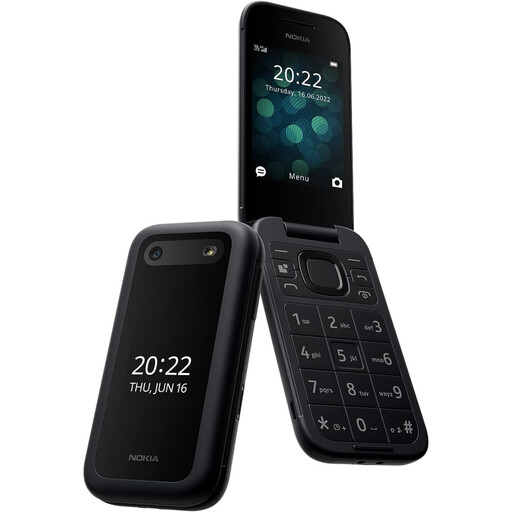
Nokia 2660 TA-1469
Consider this model if straightforward calls and texts with tactile controls are the priority.
If hearing-aid use matters, check the exact pairing or call-audio method with your hearing aid. Confirm network calling and any essential communication-app support with the intended provider and device.
View on Joybuy
 No image available
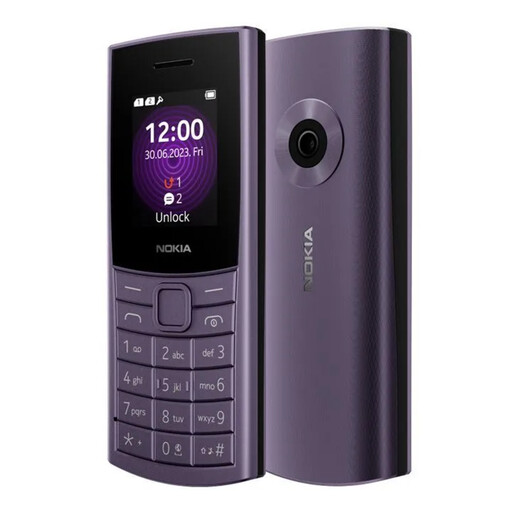
Nokia 110 4G TA-1543 DS Purple
Consider this model for basic calls and texts if physical controls and display readability are important to you.
The model name specifies 4G; confirm calling compatibility with your intended provider. Check the exact handset with your hearing aid or required communication apps if those are essential.
View on Joybuy
 No image available
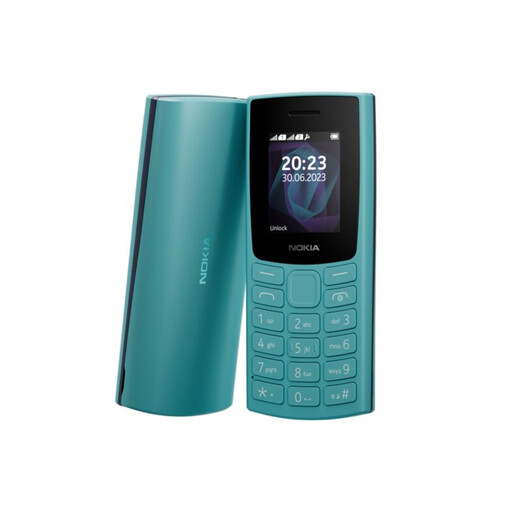
Nokia 105 TA-1557 DS Cyan
Consider this model if your main task is making calls and sending texts using a physical keypad.
Confirm network calling with the intended provider and check hearing-aid or app requirements before choosing. Confirm the battery specification for this exact variant if it affects your charging routine.
View on Joybuy
Frequently asked questions
Does a UK phone provider have to offer text relay?
Yes. Ofcom states that phone providers must give customers access to an approved text-relay service and identifies Relay UK as the UK service. Check how to use it with your intended phone and calling arrangement.
What does the Relay UK smartphone app require?
Relay UK lists iOS 15 or later and Android 11 or later for its app. It also says you need to link a phone number on first use; check the exact device, software version and number you plan to use.
Will a hearing-aid-compatible phone work with any hearing aid?
Not necessarily: the exact phone, hearing aid and connection method matter. Google identifies ASHA-compatible hearing aids for its described pairing method, while Doro advises checking its handset with the user’s particular hearing aids.
Can I contact UK emergency services without a conventional voice call?
Yes, there are alternative routes, but their requirements differ. Ofcom says text-relay users can dial 18000 and also identifies Emergency SMS and 999 BSL; 999 BSL says its video-relay service needs a good Wi-Fi or mobile-data connection.
Will accessible bills or account help start automatically?
Not always. Ofcom says some support requires advance registration or proof of need. EE describes registration for tailored disability services, while Vodafone says customers can request alternative document formats or nominate a trusted person; ask your chosen provider for its conditions.


