What to check when choosing
Test one essential task with built-in settings before choosing extra equipment. If that task still depends on another input method or several connected devices, check the complete setup rather than a feature name alone.
| Concern |
What to check |
Who this matters to |
| Reading and screen navigation |
Try screen reading or magnification in essential apps and documents. For braille, check the exact display and operating-system compatibility. |
If I cannot locate and read messages independently, screen access has to come before other features. Around 36% of consumers put reading and navigation first. |
| Typing and physical input |
Check whether speech, keyboard or switch input controls the required app, and whether the device has the necessary connections. |
Filling in forms or writing can be difficult even when I can read the screen. Around 29% of consumers prioritise a dependable way to enter text or control the pointer. |
| Alerts and communication |
Test captions and visual or vibration alerts with the calls, media and notifications that matter to you. |
When an audible alert is easy to miss, I need a way to notice it and follow the communication it concerns. Around 21% of consumers make alerts and communication their primary concern. |
| Learning and organisation |
Try reminders and the required learning or workplace systems; consider whether help setting them up is needed. |
Keeping track of tasks matters more to me than adding another device if I cannot use its prompts consistently. Around 14% of consumers focus first on learning and organisation. |
Joybuy product choices
These phones, laptops and mouse represent different starting points: mobile access, computer-based tasks and conventional pointing. Match each one to the task and input method you need rather than treating them as interchangeable accessibility solutions.
 No image available
Microsoft Surface Laptop 7 Copilot+ PC, 15-inch, Snapdragon X Elite, 16GB RAM, 256GB SSD, Maya Color
Consider this laptop for computer-based reading and writing if your essential apps and preferred access method work on the exact configuration.
The listed configuration has a 15-inch PixelSense touchscreen. If you need Windows Voice Access or a braille display, confirm the operating-system version and compatibility before buying.
Joybuy
 No image available
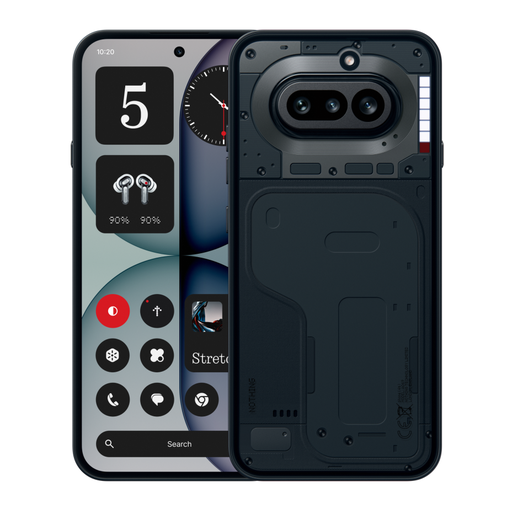
Nothing Phone (4a), 12+256GB, Black
Consider a phone for portable communication and information access if you can complete your essential tasks on the exact device.
Check the required screen-reading, voice or notification settings and their behaviour in your apps; Google notes that Android accessibility features can vary by device and market.
Joybuy
 No image available
HP OmniBook X Flip 16-as0004na Copilot+, 16-inch touchscreen, Intel Core Ultra 5 226V, 16GB RAM, 512GB SSD
This Windows 11 Home laptop is a computer-based option for reading and writing tasks, subject to checking the apps and access tools you need.
Its listed configuration includes a 16-inch 2-in-1 touchscreen. Confirm the Windows version if you intend to use Voice Access, and check any assistive peripheral against the exact device.
Joybuy
 No image available
MSI Summit 16 AI Evo, 16-inch QHD+ 165Hz, Intel Core Ultra 7 255H, 32GB LPDDR5 RAM, 1TB SSD
Consider this laptop for computer-based tasks only after checking that its operating system, essential apps and chosen accessibility tools work together.
The listed configuration has a 16-inch display and Intel Arc graphics. Confirm the operating-system version before relying on a version-dependent feature such as Windows Voice Access.
Joybuy
 No image available
Logitech MX Master 3S ergonomic mouse, Black
Consider this mouse if conventional pointing remains workable and mouse fit is the issue you want to address.
Check hand fit, button reach and compatibility with your computer. A conventional mouse is not a substitute for switch or speech input when pointing itself is the barrier.
Joybuy
Frequently asked questions
Should I try built-in accessibility settings before buying specialist hardware?
Yes, start by trying a setting against one task you need to complete, such as reading a message, entering text or noticing an alert. Consider specialist equipment if that route does not provide dependable access, particularly when switches, braille equipment or several connected tools are involved.
When should I seek a needs assessment or specialist advice?
Seek advice before buying when the setup involves switches, braille equipment, several devices or apps, or funded study support. For first-time Scottish Disabled Students' Allowance applications, SAAS requires a Needs Assessment Report identifying support or equipment needed for the course.
Can a workplace provide accessible equipment?
An employer may need to make reasonable adjustments for a worker with a disability or health condition who would otherwise be substantially disadvantaged, according to GOV.UK. Discuss the job-specific barrier with the employer; Access to Work may offer additional support for eligible people in England, Scotland and Wales, while Northern Ireland has a separate Access to Work (NI) service.
What study support should I check before buying equipment?
Check the Disabled Students' Allowance arrangements that apply to your UK nation, residency and course before buying equipment you expect to be funded. GOV.UK says equipment bought before the assessment for England's scheme will not be reimbursed; SAAS requires a Needs Assessment Report from first-time Scottish applicants, and other nations administer their own arrangements.
Will a keyboard, headset or switch work with my device?
Check the exact device and operating-system version, its connections, and whether your essential software accepts that input. A switch may also need a compatible interface and configuration; a connection that fits physically does not establish that the complete task will work.


