People who need speech or enlarged text
If text, icons, forms or navigation are difficult to see or read, you may need screen reading, magnification, larger text, contrast adjustments or a compatible braille device.


Start with the built-in accessibility settings on the exact phone or tablet you are considering, and try the calls, messages and apps you use every day. If touch control, typing, audio access or a simple daily routine remains difficult, consider compatible accessories, software or a specialist phone; check the complete setup rather than relying on an accessibility label.
If text, icons, forms or navigation are difficult to see or read, you may need screen reading, magnification, larger text, contrast adjustments or a compatible braille device.
Calling, messaging and navigating may be easier to assess using voice commands, adjusted touch controls, an external keyboard or switches instead of relying on small touchscreen targets.
Captions, visible or vibrating alerts, hearing-device compatibility, spoken text or a simpler interface may change whether a device works for daily communication.
Try built-in settings with your essential tasks before deciding whether an accessory or a different kind of phone is needed.
Consider this when: Calls, messages and essential apps work with the access settings you can use on the exact device.
Trade-off: Features and their behaviour can vary by model, software version, language and app.
Consider this when: The phone or tablet can run your tasks, but you need a different way to control it or receive output, such as a switch, keyboard or braille display.
Trade-off: The accessory, connection and setup must work together with the exact device.
Consider this when: A configured mainstream device still makes essential daily communication difficult, and simpler physical controls or a more focused setup are central to the choice.
Trade-off: A specialist phone may not provide the apps or flexibility you need; AbilityNet advises seeking specialist advice when considering a different, easier-to-use phone.
| Concern | Buying checks | Who this matters to |
|---|---|---|
| Seeing and reading the screen | Try your preferred text size, magnification or screen reader in essential apps. Check compatibility if you use a braille device. | If forms or messages are hard to navigate visually, I need to know whether I can read or hear them on this device. Around 29% of consumers may put visual access first. |
| Hearing speech and noticing alerts | Try captions and visible or vibrating alerts in the apps you use. If relevant, check your exact hearing device with the phone. | When I might miss spoken calls or notifications, I need an alert or caption I can follow. Audio access may come first for around 21% of consumers. |
| Controlling the device | Try calling, messaging and correcting text with your intended voice, touch, keyboard or switch method. Confirm accessory connections. | Small targets or repeated gestures can make even a familiar app difficult for me to operate. Around 29% of consumers may prioritise an alternative input method. |
| Keeping daily tasks manageable | Try the full sequence of contacting someone, reading and replying to a message, then returning to the home screen. Assess any simplified setup. | If reading, writing or remembering steps interrupts my routine, I need the everyday sequence to remain manageable. Simpler routines may be the primary concern for around 21% of consumers. |
Apple, Google and Samsung describe accessibility options, but availability can depend on the model, software, language or app. A feature list cannot tell you whether your complete daily task will work.
Try the exact device with your essential apps and preferred settings while you still have an opportunity to assess it.
A switch or hearing-device connection needs compatible equipment at both ends. Samsung documents Bluetooth or USB connections for external switches and says hearing-aid audio streaming requires support from both devices.
Check the accessory model, phone or tablet, connection method and setup requirements together before buying.
An adapter or help with setup may also be needed for the intended arrangement.
In its 2020 panel survey, the Research Institute for Disabled Consumers reported difficulties with smartphone and tablet apps, including navigation, forms and text size. Device settings alone do not establish that a particular app will work for you.
Try the communication and other essential apps with the access method you intend to use.
Support through Access to Work or Disabled Students' Allowance depends on the applicable route and an individual assessment. GOV.UK says equipment bought before a DSA assessment will not be reimbursed through that route.
If such support affects your choice, check eligibility and complete the relevant assessment before purchasing equipment for it.
An iPhone or iPad may be worth assessing if you want built-in options for visual access, spoken content and alternative control.
Android phones and tablets offer a route to screen reading, display adjustments and alternative input, subject to the device chosen.
Galaxy phones and tablets are another route to accessibility settings, including display, audio and interaction controls.
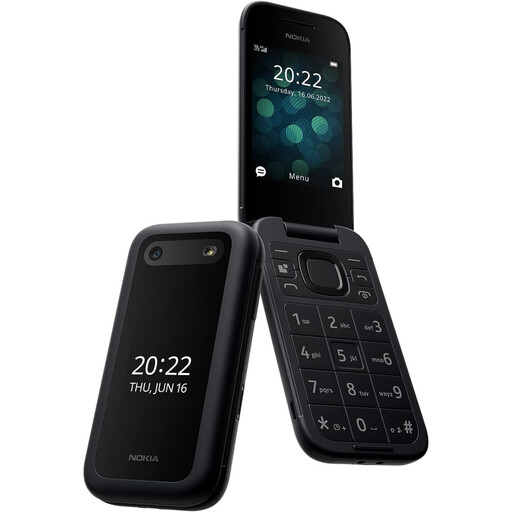
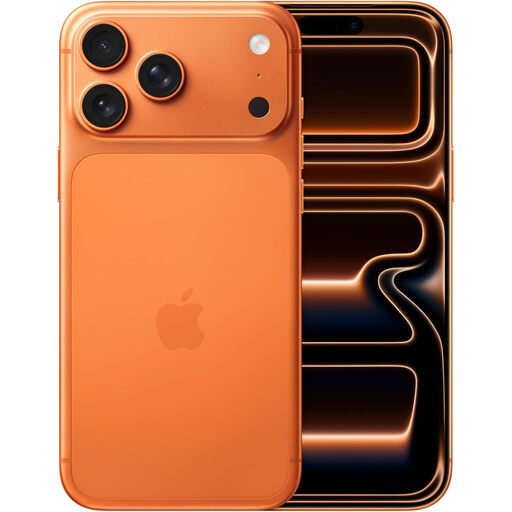
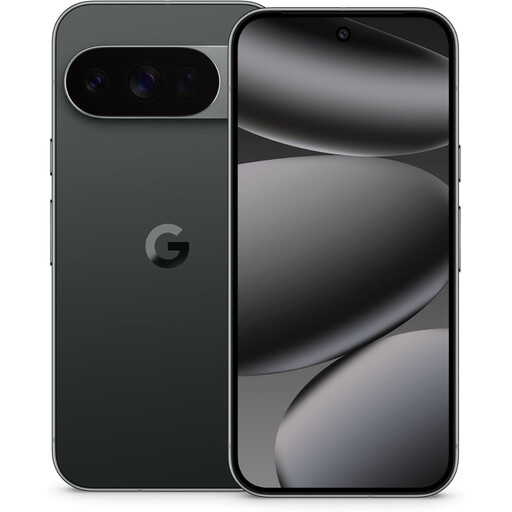
These phones offer two different starting points for daily communication: a call-focused Nokia handset to assess if physical controls matter most, and iPhone and Android smartphones to assess with built-in accessibility settings. Try the tasks and access method you need on the exact model before choosing.
 No image available
Consider this call-focused phone if you prefer to assess physical buttons and flip-call controls rather than a touchscreen. Try its menus and messaging yourself, and check any essential apps or hearing-device connection before choosing it instead of a smartphone.
 No image available
Consider this iPhone if you want to try Apple's built-in accessibility route for everyday calls, messages and apps. This is the 256 GB Cosmic Orange variant; check the required settings, language and app behaviour on this exact model.
 No image available
Consider this Android phone if you want to assess screen reading or alternative input for daily communication. Google documents these options for Android, but test the settings, language and essential apps you need on this exact Pixel; this is the 5G Dual Sim variant with 16 GB RAM and 128 GB storage.
Yes, if you can use the exact device for your calls, messages and essential apps after configuring it. Apple and Google document screen reading, display and alternative-input options, but availability and app behaviour can vary by model, software and language.
Consider an external device when built-in settings alone do not give you a workable way to control the phone or read its output. Check the exact accessory and connection method: Apple Support documents connected keyboards and braille displays, while Samsung UK documents Bluetooth or USB external switches.
It may help eligible people with disability-related support needed for work. GOV.UK describes workplace aids and equipment as possible support, but the equipment and assistance available to you depend on your circumstances; check the scheme before relying on it for a purchase.
No, not if you are seeking reimbursement through the Disabled Students' Allowance route described by GOV.UK. Its guidance says equipment bought before assessment will not be reimbursed; check your applicable student-finance route and assessment outcome first.