For everyday calls and texts, consider a 4G phone with separated physical keys when touchscreen controls are the main barrier. Choose a smartphone when apps or spoken and magnified screen access matter, provided the intended user can manage its configured interface. Try the exact handset together, check it with the chosen network and keep any telecare arrangements separate from a phone’s assistance button.
Who is choosing?
People who need tactile controls
If small on-screen targets are difficult to press, separated keys and favourite-contact controls may make calls and texts more manageable. O2 advises checking the required features on the particular phone rather than relying on its category.
People who need speech or magnification
A smartphone may preserve access to apps and messages while offering spoken feedback or enlarged content. RNIB describes speech and magnification as ways blind and partially sighted people use phones; the controls still need trying on the intended device.
Carers setting up an everyday contact phone
A short list of contacts and a familiar calling routine can be more important than extra functions. Check how the person answers, sends a message and charges the phone, and confirm any separate telecare arrangements with their provider.
What matters when choosing?
For calls and texts, start with the controls the person can operate. If they also need apps or spoken navigation, try a configured smartphone before deciding; check network service and any critical-support equipment whichever phone you choose.
4G physical-key phone
Consider it when: Calls, texts and a small set of contacts matter most, and separated keys are easier to operate than a touchscreen.
Trade-off: Check whether it provides any apps or other connected functions the person needs, as well as calling on the chosen network.
Configured smartphone
Consider it when: The person needs apps, video calls, magnification or spoken screen access and can use the interface after set-up.
Trade-off: Larger icons or a simpler home screen do not remove every gesture, notification or unfamiliar screen.
| Concern | What to check | Who this matters to |
|---|
| Tactile operation and grip |
Try the key spacing, call controls and volume buttons. Check whether charging is manageable. |
When small touch targets are hard to press, I need controls I can find and operate without accidental taps. Around 36% of consumers put tactile operation first. |
| Sight and spoken access |
On the exact handset, try text size, magnification and speech feedback while reading a message and finding a contact. |
If I cannot comfortably read the screen, I need enlargement or spoken navigation that works for my usual tasks. Sight or speech access comes first for around 29% of consumers. |
| Connected communication |
Decide whether calls and SMS suffice or whether messaging apps and video calls are needed; try a simplified home screen if relevant. |
I want to keep in touch through apps, but a crowded screen makes familiar tasks harder. Around 21% of consumers primarily need smartphone communication with a manageable interface. |
| Network and support continuity |
Confirm 4G calling with the chosen network and check coverage where the phone will be used. Discuss any connected alarm with its provider. |
Before changing phones, I need to know that calls will work and that any separate support equipment remains accounted for. For around 14% of consumers, continuity is the primary concern. |
Mistakes to avoid
-
Trusting an “easy” phone label without trying it
O2 notes that accessibility features vary by phone, while Google says the Android TalkBack experience can vary by manufacturer and Android version. A suitable-looking keypad or screen does not establish that the intended user can complete their usual tasks.
Have them answer and make a call, read a message, adjust volume and charge the exact handset. Test any speech or magnification setting they will use.
-
Choosing an older phone without checking its network
Ofcom says UK 3G networks are switched off and 2G networks are being gradually withdrawn. A 2G- or 3G-only handset is therefore a poor basis for a new long-term calling set-up.
Confirm that the exact model supports 4G calling on the intended provider’s service before buying.
-
Treating an assistance button as telecare
A button that contacts selected people does not establish a monitored response service or compatibility with a care alarm. Ofcom advises people with care alarms, health pendants or other connected devices to tell their provider before a communications change.
Discuss the existing arrangement with the telecare or device supplier and the relevant communications provider before changing equipment used for critical support.
-
Assuming size alone solves an access difficulty
A larger display does not replace speech feedback where that is needed, and physical keys may still be difficult to press or grip.
Test magnification or speech for sight access, and key pressure, spacing and charging for dexterity needs.
Brands to consider for these phone types
Doro
Doro offers feature phones aimed at straightforward everyday communication, including physical-key models.
- Doro lists a high-contrast keypad, adjustable font size and screen magnification for the Leva E10.
- Check the exact model, its network and how any assistance contacts are configured; these features do not establish monitored telecare.
emporia
emporia offers 4G feature-phone options for people considering tactile buttons and uncomplicated calling.
- emporia describes raised, illuminated buttons on the SIMPLICITY LTE and speed-dial keys on the PURE LTE.
- Try the particular model’s controls and confirm network support; a brand’s description cannot establish an individual user’s fit.
HMD
HMD’s feature-phone range provides another route for people considering physical controls and flip-phone formats.
- HMD describes models in its range with larger buttons and displays and easier access to contacts.
- Check the current model and listing: HMD marks the Nokia 2660 Flip as no longer available from its own shop.
Joybuy phone options
These phones offer different ways to use physical controls, from feature phones to an Android smartphone with a keyboard. Compare their keys and screens through the everyday tasks the intended user needs to perform.
 No image available
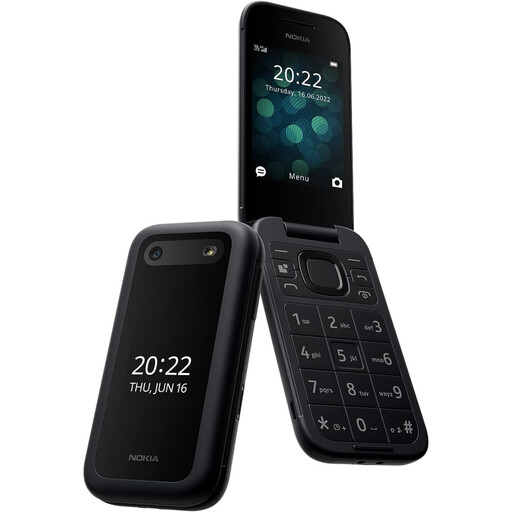
Nokia 2660 TA-1469
Consider this phone if physical call controls are the priority; try answering, dialling and reading a message with the intended user. Confirm the precise variant and calling support with the chosen network. HMD marks the Nokia 2660 Flip as unavailable from its own shop, so check this listing carefully. Do not treat a contact button as a telecare service.
View on Joybuy
 No image available
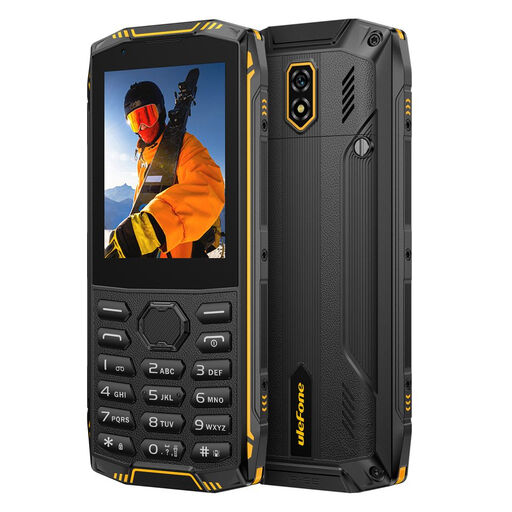
Ulefone Armor Mini 5, 1GB+8GB, 4G LTE, no charger
Consider it if you want to try a feature phone that also has a touch display, rather than assuming either input method will be easier. The named variant has a 2.8-inch touch display and 4G LTE; a charger is not included. Try the controls and confirm calling support with your chosen network.
View on Joybuy
 No image available
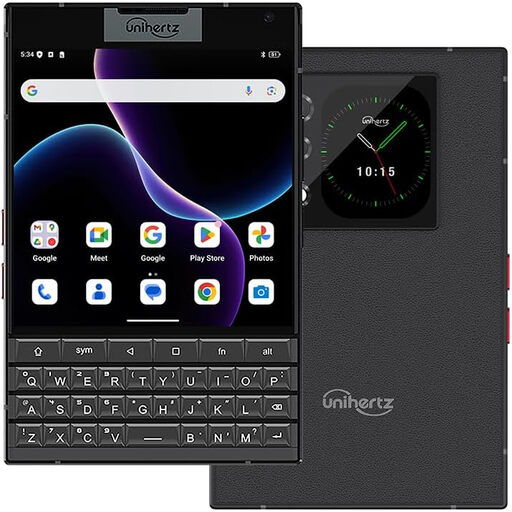
Unihertz Titan 2 5G Android, QWERTY keyboard, 12 GB + 512 GB, Black Dual SIM
This smartphone is worth considering when apps are needed but physical typing is preferred. Its named variant has a QWERTY keyboard, NFC and OTG support. Try typing and calling to judge the keys, then check the required accessibility settings and network compatibility on the exact handset.
View on Joybuy
Common questions
Should I buy a 2G- or 3G-only feature phone?
For a new long-term UK calling set-up, choose a route other than a 2G- or 3G-only phone. Ofcom says 3G networks are switched off and 2G networks are being gradually withdrawn. Check the exact handset’s 4G calling support with the provider you intend to use.
Can a phone’s assistance button replace a telecare alarm?
Do not assume it can: contacting selected people is not the same as a confirmed monitored service or a compatible alarm arrangement. If the person uses telecare or another connected support device, speak to its supplier and the relevant communications provider before changing the set-up.
What should I test on a smartphone for sight needs?
Try speech feedback or magnification on the exact handset while the intended user answers a call, finds a contact and reads a message. Google says Android TalkBack can provide spoken feedback, but its experience can vary by manufacturer and Android version.
How can a carer make a new phone easier to use?
Set up important contacts and practise the person’s usual calling, messaging and charging steps together. Adjust text size, volume or notifications where the particular phone permits it; O2 advises checking required accessibility features before purchase because they are not available on every handset.


