Students who find reading difficult to access
If you need to read or navigate course files and learning platforms, consider whether spoken text is enough or whether you also need screen-reader access to controls.


For disabled higher-education students, start by testing the accessibility tools on a device you already have, and consider specialist software, an accessory or a different computer only if a specific study task remains unmet. Microsoft, Apple and Google document built-in options, but course files, university systems and assessments still need testing; GOV.UK advises students in England not to buy equipment before a Disabled Students’ Allowance (DSA) assessment if they expect reimbursement, while funding arrangements differ across the UK nations.
If you need to read or navigate course files and learning platforms, consider whether spoken text is enough or whether you also need screen-reader access to controls.
If conventional typing is difficult, look for a way to draft and edit work in the applications required for your course; basic dictation may not cover every workflow.
If you need to capture or review teaching, check what recordings or captions your university provides and what its rules allow you to record yourself.
Start with the task that is hardest—reading, writing or following live teaching—then test built-in accessibility before adding dedicated software or hardware.
| Concern | What to check when buying | Who this matters to |
|---|---|---|
| Reading and navigating course content | Try a representative course file and learning-platform page with spoken text and screen navigation. Ask about an accessible document if the original file is not usable. | If I struggle with course documents or moving through platform controls, I need to know whether spoken reading alone is enough. Around 28% of consumers put reading and navigation first. |
| Creating and editing written work | Test dictation, correction and editing in the applications used for coursework. Check the exact operating system and processor before choosing specialist software. | When typing makes drafting difficult, I need a way to create and revise assessed work in the required applications. Around 22% of consumers prioritise writing and dictation. |
| Following and revisiting live teaching | Check whether the course provides usable recordings or captions, and whether university rules permit your intended recording and transcription workflow. | If I cannot keep up with notes during teaching, I need a permitted way to capture or review what was said. Around 22% of consumers prioritise lecture capture. |
| Compatibility with course systems | Ask which software, learning platforms and assessment arrangements are required. Check processor and driver support for specialist applications or connected devices. | When a course depends on particular software or assessment tools, I need them to work together on my chosen setup. Around 17% of consumers put course compatibility first. |
| Physical input and device setup | Try the input task and check the accessory’s connection, drivers and compatibility with the exact computer and any university installation rules. | If a standard keyboard or other input method is not workable, I need an alternative that connects to my study device. Around 11% of consumers prioritise physical input. |
GOV.UK advises students in England not to buy equipment before assessment if they are seeking reimbursement. DSA processes differ across the UK nations.
Check the guidance for the nation where you ordinarily live and follow the relevant assessment and entitlement instructions before buying on the expectation of funding.
A screen reader, magnifier or speech feature does not establish that a particular course file, learning platform or assessment will work with it.
Test representative materials and the actual learning platform, and ask your institution about accessible formats and assessment arrangements.
If materials or tools do not work together, you may need time to change your setup or request usable course materials.
Microsoft’s Arm guidance identifies third-party dependencies and drivers as compatibility checks for Arm-based Windows devices.
Check the processor as well as the Windows version against the exact software edition and accessory before choosing a computer.
If a required driver is unsupported, a different software choice or accessory may be needed.
A device’s recording function does not establish permission to record, store or share a class. University procedures can set conditions.
Check your institution’s adjustment and recording rules before using personal recording or transcription features in class.
These brands cover built-in accessibility features and specialist software, but their inclusion does not establish compatibility with a particular course or device.
Relevant if your study workflow requires Windows or a Windows laptop.
MacBook Air and macOS may suit you when required course applications work on Mac and the built-in accessibility tools meet your needs.
Chromebook accessibility is relevant when the course’s required applications and browser-based tools work in your setup.
Read&Write is a specialist reading-and-writing software line to assess if built-in tools do not suit your documents or drafting workflow.
JAWS is a specialist Windows screen reader to assess if built-in access does not meet your navigation needs.
These choices cover laptops with built-in accessibility routes and a voice recorder for reviewing teaching; check course compatibility and recording rules against your own needs.
 No image available
Could suit coursework where Mac dictation or spoken control fits the required workflow; test your course applications before choosing.
13-inch MacBook Air; M5 chip with 10-core CPU and 10-core GPU; 16GB memory; 1TB SSD.
 No image available
Could suit study tasks that use Windows 11 and a larger laptop display; check your course applications and any required accessories.
15.6-inch Full HD display; Intel Core 5 120U; 24GB RAM; 1TB SSD; Windows 11 Home.
 No image available
Could suit a Windows study workflow where a touchscreen is useful; verify required software and connected devices on this processor before buying.
15-inch PixelSense touchscreen; Snapdragon X Elite; 16GB RAM; 256GB SSD.
For specialist software or connected devices, check Arm64 support for third-party dependencies and drivers.
 No image available
Could suit a Chromebook-based study setup if your course tools work in that environment; check required applications and assessment arrangements.
15.6-inch display; Intel Pentium; 8GB RAM; 128GB eMMC storage.
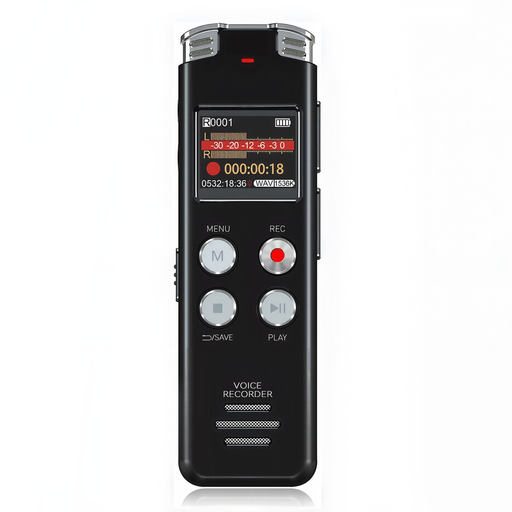 No image available
Could suit reviewing captured teaching where recording is permitted; check your institution’s rules before using it in class.
128GB storage; one-touch and voice-activated recording; A-B repeat playback; MP3 and WAV recording; USB-C transfer. The product description lists Windows, Mac and Android compatibility.
No. DSA support depends on the applicable nation’s rules and an individual assessment of needs. GOV.UK advises students in England not to buy equipment before assessment if they are seeking reimbursement; check the process that applies to where you ordinarily live.
Check the student-finance authority relevant to where you ordinarily live, rather than assuming the university’s location determines the rules. England, Scotland, Wales and Northern Ireland have separate guidance, so confirm the eligibility and assessment process with the relevant authority and your university disability service.
Yes: test the built-in option with your own course materials and learning platform first. Windows includes Narrator and Chromebooks include ChromeVox, but if that workflow does not meet your needs, check a specialist product against your exact computer and applications.
A recording feature does not establish permission to record. Check your institution’s rules for recording, storage, transcription and sharing; the University of Cambridge’s procedure is an example of an institution-specific process, not a UK-wide permission rule.
Confirm that the software edition supports your operating system and processor, works with the applications required for your course, and can be installed under your university’s rules. If equipment is being funded through an England DSA award, check the entitlement instructions for the supplier and any training arrangements.