Who this guide is for

People who need accessible reading

If you need to read messages, forms or other online content using magnification or speech, check whether the device’s built-in settings work for the content you use. The UK Department for Science, Innovation & Technology identifies inaccessible design and device suitability as barriers to digital inclusion.

People who need alternative controls

If touch, typing or pointer control is difficult, consider how the operating system and any keyboard or switch will work together. The UK Department for Science, Innovation & Technology identifies accessible design and suitable assistive technology as relevant digital-inclusion needs.

People getting online with support

If you need a device for everyday services or communication, but setup, ongoing help or available resources affect your choice, consider both the equipment and the support around it. These barriers are described in the UK Department for Science, Innovation & Technology’s digital inclusion research.

What to check before choosing

Concern What to check when buying Who this matters to
Reading and seeing content Try the text size, contrast, magnification or screen reader in the apps, forms and documents you use. If I rely on larger text or speech to read messages and services, I want to test those tasks on the actual device. Around 25% of consumers put accessible reading first.
Physical input Try the keyboard or switch controls and confirm the host device, receiver and cable requirements. If touch, typing or pointer control is difficult, I need a way to enter or select information that works with my device. Around 25% of consumers put alternative physical control first.
Speech input Test the intended microphone, language, operating-system version and apps for dictation or voice control. If speaking is my preferred way to enter text or navigate, I want to check the exact task rather than rely on a feature name. Around 19% of consumers put speech input first.
Existing tools and apps Check the exact accessory model, connection, operating system and essential apps as one setup. If I already use an assistive tool or depend on particular apps, I need to know they will work with the device I am considering. Around 19% of consumers put existing-tool compatibility first.
Supported access Check whether setup help, eligible support or any required additional components are available for your circumstances. If learning or setting up a suitable device is a barrier, I want to know what practical help I can access. Around 12% of consumers put affordable, supported access first.

Buying pitfalls to avoid

  • Assuming a USB switch works with every tablet

    A shared connector type does not guarantee that an assistive switch will work with a particular device. Pretorian’s USB Switch instructions exclude iPad and iPhone and specify an alternative cable for Android tablet use.

    Check the exact switch model and the manufacturer’s compatibility instructions for the intended host before ordering.

    A separate compatible interface or cable may be needed, so check the complete connection setup.

  • Buying specialist reading software before trying built-in settings

    Devices may include magnification or screen-reading tools, but those features may not meet every reading need. RNIB notes that built-in magnification can be insufficient for some uses.

    Try your own documents and services with the built-in settings first, then identify any specific shortfall before considering specialist software.

  • Checking an accessory without checking the complete setup

    Pretorian’s SimplyWorks Keyboard pairs with a SimplyWorks receiver. The UK Department for Science, Innovation & Technology also identifies device suitability and access to support as separate digital-inclusion barriers.

    List the components you need and check the host device, connections and setup support together before choosing.

    A receiver or other connection component may be required, and setting up the full system may take additional planning.

  • Assuming a work or study scheme covers an everyday home purchase

    Support schemes have specific purposes and conditions. Access to Work relates to work, while the cited Disabled Students’ Allowance guidance for England says not to buy equipment before assessment.

    Check the scheme’s location, purpose and approval process before relying on it for equipment.

Relevant brands and product lines

Apple

An iPad route to consider when your essential tasks work in iPad apps and you want to try built-in reading, voice or switch settings.

  • Apple lists VoiceOver, Zoom, Voice Control and Switch Control for the iPad 11-inch (A16).
  • Those features do not establish that a particular app or third-party switch will work; check the exact setup.

Samsung

A Galaxy tablet route to consider when your required apps and accessibility workflow suit Android.

  • Samsung describes TalkBack and display accessibility settings for Galaxy mobile devices.
  • Feature availability depends on the device and software version; confirm that the settings and any separate peripheral suit your intended use.

Microsoft

A Windows route to consider when your tasks or existing software require a computer workflow.

  • Microsoft documents Magnifier and voice-recognition features in Windows.
  • Voice Access and Windows Speech Recognition differ by Windows version, and operating-system features do not establish compatibility with every laptop or app.

Google

A Chromebook route to consider when browser-based tasks and the required assistive workflow work on ChromeOS.

  • Google documents screen reading, magnification, dictation and Switch Access for Chromebook.
  • The feature list does not establish that desktop software or an existing peripheral will work with a particular Chromebook.

Pretorian Technologies

Specialist keyboard and switch products to consider when standard controls do not provide workable input.

  • Pretorian specifies 25 mm keys and an optional keyguard for the SimplyWorks Keyboard.
  • The keyboard pairs with a SimplyWorks receiver. Pretorian’s USB Switch instructions exclude iPad and iPhone and specify an alternative cable for Android tablet use.

Joybuy products for accessible everyday use

These Joybuy choices cover an iPad and a Chromebook for everyday digital tasks. Check your essential apps, accessibility settings and any assistive accessories against the exact device before choosing.
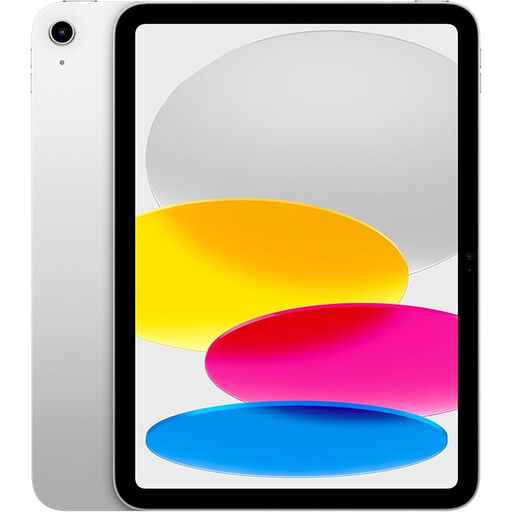
Apple iPad 11-inch (A16), 128GB, Silver

Apple iPad 11-inch (A16), 128GB, Silver

Consider it if your everyday tasks work in iPad apps and its built-in accessibility settings suit the way you read or control the device. Apple lists VoiceOver, Zoom, Spoken Content, Voice Control and Switch Control for the iPad 11-inch (A16); check the particular apps and any switch you plan to use.

11-inch display; 128GB; Silver.

View on Joybuy

Acer Chromebook 311 CBOA311-1H, 11.6-inch HD, Intel Celeron N4500, 4GB RAM, 64GB eMMC, Black

Acer Chromebook 311 CBOA311-1H, 11.6-inch HD

Consider it if browser-based tasks suit your needs and you want a Chromebook workflow. Google documents accessibility features for Chromebook, but check the required apps and any existing assistive device on this model.

11.6-inch HD (1366 x 768); Intel Celeron N4500; 4GB RAM; 64GB eMMC; Black.

View on Joybuy

Frequently asked questions

What should I establish before choosing a device?

List the online services and communication tasks you need, how you will read and control them, and the exact models of any assistive tools you already use. Test those tasks with the intended settings and complete accessory connection; an operating-system feature list alone cannot establish whether your full setup will work.

Can someone help set up a device at home?

AbilityNet says its UK volunteers can help by phone, online or at home. Ask what assistance is available in your area, as a support service cannot guarantee that a particular product will suit your needs.

Is there help with the cost of a home device?

Possible support depends on your circumstances and location. AbilityNet describes charitable funding and second-hand or loan-equipment routes, and its July 2026 tablet programme named specific eligible groups and areas. RNIB has a conditional technology-grant scheme for eligible people with sight loss. Access to Work relates to work, while the cited Disabled Students’ Allowance guidance concerns assessed study needs in England, not general funding for a home purchase.

Does being disabled automatically remove VAT from a tablet or accessory?

No. HM Revenue & Customs says zero rating requires an eligible customer, personal or domestic use, and eligible goods or services. The supplier is responsible for checking the conditions, so confirm the treatment of the particular supply rather than assuming every mainstream device qualifies.

Can I return an online purchase if the controls do not suit me?

For ordinary UK distance sales, GOV.UK says customers can generally notify the seller of cancellation within 14 days of receiving goods and then have another 14 days to return them. Exceptions include certain personalised goods; faulty or misdescribed goods have separate remedies. Check the conditions for the specific transaction before ordering a customised setup.