Start with the tasks and input methods that matter to you, then check the built-in accessibility tools on the exact phone, tablet or computer you are considering. Add specialist hardware or software when those tools do not meet your needs, but confirm the device version, language, apps and peripheral compatibility before relying on a particular setup.
Who needs which access method?
The useful starting point is the task you need to complete, not a device labelled accessible. GOV.UK describes reading, writing, communication and task management as activities that accessible technology can support.
People who need spoken or enlarged access
If messages, documents, web pages or physical text are difficult to read, compare screen reading, braille, display enlargement and camera magnification against the material you use. Apple and Google document different options across their devices, so check the exact model and access method.
People who need another way to write
For emails, forms, coursework or notes, the decisive question may be whether speech, a physical keyboard, an onscreen keyboard or switches work in your required apps. Microsoft documents voice-based text entry on eligible Windows 11 PCs, while Apple documents switch-based text entry on Mac.
People organising everyday tasks
If reminders, planning or keeping track of tasks matter most, look at how easily you can enter information and respond to notifications. GOV.UK includes memory and task management among the activities accessible technology can support.
What should you check before buying?
Try the device’s built-in controls with your own tasks first; consider separate software or an adaptive peripheral if your preferred way of reading or controlling the device still does not work.
| Concern |
What to check |
Who this matters to |
| Reading and information access |
Try spoken feedback, enlargement or braille with the text you use. Check the exact device and any required braille display. |
If I need to read messages or documents independently, the choice between speech, enlarged text and braille matters more than the device category. Around 24% of consumers put reading access first. |
| Writing and text creation |
Test your preferred keyboard, speech or switch input in the apps where you write. For Windows Voice Access, check the installed Windows version. |
When I have to complete forms or write longer documents, I need an input method I can use for the whole task. Writing is the primary concern for around 24% of consumers. |
| Communication |
Check calls, messages and essential apps using your preferred touch, voice, keyboard or audio-feedback controls. |
If staying in contact is my main task, I need to operate everyday communication apps without changing to a control method that does not suit me. Around 19% of consumers prioritise communication. |
| Planning and reminders |
Try creating and responding to reminders or to-do items with your chosen access method. |
I may need a straightforward way to record plans and notice what comes next, rather than a device with more functions. For around 14% of consumers, task management comes first. |
| Alternative device input |
Confirm the switch, joystick, mouse or keyboard model, its connection method and its operation in required apps. |
If standard touch or pointing controls are difficult for me, being able to operate the device is the deciding factor. Alternative physical input is the main concern for around 19% of consumers. |
Common buying mistakes
-
Assuming an accessibility feature is available on every device in an ecosystem
Apple notes that some features, apps and services vary by region or language; Google documents features with particular Android-version or phone-model requirements.
Check the exact model, operating-system version, UK language setting and feature you intend to use before buying.
-
Choosing an adaptive peripheral by its connection label alone
A wired or wireless connection does not establish that a switch, joystick or keyboard will perform the actions you need. Apple’s Mac Switch Control and Android Switch Access have their own setup requirements.
Check the peripheral model and connection, then test the complete device-and-app workflow where possible.
-
Assuming speech control will suit every writing task
Microsoft says Windows Voice Access requires Windows 11 version 22H2 or later and an internet connection for initial setup. Speaking may also be impractical in some places or for some tasks.
Try your microphone, language setting, corrections and essential writing apps before making speech your main input method.
-
Treating a manufacturer’s comfort claim as proof of individual fit
Logitech describes alternative mouse shapes and sizing options, but a product-line description cannot establish how a particular mouse will suit your hand, device or work.
Check dimensions, handedness, connection and the controls your tasks require; assess the mouse for yourself where possible.
Relevant brands for reference
These ecosystems and product lines offer different access methods. A brand’s inclusion here does not establish that every model has the same features or that it will fit your tasks.
Apple
An iPhone, iPad and Mac ecosystem to examine if you use several Apple devices and want to compare their accessibility controls.
- Apple documents VoiceOver, support for Bluetooth refreshable braille displays and Magnifier; Mac Switch Control can use adaptive switches or a joystick.
- Apple says some features, apps and services vary by region or language. Confirm availability on the exact device and in your required apps.
Microsoft
A Windows option to examine when desktop writing or voice-operated PC control is central to your work.
- Microsoft documents Voice Access for controlling a PC and creating text, with English (UK) among its supported dialects.
- Voice Access requires Windows 11 version 22H2 or later and an internet connection for initial setup. Check the installed version before relying on it.
Google / Android
An Android ecosystem to examine for mobile screen reading, display adjustments, voice control or switch input.
- Google documents TalkBack, magnification, Voice Access and Switch Access among Android’s accessibility options.
- Availability can depend on the Android version or device: Google specifies Android 16 or later for outlined text and Pixel 5 or later for its Pixel Magnifier app.
Logitech
A peripheral brand to consider when comparing mouse shapes or other alternative controls alongside a computer or compatible device.
- Logitech describes vertical mice and sizing options in its accessibility range.
- Those manufacturer descriptions do not establish individual comfort or compatibility. Check the specific model, connection and intended controls.
Joybuy products for everyday tasks
These choices cover a digital notebook and mainstream tablets, a phone and a laptop for reading, communication, writing or organising tasks. Check each device’s access features and any required peripheral against the way you intend to use it.
 No image available
iFLYTEK AINOTE 2 with protective case
Consider this digital notebook if handwriting, capturing spoken information and keeping notes together suit your routine; check that its input methods meet your access needs.
10.65-inch E Ink tablet with voice-to-text, transcription described as covering 16 languages and handwritten-to-text conversion. Confirm that your required language is included and check the conditions for transcription before relying on it.
If you need a screen reader, switch, external keyboard or audio output, check the complete setup on this model.
Joybuy
 No image available
Apple 11-inch iPad Air (2026, M4) Wi-Fi 128GB, Starlight
This tablet is a choice to assess for everyday reading and communication if you prefer an iPad and its available access methods.
Apple documents accessibility options for iPad, but check the installed iPadOS version, UK language settings and the features and apps you need on this exact model.
Joybuy
 No image available
Xiaomi Pad 8, 8G RAM, 128GB Wi-Fi, grey
Consider this tablet if you want to assess Android access methods for reading or everyday information tasks.
Google documents Android screen-reading, voice and switch options. Confirm the features and language settings on this Pad 8, and test any required keyboard, switch or app with the device.
Joybuy
 No image available
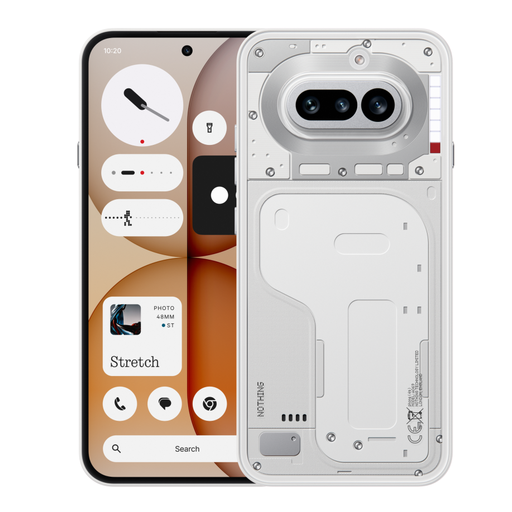
Nothing Phone (4a) 12+256GB, white
This phone is relevant if portable calls, messages and information access are your priority and its controls suit you.
Check the Android accessibility features, UK language settings and communication apps you need on the Phone (4a). If you use a switch, keyboard or other peripheral, confirm its connection and operation with this model.
Joybuy
 No image available
ASUS Vivobook 14 X1407QA-LY003W Copilot+ PC, Quiet Blue
Consider this laptop for computer-based writing if a physical keyboard or voice entry is part of your preferred setup.
Snapdragon X, 16GB RAM and 512GB SSD distinguish this variant. If you plan to use Microsoft Voice Access, confirm Windows 11 version 22H2 or later, English (UK) setup and operation in your required apps; check any adaptive peripheral separately.
Joybuy
Frequently asked questions
Should I check built-in features before buying specialist technology?
Yes: start with the accessibility settings on the exact phone, tablet or computer you are considering. GOV.UK notes that these devices often have built-in features; add specialist hardware or software when the available controls do not support your required task or input method.
Can I use Windows Voice Access in English (UK)?
Microsoft lists English (UK) among the supported Voice Access dialects for Windows 11 version 22H2 and later. Initial setup requires an internet connection, so check the laptop’s installed version and complete setup before relying on voice input.
Will one switch or keyboard work with every device?
Do not assume it will: compatibility depends on the peripheral, device, connection and control setup. Google documents Android Switch Access, while Apple documents Mac Switch Control; check your exact combination and the actions it must perform in your apps.
Do all devices in an ecosystem offer the same accessibility features?
No. Apple notes that some features vary by region or language, and Google specifies device- or Android-version requirements for certain functions. Check the model, operating-system version, UK language configuration and apps you intend to use.


