Households using text relay
For people who use live text during calls, the choice includes both the calling device and a way to connect it to Relay UK. Ofcom identifies Relay UK as the approved UK text-relay service.


Choose the communication method before the equipment: Relay UK calls need a suitable connected device, hearing-device use calls for an exact compatibility check, and a physical-button home phone may suit someone who prefers familiar controls. For a digital landline, also confirm how the phone connects to the broadband router and arrange any needed provider support before relying on it.
For people who use live text during calls, the choice includes both the calling device and a way to connect it to Relay UK. Ofcom identifies Relay UK as the approved UK text-relay service.
Apple and Google describe different pairing and coupling requirements. Check the particular hearing device, handset and connection method rather than relying on a general compatibility label.
If calls depend on a home phone, ask the provider how it will connect after a move to digital voice. Ofcom also advises registering in advance when priority fault repair is needed.
Start with the way the person makes and receives calls, then check the device, home connection and provider arrangements needed to make that method usable.
| Priority | What to check | Your needs |
|---|---|---|
| Text relay | Relay UK lists iOS 15 or later and Android 11 or later for its mobile app; Android on Chromebook is not supported. Check app availability and how the telephone number is linked. | I use live text alongside a call, so I need a device on which I can set up the service and read or enter text comfortably. |
| Hearing-device connection | Check the exact hearing-device and phone models, software requirements, and whether the intended method is pairing or telecoil coupling. Apple specifies compatibility requirements for Made for iPhone devices; Google gives separate conditions for Android pairing and compatible Pixel telecoil use. | My existing hearing device needs to work with the phone in the way I intend to use it, not merely carry a broad compatibility label. |
| Controls and alerts | Try the keys or touchscreen, display and call alerts on the exact model. Check which receiving-volume and visual-ringing controls that model provides. | Physical buttons or a visible ring indicator might make everyday calls easier for me to manage than a touchscreen-only arrangement. |
| Digital-landline connection | Ofcom says a digital landline works over broadband, with the phone connected through the router rather than the wall socket. Ask the provider whether the intended phone needs an adaptor or supplied equipment. | We rely on a home phone, so I need to know how it will be connected and set up before our service changes. |
| Provider support | Tell the provider about installation or urgent-repair needs. Ofcom says some support requires advance registration or proof of need; ask the actual provider about its conditions. | If our household depends on the connection, I want the relevant support arranged before a fault or changeover. |
A hearing device may have different requirements for pairing, direct streaming or telecoil use. Apple and Google both specify conditions that depend on the devices and connection method.
Identify the hearing-device model and ask for confirmation or a demonstration using the intended handset and software version.
Ofcom says a digital landline works through broadband, so a phone previously plugged into a wall socket may need a different connection.
Ask the provider how the existing or replacement phone will connect, and raise any installation, alarm or emergency-calling needs before the change.
Relay UK publishes mobile operating-system minimums and says Android on Chromebook is unsupported.
Check the intended device against Relay UK’s current requirements, complete number linking and try a non-emergency call after setup.
Ofcom advises advance registration for priority fault repair. Eligibility and application conditions belong to the relevant provider; BT, for example, describes conditions for its own scheme.
Contact your phone or broadband provider beforehand, ask what evidence it needs and keep its confirmation with the account details.
These brands illustrate different device approaches; a brand name alone does not establish compatibility with a particular hearing device or home setup.
An iPhone may be considered when someone uses a Made for iPhone hearing device or wants to check iPhone text-calling features.
Android phones offer hearing-device connection routes that need checking against the specific phone and hearing device.
Geemarc makes home phones with physical controls and model-specific calling and alert features.
Doro offers different phone formats for people comparing physical-button calling with smartphone functions.
These smartphones are options to consider for mobile calling and a possible Relay UK app setup. Check the app, operating-system requirements and any hearing-device connection on the exact handset before relying on either for accessible calls.
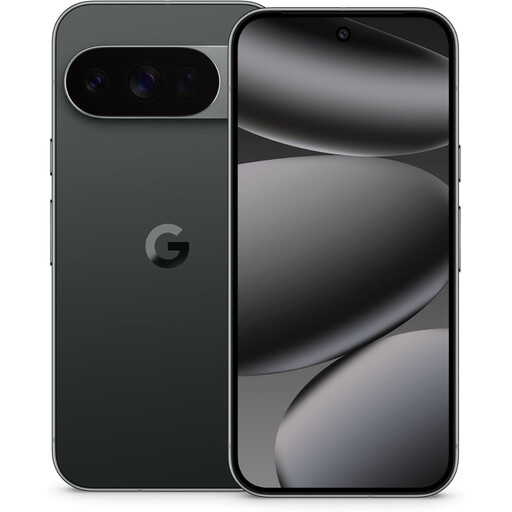 Image unavailable
A smartphone option for someone considering mobile calling or a Relay UK app setup. Check app operation and the required connection method with your particular hearing device before purchase.
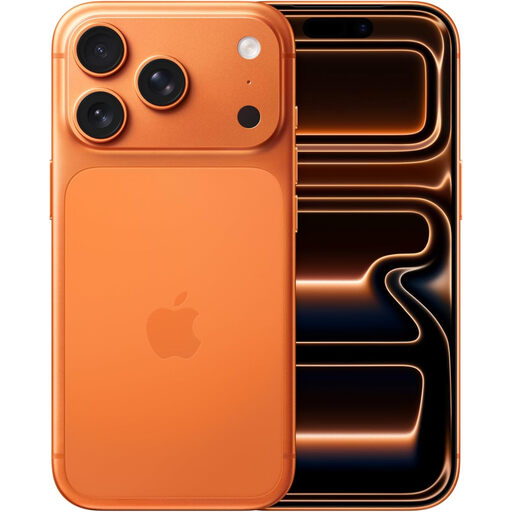 Image unavailable
An iPhone option for mobile calling or a possible Relay UK app setup. Check the intended hearing device against Apple’s compatibility requirements; if you need built-in RTT/TTY, Apple says availability depends on carrier and region.
Ofcom says phone providers must give customers access to an approved text-relay service and identifies Relay UK as the UK service. Choose equipment according to whether you intend to use its app or a textphone.
Relay UK lists iOS 15 or later for iPhone and iPad and Android 11 or later for Android phones and tablets; it says Android on Chromebook is unsupported. Check the intended device’s current app availability and complete telephone-number linking during setup.
A general label does not establish direct streaming or every control. Check the hearing-device and handset models, software requirements and intended pairing or telecoil method; Apple and Google set out different conditions for their respective devices.
Ofcom says a digital landline works over broadband, with the phone connected through the router rather than directly to the wall socket. Ask your provider whether your phone needs an adaptor or supplied equipment, and discuss installation or emergency-calling needs before the change.
If your household depends on urgent landline or broadband repair, Ofcom advises registering with the provider in advance. Ask your own provider about eligibility and evidence: BT’s published scheme, for example, has its own application conditions.