
24/7 Customer Support

Free returns

Same-day & Next-day Delivery

Quality Guaranteed

Unlock Your Welcome Offers: FREE Delivery | Up to 80% OFF | Free 30-day JoyPlus trial
Download the APP
Finding a gaming laptop that can handle the latest titles without emptying your bank account can feel like a difficult quest. You need a machine with enough power for smooth frame rates and modern features like ray tracing, but the price tags on high-end rigs are often a major hurdle. This is where the search for a capable and affordable gaming laptop begins.
The Acer Nitro V 15 gaming laptop has generated considerable interest for its attempt to balance performance and price. In this guide, we'll take a detailed look at what the Acer ANV15-52 model offers, help you understand the key features to look for in a budget gaming laptop and show you how it compares to other options. Our goal is to provide clear, practical information to help you decide if this is the right machine for your gaming and daily needs.
Navigating the world of gaming laptops can be complex. Here are a few key things to prioritise when you're working with a specific budget.
The GPU is the heart of any gaming machine. For an entry-level to mid-range laptop in 2026, a graphics card like the NVIDIA GeForce RTX 4050 is a strong contender. It not only provides the power for smooth 1080p gaming but also unlocks access to modern technologies. This includes DLSS 3, which uses AI to boost frame rates and ray tracing for more realistic lighting and reflections, making it a viable entry-level ray tracing laptop.
A high-refresh-rate screen is no longer a luxury; it's a core feature for a good gaming experience, especially in fast-paced competitive games. A 144Hz gaming laptop display updates the image 144 times per second, resulting in visibly smoother motion and quicker response times compared to a standard 60Hz screen. For a laptop with an RTX 4050, a Full HD (1920x1080) resolution is the perfect match, ensuring the GPU can consistently deliver high frame rates.
A powerful GPU needs a capable team of components to support it. An Intel i5 gaming laptop processor, such as the Core i5-13420H, provides enough processing power for gaming and multitasking without bottlenecking the graphics card. Paired with 16GB of RAM and a fast 512GB SSD, this combination ensures that games load quickly and the system remains responsive, even with multiple applications open.
Here are our recommendations, starting with the Acer Nitro V 15 and a couple of alternatives for different needs and budgets.
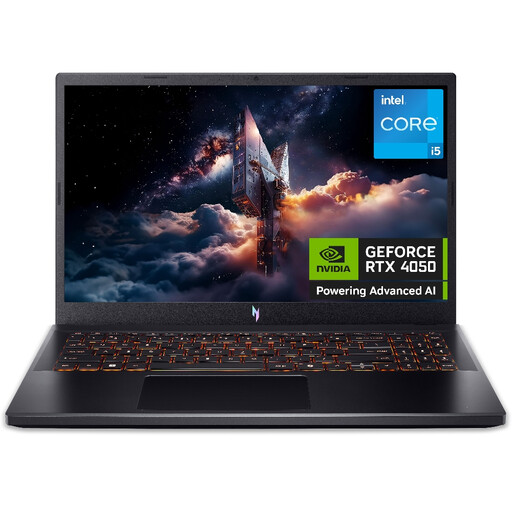
Why It Stands Out: The Acer Nitro V 15 ANV15-52 is notable for bringing together a highly effective set of gaming-focused components at a very competitive price point. The combination of an Intel Core i5-13420H processor and an NVIDIA RTX 4050 GPU is a powerful duo for 1080p gaming. Acer has also included practical features like a dual-fan cooling system with four exhaust ports and the NitroSense utility, which gives you direct control over fan speeds and performance modes. This focus on core performance and usability makes it a standout choice in the budget gaming laptop category.
Pros:
Who is it for? This laptop is an excellent fit for students, young adults and anyone in the UK looking for a capable yet affordable gaming laptop. It's built to handle modern AAA titles and competitive esports games at 1080p with good settings, delivering a genuine gaming experience without the premium cost.
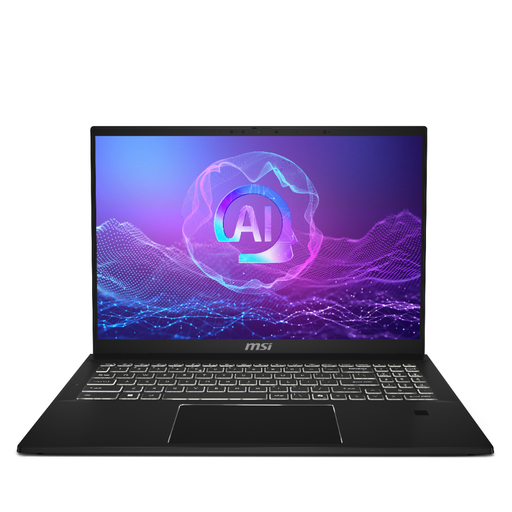
Why It Stands Out: The MSI Summit 16 AI Evo is a different class of machine, aimed at professionals and creators who also value high-end features. Its standout feature is the stunning 16-inch QHD+ (2560x1600) touchscreen with a 16:10 aspect ratio and a 165Hz refresh rate, offering more vertical screen space and incredibly smooth visuals. Powered by an Intel Core Ultra 7 processor with built-in AI acceleration, it's optimised for demanding productivity and creative workflows.
Pros:
Who is it for? This is for the professional, student or creator who needs a powerful, portable machine for work or study first, but also wants a premium device for media and light gaming. If your budget is more flexible and your primary use is productivity, this is a compelling option.
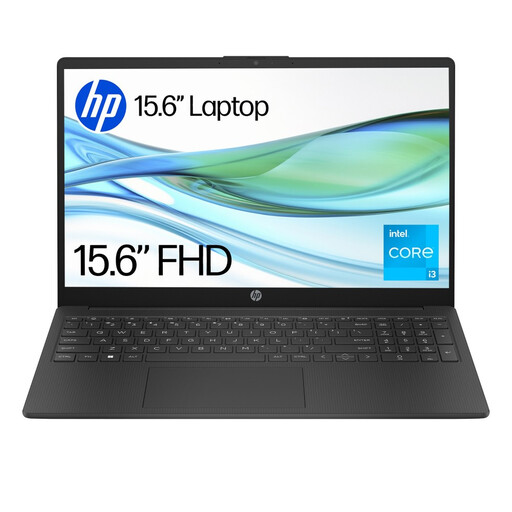
Why It Stands Out: The HP 15-fd0060na is all about delivering the essentials for everyday computing at an extremely accessible price. It features a reliable Intel Core i3-N305 processor and a crisp Full HD anti-glare display, which is great for browsing, streaming and working on documents. Its lightweight design and use of sustainable materials are also noteworthy points for a device in this price bracket.
Pros:
Who is it for? This laptop is intended for users who need a dependable machine for web browsing, email, video calls and office applications. It is not designed for intensive gaming, but it serves as a practical and low-cost solution for school, home or office work.
If none of these models are quite what you're looking for, there is a wide world of laptops to suit every need and budget. From ultra-portable notebooks to powerhouse workstations, you can explore our full range of functional laptops to find the perfect match.
Q1: Is the Acer Nitro V 15 good for gaming? A: Yes, the specified model with the NVIDIA RTX 4050 GPU, Intel Core i5 processor and 144Hz display is well-equipped for a solid 1080p gaming experience. It can run many modern AAA and esports titles at smooth frame rates.
Q2: Can you upgrade the Acer Nitro V 15? A: Yes, one of the strengths of the Acer Nitro V 15 (ANV15-52) is its upgradability. The chassis provides user-accessible slots to expand the RAM and add a second M.2 SSD for more storage, which helps extend the laptop's useful lifespan.
Q3: What is the main difference between the Acer Nitro V and other Nitro series laptops? A: The Nitro V series is generally positioned to offer a more accessible entry point into Acer's Nitro gaming brand. It focuses on delivering a strong price-to-performance ratio by prioritising core gaming components like the GPU and display, while other, more expensive Nitro series models may offer higher-tier processors, more premium chassis materials or more advanced cooling solutions.