
24/7 Customer Support

Free returns

Same-day & Next-day Delivery

Quality Guaranteed

Unlock Your Welcome Offers: FREE Delivery | Up to 80% OFF | Free 30-day JoyPlus trial
Download the APP
Navigating the market for a budget gaming laptop in the UK can feel like a minefield. Brands often use flashy marketing to promote machines that promise high-end performance but fall short in practice. Many buyers find themselves with a laptop that either overheats and slows down during intense gaming sessions or features a screen that makes modern titles look dull and blurry. This guide cuts through the clutter, focusing on the essential features you need and highlighting common pitfalls to avoid, with a close look at the Acer Nitro V 15 gaming laptop as a benchmark.
As a Joybuy Product Recommendation Officer, my role is to help you identify genuine value. Before you commit, let's analyse the three most common traps that catch out unwary buyers.
To ensure you get a machine that delivers on its promises, focus on these three non-negotiable parameters.
The GPU is the single most important component for gaming. For a modern affordable gaming laptop, a model like the NVIDIA RTX 4050 represents a solid entry point for playing current AAA titles at 1080p. This GPU supports key technologies like DLSS (Deep Learning Super Sampling), which uses AI to boost frame rates. When looking at an RTX 4050 laptop in the UK, it's important to consider that its performance can vary based on the power allocated to it by the manufacturer (Total Graphics Power or TGP). A well-cooled system will allow the GPU to sustain higher performance levels.
A fast GPU needs a fast screen. A 144Hz gaming laptop should be your minimum standard. A 144Hz refresh rate means the screen can display up to 144 frames per second, resulting in visibly smoother motion compared to a standard 60Hz panel. This is crucial for fast-paced games. Beyond speed, look for colour accuracy, often measured in sRGB coverage. A display with close to 100% sRGB will produce more vibrant and accurate colours, making games and creative content look their best.
While the GPU handles the visuals, the Central Processing Unit (CPU) and Random Access Memory (RAM) manage game logic, background tasks and overall system responsiveness. An Intel Core i5 gaming laptop, particularly a 13th-generation model like the i5-13420H, provides an excellent balance of performance and efficiency. Paired with 16GB of DDR5 RAM, this combination is more than capable of handling modern games, streaming and study-related applications, making it a versatile choice and a contender for the best gaming laptop for students on a budget.
Based on these critical parameters, here are some recommendations matched to different user needs.
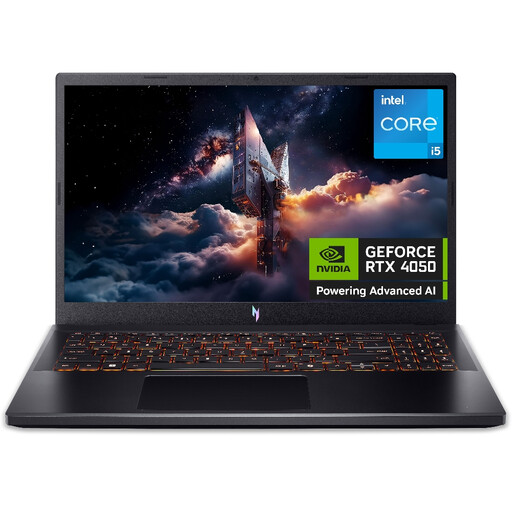
Why This Fits Their Persona: This laptop is a prime example of a well-balanced machine for those in the UK who need solid 1080p gaming performance for titles like Call of Duty or Baldur's Gate 3 without a premium price. It's also a great all-rounder for students needing to run demanding software for their courses.
It directly addresses the thermal throttling trap with a dual-fan cooling system and dedicated NitroSense software for manual fan control. Its 144Hz display avoids the 60Hz bottleneck, ensuring you see the smooth frames the RTX 4050 produces.
A strong combination of a 13th Gen Intel Core i5 processor, an NVIDIA RTX 4050 GPU and a 144Hz Full HD display provides a complete and capable gaming platform at an accessible price point. It also offers easy upgrade paths for RAM and SSD storage.

Why This Fits Their Persona: For the user who splits their time between gaming and creative hobbies like video editing or graphic design. This machine offers a more powerful CPU and a superior display for colour-sensitive work, providing more versatility than a pure gaming-focused laptop.
It sidesteps the display sacrifice trap by offering a 144Hz panel with 100% sRGB colour coverage. This ensures that visuals are not only smooth but also vibrant and accurate, which is essential for both gaming and creative tasks.
The combination of an AMD Ryzen 7 processor, a generous 1TB SSD and a colour-accurate 144Hz display makes it a highly capable all-rounder. The NVIDIA GeForce RTX 5050 GPU provides ample power for modern gaming and GPU-accelerated creative applications.
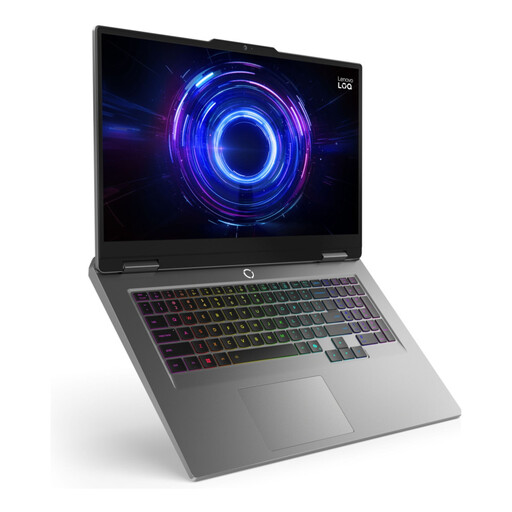
Why This Fits Their Persona: This is for the user who prioritises screen size and multitasking power. The large 17.3-inch display offers a more immersive gaming experience, and the huge 24GB of RAM is ideal for running games, streaming software and multiple other applications simultaneously without compromise.
This model avoids compromise by pairing its powerful Intel Core i7-13650HX processor with a massive 24GB of DDR5 RAM and a fast 165Hz display. It ensures that no single component bottlenecks the others, delivering a consistently high-performance experience across the board.
The expansive 17.3-inch 165Hz display provides a desktop-like immersive experience. The 14-core i7 processor and 24GB RAM combination offers exceptional power for heavy multitasking, streaming and demanding creative workloads alongside gaming.
We have compiled a complete, real-time list of products that fully satisfy these strict selection criteria and UK safety regulations.
Here are answers to some common questions about the Acer Nitro V 15 review and its features.
Yes, one of the practical advantages of the Acer Nitro V 15 is its design, which allows for relatively straightforward upgrades. The bottom panel can be removed to access the RAM slots and an additional M.2 SSD slot. This means you can increase the memory or add more storage in the future, extending the useful lifespan of the laptop.
An RTX 4050-equipped laptop is well-positioned to handle new games for the next few years, especially at 1080p resolution. By using performance-boosting technologies like NVIDIA's DLSS, you can achieve smooth frame rates in most modern titles by selecting a mix of medium to high settings. It represents a capable entry point into modern PC gaming that should not become obsolete quickly.
Once you have completed the initial Windows 11 setup, there are a few steps to optimise your experience. First, connect to the internet and run Windows Update to ensure all system drivers are current. Next, open the NVIDIA GeForce Experience application to download the latest graphics drivers. Finally, familiarise yourself with the NitroSense utility, which you can launch via a dedicated key. Use it to monitor system temperatures and adjust fan speeds or performance modes to suit your task, whether you're gaming or working.