Long-session console players
If you play action-RPGs on a console, start with a controller intended for that system. Consider how the full-size pad feels in your hands and how you will avoid a charging interruption during an extended session.


Choose a controller that works with the platform and connection you actually use, then consider how it feels to hold, how you will keep it powered and whether frequently used actions are easy to reach. A standard controller is a straightforward console route; extra buttons and profiles matter more if you intend to configure them. On PC, check game-specific support before choosing a controller for haptic feedback or adaptive triggers.
If you play action-RPGs on a console, start with a controller intended for that system. Consider how the full-size pad feels in your hands and how you will avoid a charging interruption during an extended session.
If reaching for dodge, item or ability commands repeatedly gets in the way of camera control, look at alternate inputs and profiles you would actually set up. Extra controls are less useful if you plan to leave the default layout unchanged.
Check the exact controller's Windows compatibility and your intended connection. If haptic feedback or adaptive triggers influence your choice, PlayStation advises checking support in the particular PC game as well.
For a long action-RPG session, establish platform compatibility first; then weigh hand fit, power planning and access to repeated commands against the setup each controller requires.
| Concern | What to check | Who this matters to |
|---|---|---|
| Comfort and reach | Assess the grip and whether you can reach your usual buttons and triggers without an awkward stretch; specifications alone cannot establish hand fit. | During a long fight, I want to keep a secure hold and reach core controls without changing my grip. Around 33% of consumers would put comfort and reach first. |
| Platform and game support | Confirm the exact console or operating system, connection mode and any game-specific features you intend to use. | If I move between devices, the controller needs to work with the system I will actually play on, not just have the right-looking connector. Roughly 33% of consumers would make compatibility their primary concern. |
| Power and connection | Compare battery claims for the connection mode you will use, and check your charging or wired-play arrangement. | I do not want a charging or connection interruption partway through an extended session. About 20% of consumers would prioritise continuity of play. |
| Custom combat inputs | Identify the commands you would remap, then check for suitable extra inputs, trigger settings or profiles. | When I use dodge or abilities frequently, I want those commands within easy reach while I control the camera. Approximately 14% of consumers would put custom inputs first. |
Compatibility belongs to the exact model. Microsoft Xbox lists the standard Xbox Wireless Controller for Xbox consoles, Windows PC, iOS and Android, while 8BitDo lists the Ultimate 2C Wireless for Windows and Android.
Write down your console or operating system and preferred connection, then check the model's stated compatibility before comparing its extra buttons.
A supported controller can still lack haptic feedback or adaptive-trigger effects in a particular PC game. PlayStation says these features work in select games and may require USB.
Check the game's compatibility notice and the connection it requires if those effects are important to your decision.
Nintendo says its approximately 40-hour estimate for the Switch Pro Controller varies with use. 8BitDo describes the Ultimate 2C Wireless's stated wireless figures as laboratory results under ideal conditions.
Compare figures for the relevant controller and connection mode, and have a suitable charging plan for longer sessions.
Back buttons and profiles address particular input-access problems; they do not automatically change how every action-RPG plays.
Name the actions you would move before choosing a customisable pad. Check whether its available inputs and profile controls let you set up that layout.
These brands offer different platform and control routes; the features below apply to the named controller lines, not every product bearing the brand.
Microsoft Xbox lists its standard Xbox Wireless Controller for Xbox consoles, Windows PC, iOS and Android.
PlayStation offers the standard DualSense for PS5 and the more configurable DualSense Edge.
Nintendo's Switch Pro Controller is a full-size option for Nintendo Switch play.
The Ultimate 2C Wireless is a Windows and Android controller for players considering extra remappable inputs.
These choices cover Xbox or Windows PC, PS5 and Nintendo Switch 2 play. Match the controller to your system first, then decide whether its controls suit the actions you use throughout a long session.
 No image available
Consider this Xbox-oriented controller if you intend to move frequently used actions to alternative controls. Check compatibility with your exact Xbox model or PC before buying, as the listing's platform details differ.
 No image available
For Xbox Series X|S, Xbox One or Windows 10/11 PC play, consider this model if you want to configure alternative combat inputs. Check which controls and connection options suit your setup before choosing it for a long session.
 No image available
For Nintendo Switch 2 action-RPGs, this is a full-size controller option if you prefer a single pad. Check the features supported by your game and make a charging plan that suits your usual session length.
 No image available
For PS5 play, the mappable back buttons and control profiles are relevant if you will assign repeated actions to them. PlayStation says trigger effects do not work with medium or shallow trigger-stop settings; on PC, advanced feedback also depends on game support and may require USB.
 No image available
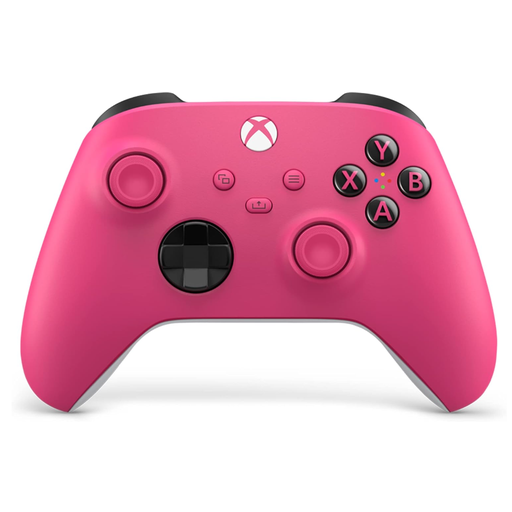
For Xbox or Windows PC play, the standard Xbox Wireless Controller is a conventional layout to consider if you do not need extra rear inputs. Microsoft Xbox lists textured triggers and bumpers, a hybrid D-pad and button mapping; check how you will power the controller during longer sessions.
Yes. Confirm the exact controller's compatibility with your system and preferred connection first. Microsoft Xbox lists its standard Wireless Controller for Xbox consoles, Windows PC, iOS and Android; 8BitDo lists the Ultimate 2C Wireless for Windows and Android. Extra inputs cannot resolve a platform mismatch.
No. PlayStation says only select PC games support those DualSense and DualSense Edge features, which may require a USB connection. Check the particular game's compatibility notice before choosing a controller for those effects.
They are worth considering if you have frequent commands you want to move to reachable alternate inputs and are willing to configure them. PlayStation lists mappable back buttons on DualSense Edge, while 8BitDo lists remappable R4/L4 bumpers on the Ultimate 2C Wireless; a standard layout may suffice if neither solves a specific problem for you.
No. Nintendo says its approximately 40-hour Switch Pro Controller estimate varies with use, and 8BitDo's Ultimate 2C Wireless figures depend on the wireless mode and ideal laboratory conditions. Compare the figure for your chosen model and connection, then plan how you would charge it if needed.