PC or Xbox action-RPG players
If you play at a Windows desk or on Xbox and may switch devices, consider the Xbox Wireless Controller’s stated device support, button mapping and headset jack. For a PC game, check gamepad support separately.


Choose for the device and action RPG you actually play before choosing a layout or special feature. Xbox Wireless Controller suits an Xbox-led or Windows setup; DualSense is the PS5-led route, Nintendo Switch Pro Controller serves Switch play, and 8BitDo Ultimate 2C Wireless offers a Windows route with extra remappable bumpers. For PC play, confirm gamepad support and check whether the features you want work over your planned connection.
If you play at a Windows desk or on Xbox and may switch devices, consider the Xbox Wireless Controller’s stated device support, button mapping and headset jack. For a PC game, check gamepad support separately.
DualSense is worth considering if you mainly play on PS5 or want its features in a supported PC game. Sony says PC haptic feedback requires both USB and game support, so wireless pairing alone will not provide every feature.
For action RPGs on an original Nintendo Switch, the Switch Pro Controller offers a full-size alternative to handheld Joy-Con controls. Nintendo lists wireless pairing, USB-C charging and a conventional D-pad.
Start with the console or computer and the exact game. Then decide whether your control layout, connection and room setup make an additional feature worthwhile.
| Concern | What to check | Who this matters to |
|---|---|---|
| Device and game support | Match the controller to your console or computer; for PC, check the exact game’s gamepad-support information. | If I move between a laptop and a console, I need a controller that works with the device and game I will actually use. Around 36% of consumers put compatibility first. |
| Command access | Decide whether extra buttons would help your preferred layout, and check how remapping works on your device. | When combat, camera and item commands compete for my fingers, I want to place the actions I use most where I can reach them. For around 29% of consumers, control layout is the primary concern. |
| Connection and room setup | Check wired reach or wireless charging, what accessories come with the controller, and headset-jack conditions. | In a small room, I need my chosen connection to suit the distance to the screen and the way I use headphones. Room practicality comes first for around 21% of consumers. |
| Tactile feedback | Check the individual game’s feature support and whether the feature needs a particular connection. | If feedback is part of why I am changing controllers, I want it to work in the action RPG I play. Around 14% of consumers make supported tactile features their main priority. |
A controller can connect to a PC without providing the intended controls in every game. Valve’s Steam Support says gamepad-only input styles require a game that supports gamepads.
Check your exact action RPG’s controller-support information, then check any separate requirements for the feature you want.
8BitDo specifies 2.4 GHz or wired connections for Windows on the Ultimate 2C Wireless, but Bluetooth for Android. Sony says DualSense haptic feedback on PC requires USB and a supported game.
Choose your intended device and connection before ordering, and check whether the required cable or receiver comes with that particular controller.
Nintendo quotes approximately 40 hours for the Switch Pro Controller but says duration varies with the software and functions in use.
Plan where you will charge a wireless controller, especially if longer sessions make an interrupted game inconvenient.
GOV.UK advises that electrical products and batteries should not be discarded with household rubbish when they are no longer wanted.
Use an appropriate electrical-waste collection route when you replace a controller.
These brand routes help narrow the device and feature checks; they do not establish that every controller from a brand suits the same game or connection.
The Xbox Wireless Controller is a first-party route for Xbox play with stated Windows PC, Android and iOS support.
DualSense is the first-party PS5 route, with use on supported PCs and other devices subject to feature conditions.
The Ultimate 2C Wireless is a Windows and Android route for consumers considering additional physical controls.
The Switch Pro Controller is a full-size first-party option for an original Nintendo Switch setup.
These controllers offer different Xbox, Windows and PS5 routes for action RPGs in a student room. Check each model’s stated devices and connection against your game and desk setup rather than assuming the choices are interchangeable.
 No image available
Consider this wireless model for Xbox Series X|S, Xbox One or Windows 10/11 PC play. Check that your action RPG supports controller input and that your preferred connection works with the device you use.
 No image available
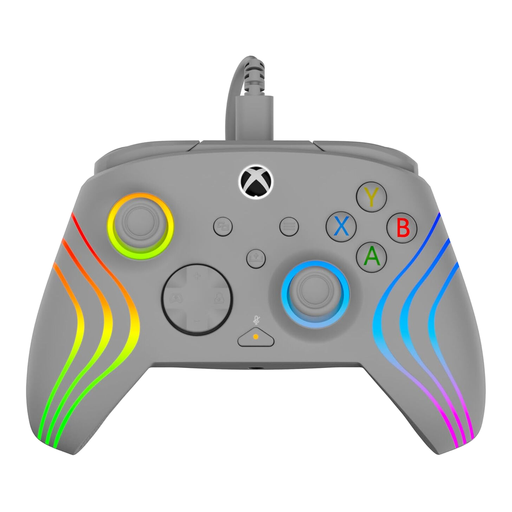
A wired Xbox choice if you prefer a cable at your student-room setup. Check that your device and game support it and that the cable arrangement suits where you sit.
 No image available
For an Xbox-led or Windows setup, Microsoft lists Bluetooth, Xbox Wireless, button mapping and a 3.5 mm headset jack for the Xbox Wireless Controller. Check PC gamepad support and which connection method you plan to use.
 No image available
Consider this wired model for Xbox Series X|S, Xbox One or Windows 10/11. Before choosing it for PC action RPGs, confirm support in the exact game and check that a wired connection reaches your usual seat.
 No image available
A PS5-led choice that can also be considered for supported PC, Mac and mobile use. Sony says haptic feedback on PC requires USB and game support; check the exact game and whether this listing includes the cable your setup needs.
No: check the exact game’s controller-support information before choosing a PC controller. Valve’s Steam Support notes that gamepad-only input styles work only with games that support gamepads, even if a controller connects to the computer.
Not every feature is available over Bluetooth. Sony says DualSense haptic feedback on PC requires a USB connection and support from the game; check the game’s feature information before making that your reason to buy.
Check whether the controller’s headset jack works with your intended device and connection. Microsoft lists a 3.5 mm jack for the Xbox Wireless Controller, while Sony says using the DualSense headset jack on PC or Mac requires a wired connection.
For a change of mind on a distance purchase, GOV.UK says customers normally have 14 days after receiving the item to tell the seller they want to cancel. A controller that is faulty or misdescribed raises a separate question about remedies, rather than relying on a change-of-mind request.
Take it through an appropriate electrical-waste collection route rather than putting it in household rubbish. GOV.UK advises separate handling for unwanted electrical products and batteries.