Laptop-first office listeners
If live albums usually play from your computer, a powered pair with a suitable digital input avoids a separate amplifier. Q Acoustics specifies USB computer input for the M20; KEF specifies USB-C for the LSX II LT.


Choose powered speakers if you want a two-speaker home-office system without a separate amplifier; check that the pair has an input for the laptop or other source you actually use. Choose passive bookshelf speakers if you have, or want to select, a compatible amplifier and can accommodate the cables and extra equipment. For live albums, leave room to position the speakers as a stereo pair rather than choosing by cabinet size alone.
If live albums usually play from your computer, a powered pair with a suitable digital input avoids a separate amplifier. Q Acoustics specifies USB computer input for the M20; KEF specifies USB-C for the LSX II LT.
If you want to stream music and also connect a laptop or TV, check the inputs and network requirements together. KEF lists streaming support, USB-C and HDMI ARC for the LSX II LT, but says its full feature set requires a home Wi-Fi network.
If you own an amplifier or want to choose one separately, passive speakers are a route to consider. Plan space for the amplifier and speaker cables as well as the pair itself; Q Acoustics lists cables and stands separately alongside its 3020c standmount speaker.
Start with how you play live albums, then check the space available for two speakers and the equipment needed to run them.
| Concern | What to check | Who this matters to |
|---|---|---|
| Computer connection and desk space | Match the speaker input to your computer output, and allow for cables, power and controls on the desk. | If I play albums from my work laptop, I want a direct connection without finding space for a separate amplifier. Around 27% of consumers would put that need first. |
| Streaming and other sources | Check the specific model’s inputs and streaming methods; for network features, check your home-office network too. | When I switch between streamed music and other devices, I need the connections to suit each source. Roughly 33% of consumers would make that flexibility their primary concern. |
| Stereo placement for live albums | Measure the desk or shelf for two separated speakers, and check whether a subwoofer output matters for future expansion. | I want room to place the left and right speakers apart when listening to concert recordings. About 20% of consumers would prioritise that setup need. |
| Separate-component planning | Confirm amplifier compatibility and account for speaker cable and any stands needed for the complete system. | If I already have an amplifier, or want to choose one, I can plan the speakers around it. Around 20% of consumers would put component flexibility first. |
A passive pair needs a compatible amplifier and speaker cable before it can play from a source. By contrast, Q Acoustics describes its powered M20 as having built-in amplification.
Check the complete equipment list and amplifier compatibility before comparing a passive pair with a powered one.
The amplifier and cables add equipment to accommodate; stands may also be needed for your chosen placement.
KEF warns that authentication or security on office, guest and public networks may prevent its LSX II LT from connecting.
If streaming is essential, check the network you will use before buying and consider whether a suitable wired input would meet your needs.
Two speakers need practical space for separate left and right placement. Stands or desk pads are optional accessories for some models, rather than something to assume is included.
Measure the desk or shelf and plan cable and power routes before settling on a speaker pair.
Old electrical speakers need an appropriate disposal route. GOV.UK sets out same-type electrical-waste take-back obligations for retailers to which its guidance applies.
Ask the seller about its take-back arrangements and check local electrical-waste recycling options before disposing of the old pair.
KEF’s LSX II LT is relevant if you want a compact active pair with laptop, TV and streaming options.
Q Acoustics offers two relevant approaches: the powered M20 for computer connection and the 3020c standmount for a separate-amplifier system.
ELAC describes its Debut 3.0 DB53 as a compact bookshelf speaker for music and other home uses.
These choices cover a compact desktop pair with computer input and two passive bookshelf pairs for listeners planning a separate-amplifier system. Check the M60’s desktop form factor against your available space if you specifically want bookshelf speakers.
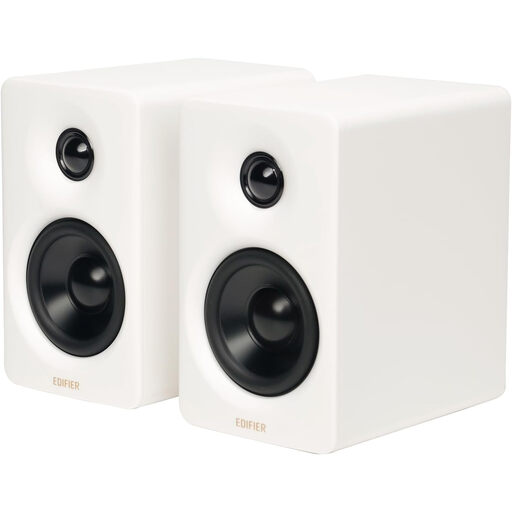 No image available
Consider this compact desktop model if you want USB-C or AUX input near your computer; check its power and operating requirements and whether the pair fits your intended stereo placement.
The product title specifies Bluetooth 5.3, 66W RMS, 3-inch mid-bass drivers and 1-inch tweeters.
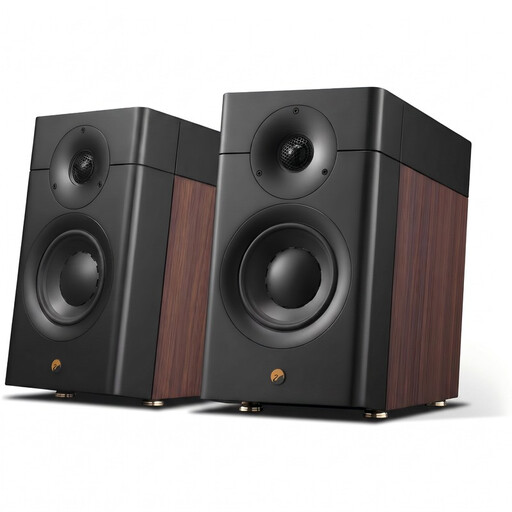 No image available
Consider this pair if you are building a system around a separate amplifier. Check amplifier compatibility and cabinet dimensions before deciding where it will go in the office.
The product title lists a 2-way design, 6.5-inch mid-bass driver, 28mm tweeter, 8-ohm impedance and 10–120W power range.
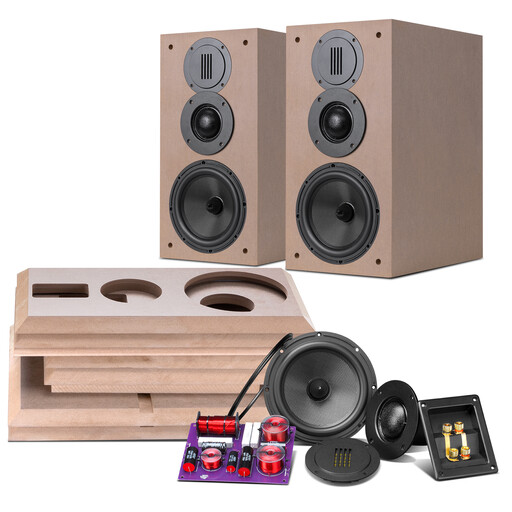 No image available
Consider this passive pair if you have, or plan to choose, a separate amplifier for music playback. Confirm amplifier compatibility and the space needed for each speaker before ordering.
The product title identifies a pair of 6.5-inch bookshelf speakers.
Choose powered speakers if you want amplification within the speaker system; choose passive speakers if you have, or want to select, a compatible separate amplifier. Q Acoustics specifies built-in amplification and USB computer input for its M20, while its 3020c standmount calls for more complete-system planning.
Only if that model has suitable connections for both devices. KEF specifies USB-C for a computer and HDMI ARC for a TV on the LSX II LT; Q Acoustics specifies USB computer input on the M20. Check the exact inputs on any other pair before buying.
Do not assume they will. KEF says its LSX II LT needs a home Wi-Fi network for its full feature set and warns that security or authentication on office and guest networks may prevent connection.
Check for a subwoofer output on the exact speaker model, then consider where the additional unit could be placed and powered. KEF lists an output on the LSX II LT, and Q Acoustics lists one on the M20.
Ask the seller about applicable take-back arrangements or use an appropriate electrical-waste recycling route. GOV.UK says retailers covered by its electrical-waste take-back rules must offer to take back waste equipment of the same type as an item bought from them, including online purchases.