Start with the console or PC you use and the actions you need to perform, then choose controls and placement that suit those requirements. The Xbox Adaptive Controller supports external-input setups for Xbox and specified Windows use; PlayStation Access is a PS5-only route, while Pretorian’s Flex Controller requires a docked Nintendo Switch for Switch play. Check each accessory and intended game separately: a supported platform does not guarantee that every input or game will work for you.
Who these setups suit
Xbox or Windows players building a multi-input setup
If holding a conventional controller is unsuitable, separate switches, buttons, joysticks and mounts may allow controls to be positioned around the player. Microsoft Xbox describes the Xbox Adaptive Controller as a hub for supported Xbox and Windows setups, with external-input ports, remapping and mounting provision.
PS5 players who need flexible placement
PlayStation’s Access controller can be placed on a surface or used with a compatible mount, with expansion ports for selected 3.5 mm inputs. It is a PS5-only controller, so placement and switch options should be assessed within that platform boundary.
Switch or specialist-input players
Pretorian Technologies offers a Flex Controller route for docked Nintendo Switch play and stated Windows use, alongside selected specialist joystick, eye-gaze and scanning configurations. The exact console mode, hardware and software matter; these are not interchangeable input options.
What matters when choosing
Choose the platform route before planning individual inputs. If a joystick, eye-gaze device or scanning control is central to the setup, check its specific hardware and software requirements as well as the controller it connects through.
Xbox Adaptive Controller
Consider it when: You play on a supported Xbox or Windows platform and need controller functions spread across separate external inputs.
Allow for: Switches, joysticks and mounts are separate components; Microsoft Xbox Support says Windows configuration in the Xbox Accessories app requires USB or an Xbox Wireless Adapter rather than Bluetooth.
PlayStation Access controller
Consider it when: PS5 is your platform and you need configurable controls, compatible 3.5 mm inputs or a different controller position.
Allow for: PlayStation limits Access to PS5, and its USB port does not support third-party USB accessories.
Pretorian Flex Controller
Consider it when: You need a switch-and-joystick route for a docked Nintendo Switch, or its stated Windows 10 configuration fits your PC.
Allow for: Pretorian Technologies excludes Switch Lite and handheld Switch play, and specifies requirements for compatible joysticks.
| Concern |
What to check |
Who this matters to |
| Platform compatibility |
Confirm the exact console or operating system and play mode. For Switch, distinguish docked play from handheld play. |
I need the controller to work with the console and mode I actually use, or the rest of the setup cannot help; roughly 33% of consumers put platform fit first. |
| Inputs and actions |
List essential game actions, then check the required switch or joystick connections and whether the controls can be mapped as needed. |
If I cannot reliably reach or activate every essential action, a configurable hub alone is not enough; around 27% of consumers prioritise their input layout. |
| Position and reach |
Check where each control will sit and whether the controller and mount have matching fittings. |
Controls need to stay within my usable reach rather than shift during play; roughly 20% of consumers place positioning first. |
| Setup and game controls |
Review the intended game’s actions and accessibility settings, plus any app, connection or profile requirements. |
I need a layout I can configure and use across the games I plan to play; around 20% of consumers primarily focus on setup and game workflow. |
Common buying mistakes
-
Assuming an adaptive hub includes every input
A usable layout may also need separate switches, a joystick, placement materials or a mount.
Write down the complete set of controls and fittings needed for your chosen game before selecting a hub.
Logitech G’s Adaptive Gaming Kit is an expansion kit; the Xbox Adaptive Controller is a separate component.
-
Matching accessories by connector shape alone
PlayStation says not all accessories work with Access, and its USB port does not support third-party USB accessories.
Check instructions for the exact accessory, controller and port before adding it to the setup.
-
Choosing controls before checking console mode
PlayStation Access is PS5-only. Pretorian’s Flex Controller works with a docked Switch, not Switch Lite or handheld Switch play.
Confirm your platform and the way you use it before comparing buttons, joysticks and mounts.
-
Assuming connection completes the setup
Games can demand different numbers and types of actions. AbleGamers notes that games requiring more buttons may need more complex setups.
Plan a small layout around one intended game, check that its essential actions are usable and save a suitable profile where the controller permits it.
Relevant brands to consider
Microsoft Xbox
The Xbox Adaptive Controller is a hub for supported Xbox and Windows setups that use separate inputs; the Xbox Adaptive Joystick has its own connection and PC requirements.
- Microsoft Xbox specifies 19 external 3.5 mm input ports, two USB 2.0 ports, remapping, profiles and mounting provision on the Xbox Adaptive Controller.
- Microsoft Xbox Support specifies wired-only use for the Adaptive Joystick and Windows 11 x64 for its stated PC use. Check each third-party input separately.
PlayStation
The Access controller offers configurable PS5 controls, compatible 3.5 mm expansion inputs and surface or mount placement.
- PlayStation specifies four 3.5 mm expansion ports and supports configurable controls and multiple profiles.
- Access is PS5-only; its USB port does not support third-party USB accessories, and PlayStation cautions that not all accessories work.
Logitech G
The Adaptive Gaming Kit adds a packaged selection of buttons and triggers to an Xbox Adaptive Controller setup.
- Logitech G lists 12 buttons and triggers in the kit, including light-touch buttons and variable triggers.
- The kit is an expansion for the Xbox Adaptive Controller, not a replacement for the hub.
Pretorian Technologies
Pretorian offers specified Switch and Windows Flex Controller configurations, plus selected switches, joysticks and specialist-input routes.
- Pretorian describes Flex Controller use with a docked Nintendo Switch and Windows 10, and lists selected Smoothie switches for use with the Xbox Adaptive Controller.
- Flex Controller cannot be used with Switch Lite or handheld Switch play; compatibility claims for other Pretorian devices depend on the particular configuration.
Joybuy choices for PS5 adaptive play
This PS5 controller choice is relevant if you need configurable controls, compatible external switches or flexible placement. Match the planned accessories and game actions to the setup before buying.
 No image available
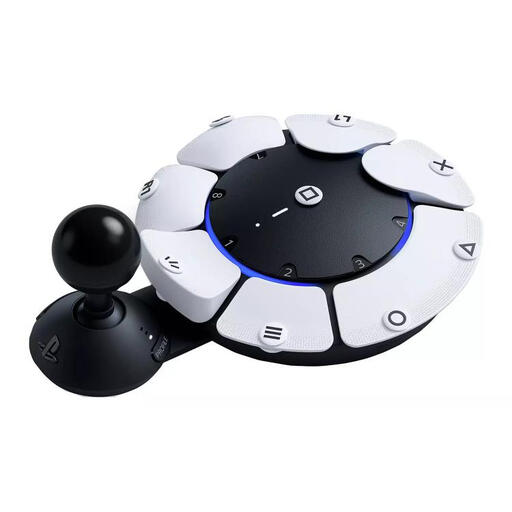
PlayStation Access Controller Kit for PS5
For PS5 players considering a configurable controller with flexible placement and compatible external switch inputs.
The Access controller has four 3.5 mm expansion ports; PlayStation also specifies configurable controls and tripod or AMPS-pattern mounting.
It is PS5-only. Confirm each accessory and the intended game’s required actions; its USB port does not support third-party USB accessories.
View on Joybuy
Questions about adaptive gaming setups
Can I use the PlayStation Access controller on PC, Xbox or Switch?
No: PlayStation states that the Access controller is compatible only with PS5 consoles. Choose a controller route documented for your actual platform rather than relying on the shape of its connections.
Will any USB switch work with the PlayStation Access controller?
No. PlayStation says the Access controller’s USB port does not support third-party USB accessories. Its four 3.5 mm expansion ports accept compatible external devices, but you still need to check the particular accessory.
Can I use the Flex Controller with Switch Lite or handheld Switch play?
No. Pretorian Technologies specifies docked Nintendo Switch use for the Flex Controller and excludes Switch Lite and handheld mode.
Does platform support mean an adaptive controller will suit every game?
No. A controller may work with the platform while a particular game’s actions or menus remain difficult to operate with your planned layout. Review the game’s controls and accessibility settings, then try the essential actions with the intended inputs where possible.


