
24/7 Customer Support

Free returns

Same-day & Next-day Delivery

Quality Guaranteed

Unlock Your Welcome Offers: FREE Delivery | Up to 80% OFF | Free 30-day JoyPlus trial
Download the APP
Driving a car you love shouldn't mean you're stuck with outdated technology. If your vehicle runs perfectly but lacks a modern infotainment system, you've likely felt the frustration of balancing your phone for navigation or fumbling with cables. The good news is you don't need an expensive, permanent stereo replacement to modernise your driving experience.
A portable CarPlay screen is a simple, cost-effective solution that brings features like large-screen navigation, hands-free calling and music streaming to any vehicle. These plug and play CarPlay devices mount to your dashboard or windscreen and are ready to use in minutes. This guide will walk you through what to look for and highlight some of our top recommendations to help you make an informed choice.
Finding the right device can feel overwhelming with so many options available. Here are a few key factors to consider to ensure you get a unit that fits your needs.
The primary benefit of these devices is a large, clear display. Look for screens that are at least 9 inches with a high-definition (HD) resolution for crisp, easy-to-read maps and menus. Also, consider connectivity. While most units offer a wired connection, a wireless CarPlay screen provides the most seamless experience, automatically connecting to your phone when you start the car. Models with dual-band Wi-Fi (2.4GHz/5GHz) often provide a more stable and faster connection for streaming and navigation.
Getting audio from the portable screen to your car's speakers is a crucial consideration. Most units offer multiple methods:
Check what your car supports and choose a device that offers a compatible, high-quality audio solution.
Many modern units are more than just a screen. If you want an all-in-one solution, look for a model that includes a carplay dash cam. These can record your journey for security and peace of mind. Some even come with a car screen with backup camera, which is a significant safety upgrade for any vehicle, especially larger lorries or SUVs. These integrated systems are a practical way to add CarPlay to an older car while also enhancing its safety features.
As your Joybuy Product Recommendation Officer, I've filtered through the options to find devices that offer a great balance of features, reliability and value.
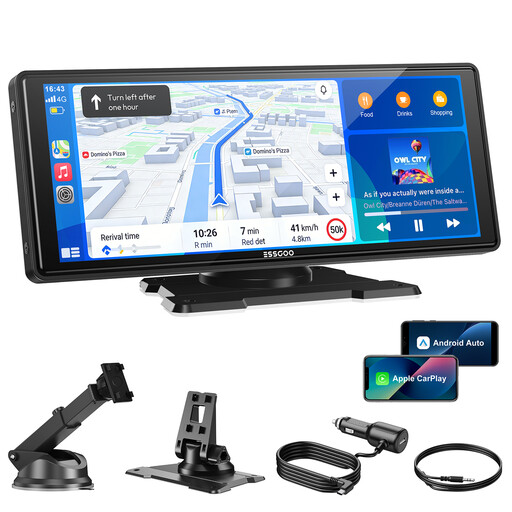
Why It Stands Out: This device is an excellent all-rounder, focusing on delivering a stable and responsive core experience. Its use of dual-band Wi-Fi and Bluetooth 5.3 ensures a robust wireless connection for both CarPlay and Android Auto, minimising dropouts. The large, bright screen is perfect for navigation.
Pros:
Who is it for? Drivers who prioritise a large, clear display and a rock-solid wireless connection for navigation and music. It's a fantastic foundational upgrade for anyone wanting to add a universal CarPlay screen to their car without unnecessary complexity.
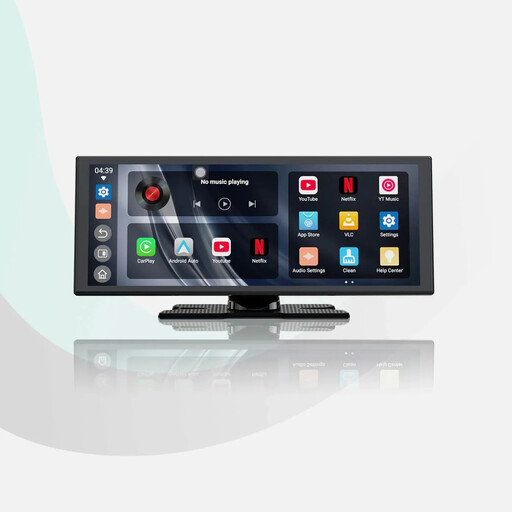
Why It Stands Out: The OTTOCAST ScreenFlow transforms your dashboard into an entertainment centre. Running on Android 13, it comes with pre-installed apps like YouTube and Netflix, accessible via a Wi-Fi or hotspot connection. It also includes a hardwired 1080P reversing camera, adding a significant safety feature.
Pros:
Who is it for? Those who spend a lot of time waiting in their car, such as professional drivers or parents and want in-car entertainment. It's also ideal for anyone looking for a portable Android Auto screen that comes bundled with a reversing camera.

Why It Stands Out: This is the ultimate 2-in-1 device for safety and convenience. It combines a full-featured wireless CarPlay display with a high-quality front 4K dash cam and a 1080P rear camera. It even includes a 64GB TF card, so it's ready to record straight out of the box.
Pros:
Who is it for? The safety-conscious driver who wants to combine a modern infotainment upgrade with the security of a high-resolution CarPlay dash cam. This all-in-one package eliminates the need for multiple devices cluttering the dashboard.
While these are our top recommendations, every driver and vehicle is different. If you're looking for a different screen size, feature set, or price point, there are many other excellent choices available.
? Explore our full range of CarPlay Display Screens to find the perfect fit for your car. [https://www.joybuy.co.uk/explore/carplay-display-screen/Em1YE64f]
1. How does a portable CarPlay screen get power? Most portable screens are designed for simplicity. They typically plug directly into your vehicle's 12V cigarette lighter socket using an included power adapter. This makes them a true plug and play CarPlay solution, requiring no wiring or complex installation.
2. Can I use a portable CarPlay screen in any car? Generally, yes. These devices are designed to be universal. As long as your car, lorry, or SUV has a 12V power outlet, you can use a portable screen. For audio, you will need either an FM radio, an AUX input, or a factory Bluetooth system to connect to your car's speakers.
3. How does the audio work on a portable CarPlay screen? You have several options. You can use the unit's built-in speaker for basic sound, but for music, it's better to connect to your car's stereo. This can be done by tuning your car radio to an FM frequency broadcast by the screen, connecting an AUX cable from the screen to your car's AUX port (recommended for best quality), or pairing via Bluetooth if both the screen and your car support it.