
24/7 Customer Support

Free returns

Same-day & Next-day Delivery

Quality Guaranteed

Unlock Your Welcome Offers: FREE Delivery | Up to 80% OFF | Free 30-day JoyPlus trial
Download the APP
Working or studying from home has become a long-term reality for many in the UK. While the flexibility is welcome, the physical toll of hunching over a laptop on a kitchen table or a makeshift desk is not. That persistent neck ache and cluttered workspace are common complaints. An adjustable laptop stand seems like a simple solution, but the market is flooded with options that often fail to deliver on their promises.
As a Joybuy Product Recommendation Officer, my role is to help you navigate these choices and find a product that genuinely improves your workspace. Before you buy, it is crucial to be aware of the common issues that lead to disappointment and wasted money.
Many laptop stands look good online but fail in practice. Here are three frequent problems to watch out for:
To ensure you get a product that lasts and performs well, focus on a few core specifications. These are the non-negotiable features that separate a worthwhile investment from a flimsy gadget.
The material dictates the stand's sturdiness and longevity. While plastic is cheap, it often lacks rigidity. Aluminium construction offers an excellent balance of strength and low weight, providing a solid base without being too heavy. Look for designs that incorporate non-slip silicone pads on the surface where the laptop rests and on the feet of the stand. These are critical for preventing your device from sliding and protecting your desk from scratches.
A proper ergonomic laptop stand should allow you to raise your laptop screen to be level with your eyes. This position helps maintain a neutral spine and reduces strain on your neck and shoulders. The best mechanisms allow for smooth, continuous adjustment of both height and angle, rather than locking into a few fixed positions. This ensures you can create a comfortable WFH setup tailored specifically to your height and chair-desk combination.
If you move between locations or have limited desk space, a foldable computer stand is a practical choice. Consider how compact the stand becomes when folded. A good portable design should fold down flat enough to slip into a backpack alongside your laptop. An open, minimalist frame also helps to improve airflow around your device and contributes to a cleaner, more organised desk, making it one of the most useful student desk accessories or home office essentials UK residents can own.
Based on these practical criteria, we have matched a few options to specific user needs.
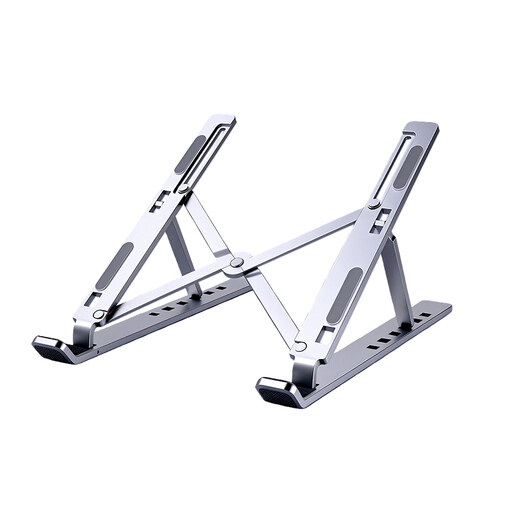
Why This Fits Their Persona: This user splits their time between the office and home. They need a stand that is lightweight, easy to pack and has a professional, clean aesthetic that fits in any environment.
Its sturdy aluminium build provides a wobble-free base, and its fully foldable design makes it genuinely portable, unlike bulkier models.
Lightweight and includes a carrying bag for excellent portability. The dual X-frame offers stable, continuous height adjustment.
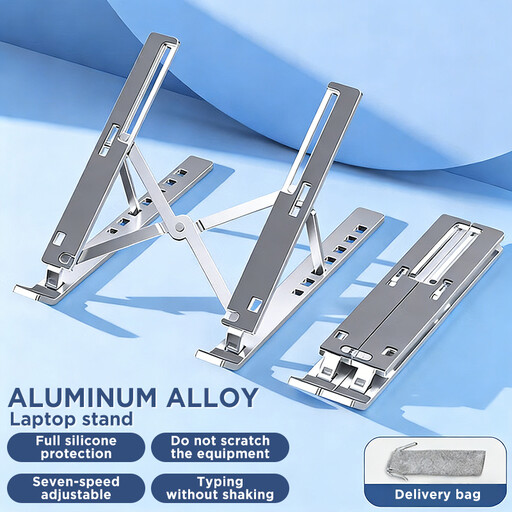
Why This Fits Their Persona: Working from a small desk in halls or a shared house, this user needs a functional, affordable solution that can be easily stored away to free up space for studying or other activities.
It avoids the "limited adjustment" trap by offering multiple height settings, providing a good ergonomic range for its price point. The aluminium build is a significant step up from flimsy plastic alternatives.
Folds down very compactly, making it ideal for small desks and easy storage. Offers great value by providing core ergonomic benefits.
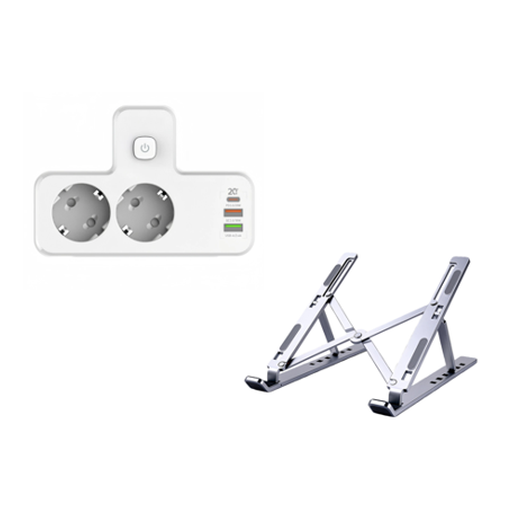
Why This Fits Their Persona: This user has a dedicated home office and prioritises efficiency and organisation. They want a complete solution that tackles both posture and the inevitable cable clutter from multiple devices.
This bundle addresses a hidden issue: a good stand clears desk space, but charging cables create new clutter. It provides a stable, ergonomic stand and a compact charging hub in one go.
An all-in-one solution for an organised and ergonomic desk. The power strip includes a PD20W USB-C port for fast charging.
We have compiled a complete, real-time list of products that fully satisfy these strict selection criteria and UK safety regulations.
The goal is to position the top of your screen at or just below eye level. Your arms should be relaxed, with your elbows bent at roughly a 90-degree angle when typing on an external keyboard. You should not have to tilt your head up or down to see the screen. Using an external keyboard and mouse is highly recommended for the most comfortable setup.
A well-designed aluminium laptop stand should not cause any damage. Look for models that feature soft silicone pads on all points of contact. These pads serve two purposes: they grip your laptop to prevent it from sliding and they create a protective barrier between the metal stand and your desk surface.
Durability largely depends on the quality of the materials and the hinge mechanism. Stands made from a single piece of bent metal are inherently strong. For those with hinges, look for sturdy metal joints rather than plastic ones. A quality foldable computer stand made from aluminium is designed for daily use and travel and should remain stable for years.