Start with the adventure games you want to play: choose Nintendo Switch 2 for titles available in its ecosystem, Steam Deck OLED for Steam games that work on the device, or a Windows/Xbox handheld for qualifying PC and Xbox Play Anywhere games. For train journeys, check each title’s offline requirements and plan around the device’s battery range rather than its maximum stated runtime.
Who is this for?
Adventure-game library holders
If you already own games on Nintendo, Steam, Xbox or another PC storefront, check the exact titles and editions you want to play before comparing handheld specifications. Owning a game on one platform does not establish access on another.
Offline train travellers
If you expect unreliable Wi-Fi, prepare locally installed games before departure and test them without a connection. Steam Support notes that games requiring an active connection or external launcher will not work in Steam Offline Mode; Xbox says offline access can also depend on the title and storefront.
Carry-light commuters
If the handheld will travel with you regularly, compare its listed weight alongside the case and charging equipment you expect to carry. Check battery estimates against your journey length rather than assuming a larger battery capacity guarantees longer play.
What matters when choosing?
Choose a platform for your must-play games first, then check whether those games will work offline for long enough to cover your journey. Nintendo, Valve and Xbox describe different game-access and compatibility conditions for their handheld routes.
Nintendo Switch 2
Choose it when: Your preferred adventure games are available for the Nintendo platform and you want a dedicated console.
Allow for: Nintendo rates battery duration at approximately 2–6.5 hours depending on software and functions; game-storage expansion requires microSD Express.
Steam Deck OLED
Choose it when: Your adventure games are on Steam and their Steam Deck compatibility meets your needs.
Allow for: Valve says some titles need configuration or do not work with SteamOS, and games requiring an active connection will not work in Steam Offline Mode.
Windows/Xbox handheld
Choose it when: You want qualifying Windows PC games or Xbox Play Anywhere titles installed locally.
Allow for: Xbox says some console titles instead require cloud gaming or Remote Play; offline access depends on the game and storefront.
| Concern |
What to check |
Who this matters to |
| Game-library compatibility |
Check each must-play game and edition on the intended platform, including device-specific compatibility and whether it runs locally. |
I want to play adventure games I already own or have chosen without discovering that I need a different version. Around 33% of consumers put access to their chosen games first. |
| Offline play and battery |
Install and test games without Wi-Fi; compare the stated battery range with your journey and check charging compatibility. |
When the connection drops, I need my game to launch and the handheld to last for the journey. Roughly 42% of consumers prioritise offline readiness and journey-length power. |
| Carrying and screen use |
Compare the device’s weight with what you will carry, and check whether game text is legible on its display. |
If I take the handheld on repeated trips, I need to carry it comfortably and read the game’s text without difficulty. About 25% of consumers make carrying comfort and screen usability their primary concern. |
Mistakes to avoid
-
Assuming a downloaded game is ready to play offline
Updates, an external launcher or a connection requirement can prevent a locally installed game from starting during a journey. Steam Support says titles requiring an active connection or external launcher will not work in Steam Offline Mode.
Update and launch each game before leaving, prepare any available offline mode, then test the game with Wi-Fi disabled.
-
Choosing Steam Deck from a Steam listing alone
A Steam listing does not establish how a title runs on Steam Deck. Valve says some games need additional configuration and others are incompatible with SteamOS.
Check the current Steam Deck compatibility information for every game you consider essential, including launcher and online requirements.
-
Planning around the maximum stated battery life
Nintendo says Switch 2 battery duration depends on software and functions; Valve describes Steam Deck OLED gameplay duration as content-dependent. Neither maximum is a guaranteed journey length.
Test the games you expect to play and check the handheld’s charging requirements before choosing travel accessories.
For longer journeys, you may need to carry a compatible charger or power bank.
-
Assuming an existing storage card will work
Nintendo specifies microSD Express for Switch 2 game-storage expansion, so an ordinary microSD card cannot serve that purpose.
Check the exact handheld’s card standard and storage requirements before relying on a card you already own.
Expanding Switch 2 game storage may require a different card.
Relevant brands for reference
Nintendo
Nintendo Switch 2 is a dedicated-console option when the adventure games you want are available on its platform.
- Nintendo lists a 7.9-inch 1080p display and 256 GB of internal storage for Switch 2.
- Nintendo rates battery duration at approximately 2–6.5 hours depending on software and functions; expanding game storage requires microSD Express.
Valve
Steam Deck OLED is a portable PC-gaming option for adventure games in a Steam library, subject to each title’s compatibility.
- Valve lists a 7.4-inch 90 Hz HDR OLED display, a 50 Wh battery and a content-dependent gameplay range of 3–12 hours for OLED models.
- Valve says some Steam titles require extra configuration and some are incompatible with SteamOS.
ASUS ROG
The ROG Xbox Ally family offers a Windows handheld route for qualifying PC and Xbox Play Anywhere games.
- Xbox says qualifying PC and Xbox Play Anywhere titles can be installed and played locally on these Windows handhelds.
- Xbox says some other console titles require cloud gaming or Remote Play; check each game’s access and offline conditions before travel.
Joybuy handheld choices
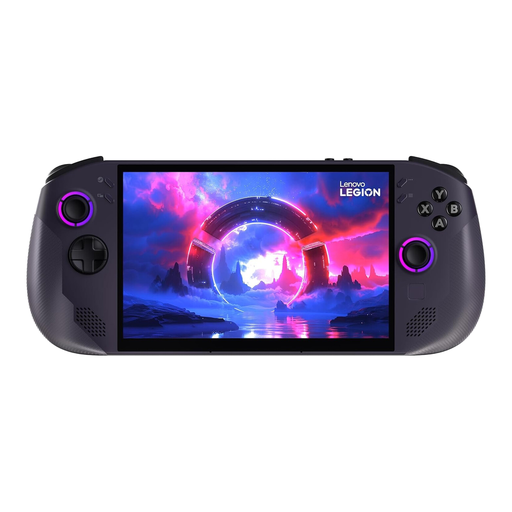
This Lenovo handheld is a choice to consider if your adventure games are on Steam. Check your particular titles and their offline requirements before relying on it for a train journey.
 No image available
Lenovo Legion Go S – AMD Ryzen Z2 Go, 1TB
For adventure games in your Steam library, check each title’s compatibility with this handheld and test its offline launch requirements before travelling.
AMD Ryzen Z2 Go and 1TB configuration.
View on Joybuy
Common questions
Can I rely on train Wi-Fi for an adventure game?
Prepare games to work without train Wi-Fi wherever the title allows it. Download updates and test each game with Wi-Fi disabled before leaving; Steam Support says games requiring an active connection or external launcher will not work in Steam Offline Mode.
How can I tell whether a Steam game will work on Steam Deck?
Check that title’s current Steam Deck compatibility information. Valve says some Steam games need additional configuration and others are incompatible with SteamOS; also check whether your game needs a launcher or an online connection.
Will my existing microSD card expand Nintendo Switch 2 game storage?
Only if it meets the microSD Express requirement for game-storage expansion. Check the card type before planning to use it for Switch 2 games; an ordinary microSD card cannot expand game storage.


