
24/7 Customer Support

Free returns

Same-day & Next-day Delivery

Quality Guaranteed

Unlock Your Welcome Offers: FREE Delivery | Up to 80% OFF | Free 30-day JoyPlus trial
Download the APP
Navigating the world of tablets can feel like a choice between paying a premium for a big-name brand or settling for a device that might not meet your needs. Many of us in the UK are looking for that sweet spot: a feature-rich tablet that handles daily tasks, entertainment and even creative work, without the hefty price tag.
As a Joybuy Product Recommendation Officer, my role is to help you find value. This guide cuts through the marketing clutter to focus on what truly matters. We will explore what to look for in an affordable Android tablet and highlight a few standout options that deliver performance and versatility for budget-conscious users.
Before diving into specific models, let's cover a few key features to consider. Keeping these in mind will help you select a device that's right for your specific use case, whether it's for studying, streaming or sketching.
The display is your window into the digital world, so its size and clarity are paramount. A standard 10.1-inch screen is a great all-rounder for browsing and watching videos. However, if your primary use is media consumption or you need more space for multitasking, a large screen tablet of 12 inches or more can be a game-changer. Pay attention to the resolution; a 1280x800 (HD) display is fine for casual use, but a 1920x1200 (Full HD) or 2K screen will offer a noticeably sharper and more immersive experience for films and creative work.
A tablet's performance is determined by its processor and RAM. For everyday tasks like browsing, social media and streaming, a quad-core or octa-core processor with 4GB to 6GB of RAM is sufficient. If you're a tablet for students who needs to juggle multiple apps or a drawing tablet for beginners running creative software, look for models with more powerful processors (like the MediaTek Helio series) and higher RAM, often boosted by virtual RAM expansion. Storage is also crucial; 64GB is a decent starting point, but 128GB or 256GB provides more breathing room for apps, photos and offline media.
The true value of a budget tablet can often be found in the box. An Android tablet with keyboard and a stylus included can save you a significant amount of money and transform your device into a productivity or creative powerhouse right away. Also, consider your connectivity needs. While Wi-Fi is standard, some models offer 4G LTE support, giving you internet access on the go, which is ideal for commuters and travellers.
Based on a balance of features, performance and value, here are our recommendations for affordable Android tablets available in the UK.
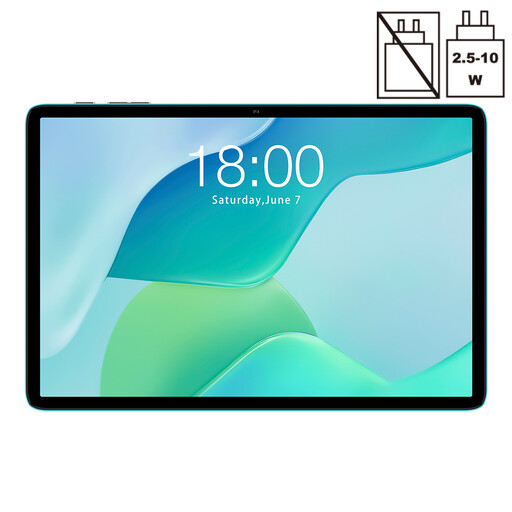
Why It Stands Out: The TECLAST P33 is an excellent entry point into the world of Android tablets. It covers all the essentials for daily use with modern software and reliable hardware, making it a practical choice for anyone needing a straightforward and dependable device.
Pros:
Who is it for? This is a great first tablet for younger users, a secondary device for the kitchen or for anyone who needs a simple, cheap tablet for media consumption and web browsing without unnecessary frills.

Why It Stands Out: The ArtPad Pro is a complete package designed for creativity and productivity. It pairs a high-resolution display with a powerful processor and includes all the necessary accessories, offering exceptional value for aspiring artists and busy students.
Pros:
Who is it for? This is an ideal drawing tablet for beginners and digital artists on a budget. It's also a fantastic option for students who need a device for note-taking, research and writing essays.
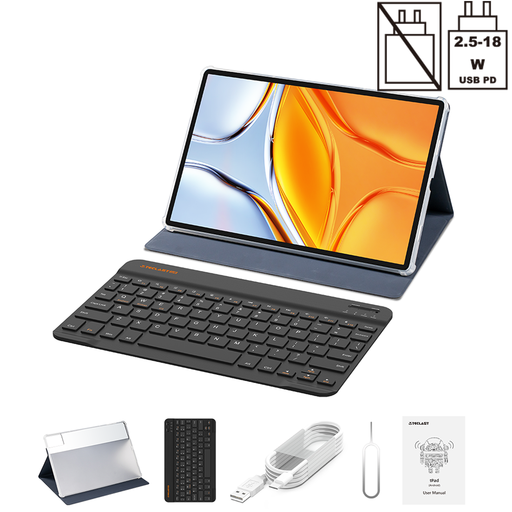
Why It Stands Out: With its massive 14-inch screen, the TECLAST T70 is built for immersive entertainment and serious productivity. It functions almost like a portable monitor, offering an expansive view for films, spreadsheets and split-screen multitasking.
Pros:
Who is it for? This large screen tablet is for the ultimate media enthusiast or the remote worker who needs a portable, large-format display for documents and video calls.
If these recommendations aren't quite what you're looking for or if you're interested in spreading the cost, there are many other models to consider. To see a wider selection, you can explore our full range of tablets, including options with monthly payments.
Absolutely. Many affordable tablets now offer powerful processors, sufficient RAM for multitasking and the option to add a keyboard. A tablet for students like the TECLAST ArtPad Pro can be a lightweight and versatile alternative to a traditional laptop for taking notes, attending online lectures and writing assignments.
Yes, you can. The key is to look for a model that supports an active stylus with pressure sensitivity. A drawing tablet for beginners doesn't need to cost a fortune. The TECLAST ArtPad Pro, for instance, includes a stylus with 4096 levels of pressure sensitivity and a large, high-resolution screen, making it a capable starting point for digital art.
For a great media experience, prioritise screen quality and battery life. Look for a display with at least an HD (1280x800) resolution, though Full HD (1920x1200) or higher is better. Also, check for Widevine L1 certification, which is required to stream content from services like Netflix and Prime Video in high definition. All the TECLAST models recommended above support this, making them excellent choices for a cheap tablet for media consumption.