
24/7 Customer Support

Free returns

Same-day & Next-day Delivery

Quality Guaranteed

Unlock Your Welcome Offers: FREE Delivery | Up to 80% OFF | Free 30-day JoyPlus trial
Download the APP
Juggling stacks of paper notebooks, deciphering hastily scribbled notes and trying to recall key points from last week's meeting can be a constant drag on productivity. For professionals, academics and students, the challenge is to capture information accurately without getting lost in a sea of disorganised pages. An AI note taking tablet offers a focused, digital solution to streamline this process.
This guide is designed to help you understand what to look for in these specialised devices. We will explore the key features that matter for productivity and highlight a few recommended options, from advanced digital notebooks to reliable paper classics, to help you find the right tool for your workflow.
Selecting the right device goes beyond just screen size. To find a tool that genuinely enhances your productivity, consider these key aspects.
Unlike the backlit LCD screens on standard tablets, many dedicated note-taking devices use E-Ink technology. An e-ink writing tablet provides a matte, paper-like surface that is comfortable to view for extended periods, even in bright light. This reduces eye strain during long reading or writing sessions and offers significantly longer battery life, as power is primarily consumed only when the page changes. It creates a distraction-free environment, perfect for deep focus.
The "smart" in a smart notebook comes from its software. Look for features like handwriting-to-text conversion, which makes your notes searchable and easy to edit. For those in meetings or lectures, a voice to text tablet is invaluable. Assess the device's transcription accuracy and the number of languages it supports. Advanced AI functions may also include automatic summarisation and keyword tagging, which can turn a simple transcript into an organised, actionable document.
A digital notebook for work should be as portable as its paper counterpart. Pay attention to the device's thickness and weight. A slim, lightweight design is easier to carry between meetings, classes or on your commute. Also, consider the build quality and the feel of the stylus. A responsive, low-latency pen on a textured screen can replicate the satisfying friction of writing on paper.
Here are our recommendations, selected to meet the needs of different users, from those seeking advanced digital integration to those who prefer the timeless simplicity of paper.

Why It Stands Out: The iFLYTEK AINOTE 2 is a highly specialised meeting transcription device and digital notebook built for serious productivity. Its core strength lies in its AI-powered features, which are integrated directly into the note-taking experience. According to iFLYTEK, its AI can assist with summarising text, organising ideas and streamlining study workflows. The device’s standout feature is its real-time transcription, making it a powerful tool for capturing spoken content accurately.
Pros:
Who is it for? This is ideal for professionals, researchers and students who frequently attend meetings or lectures and need a reliable way to digitise and organise both handwritten and spoken information. Its multilingual transcription makes it particularly useful for those working in international environments.
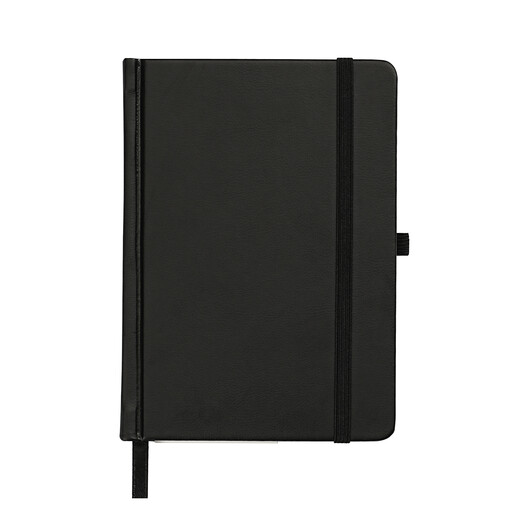
Why It Stands Out: For those who appreciate the tactile feel of pen on paper, the Jubiluu A5 notebook offers a classic and elegant solution. Its durable fabric hardcover and high-quality paper provide a premium writing experience without the need for batteries or software updates. It is a straightforward, reliable tool for journaling, daily planning and capturing ideas.
Pros:
Who is it for? Perfect for writers, journal keepers and professionals who prefer the traditional note-taking experience. It is an excellent choice for anyone seeking a stylish and dependable paper notebook for daily use in the office or at home.

Why It Stands Out: This MINISO notebook combines practicality with a touch of fun. It is an affordable and functional option for everyday tasks, from jotting down shopping lists to taking notes in class. The wirebound design allows it to lay flat, making it easy to write on any surface.
Pros:
Who is it for? Students, young professionals and Disney fans looking for a lighthearted and practical notebook for school, home or office use. It is ideal for casual note-taking, list-making and daily planning.
If these specific models aren't quite what you're looking for, or if you'd like to browse a wider selection of writing tools, there are many other choices available.
Explore our full collection of Office Stationery or Personal Item to find the perfect fit for your needs.
The primary advantages are reduced eye strain and a distraction-free environment. E-Ink screens are not backlit, so they look and feel more like paper, making them comfortable for long reading and writing sessions. They also typically have much longer battery life and are designed specifically for note-taking, removing the temptation of apps and notifications found on conventional tablets.
Not entirely. An AI note taking tablet is a specialised tool designed to replace your paper notebooks and enhance tasks like meeting transcription and idea organisation. While some models run on operating systems like Android and can support various apps, they are not built for heavy multitasking, complex software or the processing power required of a laptop. They are best seen as a companion device that excels at its specific purpose.
The accuracy of a meeting transcription device depends on several factors, including the quality of the microphones, background noise, speaker accents and the sophistication of the AI software. Devices with multi-microphone arrays, like the iFLYTEK AINOTE 2, are designed to capture clearer audio. For best results, a stable internet connection is often required for the AI processing and it is always a good practice to review and edit the generated text for critical applications.