
24/7 Customer Support

Free returns

Same-day & Next-day Delivery

Quality Guaranteed

Unlock Your Welcome Offers: FREE Delivery | Up to 80% OFF | Free 30-day JoyPlus trial
Download the APP
As a Joybuy Product Recommendation Officer, my role is to help you navigate the crowded market of productivity tools. This guide is designed to offer clear, practical advice on choosing a device that genuinely enhances how you work and study, cutting through the marketing clutter.
In an age of constant information, managing notes, meeting minutes and creative ideas can feel overwhelming. Scraps of paper get lost, digital files become disorganised, and crucial details from a lecture or client call can be forgotten. The rise of the AI note taking tablet offers a streamlined solution, merging the tactile satisfaction of writing with powerful digital intelligence. If you're a professional, academic or student in the UK looking to upgrade your workflow, this guide will help you understand what to look for.
Selecting the right device goes beyond screen size. To find a tool that truly integrates into your daily life, consider these key factors.
The "AI" in an AI note taking tablet is its most significant feature. A powerful device should function as more than just a digital notepad. Look for features like AI-powered summarisation, which can condense long meeting notes into key takeaways. For those in multilingual environments, a voice to text tablet with multi-language support is invaluable. A high-quality transcription device for meetings can save hours of manual work by accurately converting spoken words into editable text, often requiring an internet connection for real-time processing. Some advanced models even integrate features similar to a tablet with ChatGPT, allowing you to interact with your notes to expand on ideas or reformat text.
The core of any digital notebook with pen is how it feels to write on it. Many users prefer an E-Ink tablet because its screen mimics the appearance of paper, reducing the glare and blue light associated with traditional LCD screens. This creates a more comfortable, paper-like writing tablet experience, which is ideal for long sessions of reading or note-taking. Pay attention to the screen's resolution, measured in PPI (Pixels Per Inch), and the latency of the stylus. A high PPI (300PPI is a good benchmark) ensures crisp text, while low latency provides a responsive, natural pen-on-paper feel.
A truly smart notebook should not exist in a vacuum. It needs to connect with the other tools you use daily. Check for compatibility with services like Google Calendar, which allows your handwritten to-do lists and scheduled events to sync across all your devices. The ability to access and edit your notes on a companion mobile or desktop app is also crucial for a fluid workflow. This turns your device from a simple writing tablet for adults into a central hub for your productivity, making it an effective electronic notebook for work.
Based on features, user-centric design and overall utility, here are our recommendations for professionals and students seeking to enhance their productivity.

Why It Stands Out: The iFLYTEK AINOTE 2 is a purpose-built device designed for serious note-takers. Its standout feature is the powerful AI engine combined with a high-quality E-Ink tablet display. It supports real-time transcription in 16 languages, making it an exceptional tool for international business meetings and academic lectures. The AI can summarise, organise and even help you study your notes. At just 4.2mm thick and weighing 295g, it is remarkably portable without compromising on its robust feature set.
Pros:
Who is it for? This is for the professional, researcher or student who deals with a high volume of information and needs a dedicated tool to capture, transcribe and organise it efficiently. It is particularly suited for those who frequently attend meetings or lectures and want to focus on the conversation, not just on typing.
A great device is often complemented by the right accessories or, in some cases, a simpler alternative.
iFLYTEK AINOTE 2 Protective Folio Case
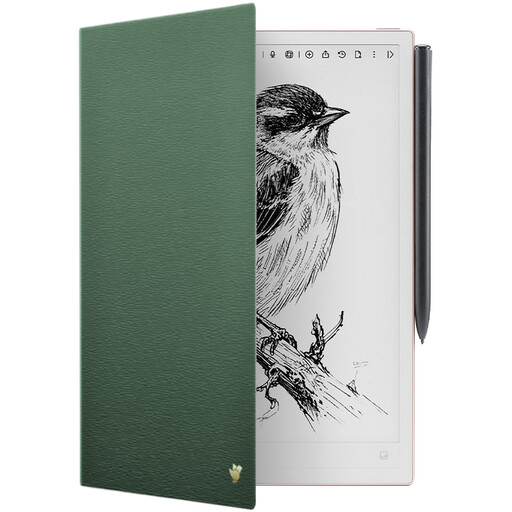
To protect a slim device like the AINOTE 2, a dedicated case is a practical necessity. This folio case attaches magnetically and features an auto wake/sleep function to conserve battery. Its PU leather exterior provides durable, water-resistant protection while remaining slim and lightweight.
Jubiluu A5 Softcover 3-Pack Stitch Notebook
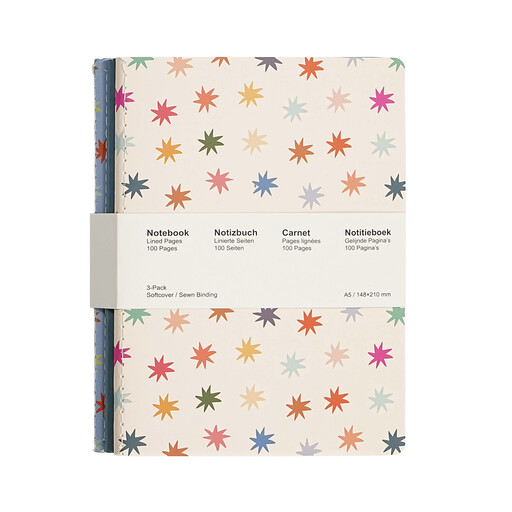
For those who aren't ready to go fully digital or prefer the simplicity of pen and paper for certain tasks, a high-quality traditional notebook remains an excellent choice. This set from Jubiluu features A5 notebooks with smooth, 80g offset paper that minimises ink bleed. The stitched binding allows them to lay flat, making for a comfortable writing experience anywhere.
Whether you're using a state-of-the-art digital device or a classic paper notebook, keeping it safe is important. A durable cover protects against spills, scratches and the general wear and tear of a busy life.
Explore our collection of notebook covers to find the perfect match for your gear.
An E-Ink tablet uses a display technology that reflects ambient light, just like paper. This results in significantly less eye strain compared to backlit LCD or OLED screens on regular tablets. E-Ink devices also consume far less power, offering weeks of battery life instead of hours. However, they are specialised for reading and writing and are not suitable for watching videos or playing games.
It depends on your needs. For capturing audio, transcribing conversations and taking handwritten notes, an AI note taking tablet is often more efficient and less intrusive than a laptop. However, it cannot run complex desktop software or handle tasks like creating a slide presentation on the fly. It is best viewed as a powerful, specialised companion to your laptop, not a direct replacement.
The accuracy of a voice to text tablet depends on several factors: the quality of the microphones, the clarity of the speaker's voice, the level of background noise and the stability of your internet connection (for cloud-based processing). Devices like the iFLYTEK AINOTE 2, which use a multi-microphone array, are designed to capture clearer audio, leading to higher transcription accuracy in typical meeting or lecture environments.