
24/7 Customer Support

Free returns

Same-day & Next-day Delivery

Quality Guaranteed

Unlock Your Welcome Offers: FREE Delivery | Up to 80% OFF | Free 30-day JoyPlus trial
Download the APP
For professionals, academics and students in the UK, the promise of a paperless workflow has never been more appealing. An AI note taking tablet offers a focused environment to capture thoughts, transcribe meetings and organise information without the clutter of paper or the distractions of a conventional tablet. However, the market is filled with devices that over-promise and under-deliver. Choosing the wrong one can lead to frustration and wasted money.
As a Joybuy Product Recommendation Officer, my role is to help you navigate the options and identify the features that truly matter. This guide will highlight common purchasing pitfalls and break down the essential specifications to look for in a high-quality digital notebook with pen.
Many devices are marketed as note-taking solutions, but not all are created equal. Here are three common traps that buyers fall into:
To ensure you are investing in a tool that enhances productivity rather than hindering it, focus on these three non-negotiable areas.
The defining feature of a dedicated e-ink writing tablet is its screen. Unlike the glowing displays of conventional tablets, an e-ink screen mimics the appearance of paper.
The "AI" in an AI note taking tablet is what transforms it from a simple digital notepad into a powerful productivity tool. A capable smart paper tablet should offer:
A great electronic notebook for work should not exist in a vacuum. It must integrate smoothly with your existing digital life. Before buying, check for:
Based on these criteria, here are some options tailored to different user needs.

Why This Fits Their Persona: This device is purpose-built for professionals and academics in the UK who need to capture meeting minutes, annotate documents and organise complex projects without distraction. Its ultra-thin design makes it highly portable for commuting or moving between lecture halls.
It features a 300 PPI E-Ink screen for eye comfort, avoiding the "All-in-One" screen trap. Its four-microphone array and AI engine are designed for accurate, 16-language transcription, directly addressing the pitfall of poor voice-to-text performance.
Its core strength is the AI-powered note management, which can summarise text and help organise ideas. It also syncs with Google Calendar and offers cross-device access via companion apps, creating a cohesive workflow.
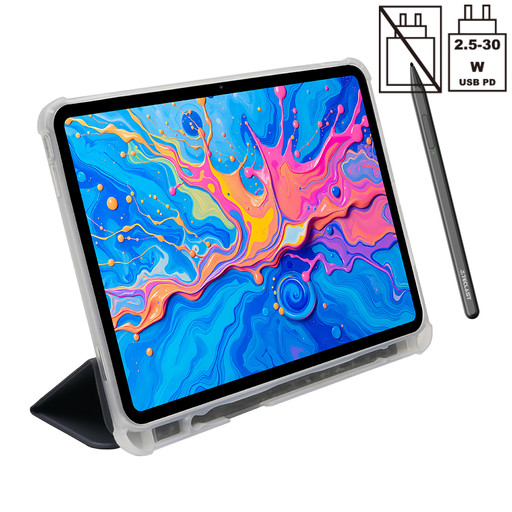
Why This Fits Their Persona: This is for the user who wants a single, versatile Android device for creative work, media consumption and note-taking. Its large, high-resolution colour screen is suitable for digital art and watching videos, while the included stylus allows for handwritten notes and drawing.
This tablet avoids the 'hidden costs' pitfall by including both a stylus and a protective case in the package. However, users should be aware that its 2K LCD screen is backlit and does not offer the same eye comfort as an e-ink display for extended reading.
Its main advantage is versatility. It runs a full version of Android 15, providing access to the entire Google Play Store. The 4096-level pressure sensitivity is a strong feature for digital artists and illustrators.
Once you have invested in a high-quality digital notebook, protecting it is paramount. A durable case prevents scratches and damage from accidental drops, ensuring your device lasts for years to come.
We have compiled a complete, real-time list of products that fully satisfy these strict selection criteria and UK safety regulations.
One of the most significant advantages of an e-ink screen is its power efficiency. Because the display only consumes energy when the page content changes, these devices can last for weeks on a single charge with typical use. This is a stark contrast to conventional tablets, which often require daily charging.
No, these are specialised companion devices. An AI note taking tablet is designed to excel at reading, writing and annotating in a distraction-free environment. It is not intended to replace a laptop for tasks like running complex software, intensive web browsing or video editing. It complements your computer by handling the tasks that would otherwise create paper clutter or eye strain.
The accuracy of handwriting conversion depends heavily on the device's AI engine and the clarity of your handwriting. Modern devices have made significant strides and the technology can be remarkably accurate for legible print and cursive. For optimal results, it is always good practice to write as clearly as possible.