
24/7 Customer Support

Free returns

Same-day & Next-day Delivery

Quality Guaranteed

Unlock Your Welcome Offers: FREE Delivery | Up to 80% OFF | Free 30-day JoyPlus trial
Download the APP
AI robots now cover a wide range of uses, from automated floor cleaning and lawn care to chess training, children’s STEM play and advanced humanoid platforms. However, the term AI robot can describe products with very different levels of autonomy, connectivity and practical usefulness.
The right choice depends less on futuristic marketing and more on the robot’s operating environment, maintenance requirements, safety controls and software support. This guide explains the main buying pitfalls and highlights suitable options for different users in the UK.
A robot with an app, voice commands or pre-set movements is not necessarily capable of independent decision-making. Many educational robot toys, robot dogs and tennis ball machines use programmed routines rather than adaptive AI.
Before buying, check whether the product supports:
For example, some humanoid robots and quadruped robots specifically state that secondary development is not supported. That may be acceptable for entertainment or demonstrations, but restrictive for university, business or robotics development work.
A robot vacuum cleaner may advertise high suction power, while a robot lawn mower may highlight garden coverage. These figures do not tell the whole story. Navigation, brush design, battery capacity, docking facilities and surface compatibility all affect everyday performance.
Likewise, a tennis robot’s number of serve modes matters less if its ball capacity, portability or battery arrangement does not suit your training space.
Moving joints, rotating brushes, lithium batteries and automated charging systems all require responsible use. Check age restrictions, pinch-point warnings, charging instructions and the availability of replacement parts.
Also review the return and warranty terms before buying specialist products. Some advanced robots are supplied as fixed configurations and may have specific policies for non-fault-related returns.
For smart home cleaning robots, compare LiDAR mapping, camera-based recognition and physical sensors. LiDAR can help a robot map rooms and plan routes, while cameras may assist with recognising objects. Neither system removes the need to clear cables, small objects and pet mess from the floor.
For robot lawn mowers, check the stated coverage in square metres, slope capability, boundary system and weather suitability. Wireless boundary systems can reduce installation work, but garden layout, trees, narrow passages and signal conditions still matter.
For humanoid robots, robot dogs and robotic exoskeletons, consider the required clear space, surface type and stability. A large robot may need an open operating area and should not be used near children or fragile objects without supervision.
Battery claims should be assessed alongside the robot’s workload. Runtime can fall when a vacuum operates on carpet, a robot dog performs demanding movements or a tennis ball machine uses higher feed speeds.
Look for:
The TENNIIX 2.0, for instance, has a swappable battery and an advertised playtime of around four hours, while the Unitree Go2 models list a battery life of approximately one to two hours depending on configuration and use.
App control is useful for schedules, custom settings and monitoring, but check whether the robot can operate without a phone or continuous internet connection. The SenseRobot AI chess robot can operate without a phone or tablet after its initial Wi-Fi setup, while some products rely more heavily on app connectivity.
For professional and educational users, also check:
For children’s educational robot toys and STEM robotics kits, confirm the recommended age range, small-part warnings, battery type and whether adult supervision is required.
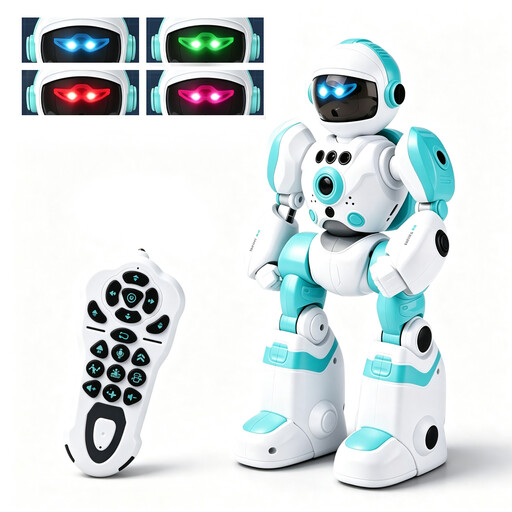
Why This Fits Their Persona: A practical entry point for families introducing robotics through play, with remote control, gesture sensing, music, dancing and programmable actions.
Its functions are clearly defined rather than presented as open-ended autonomy. The product also states its age warning and small-parts hazard.
Rechargeable 3.7V battery, infrared gesture sensing, voice recording and action programming.
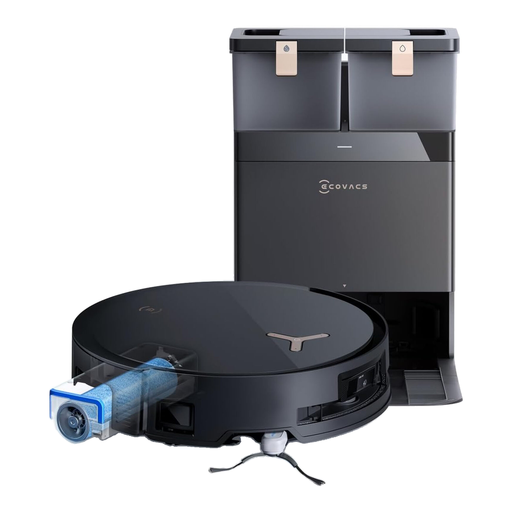
Why This Fits Their Persona: Suitable for busy UK households seeking automated vacuuming, mopping and routine dock maintenance across hard floors and carpets.
The specification covers navigation, carpet detection, mop lifting and station maintenance rather than relying on suction power alone.
18,000Pa stated suction, AIVI 3D obstacle recognition, 10mm mop lift and a 12-in-1 OMNI station.
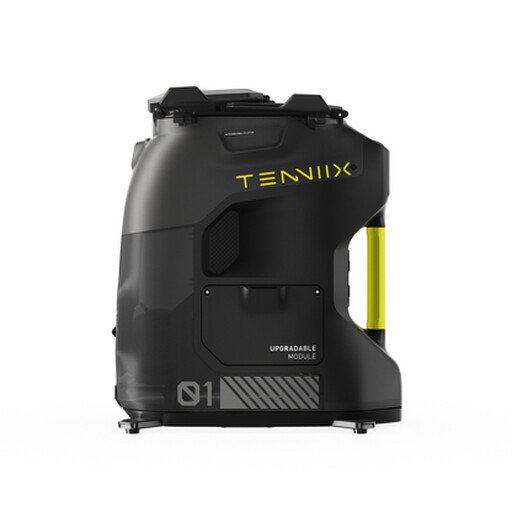
Why This Fits Their Persona: Designed for tennis players who want repeatable solo training, adjustable delivery and app or voice-based control.
It provides specific information on ball capacity, adjustable speed, spin and trajectory, battery format and upgrade limits.
Holds over 100 balls, offers 100+ serve modes and weighs 18.7 lb, with a swappable battery and LED status display.
We have compiled a complete, real-time list of products that fully satisfy these strict selection criteria and UK safety regulations.
Setup varies widely. Robot vacuum cleaners usually require charging-station placement, mapping and app configuration. Robot lawn mowers may need boundary planning or wireless positioning. Advanced humanoid robots and robot dogs require a clear operating area, careful battery installation and supervised first use. Always follow the supplied manual and check power-adaptor compatibility.
Running costs include electricity, replacement brushes, filters, mop pads, batteries and software subscriptions where applicable. A robot vacuum with automatic dust emptying may reduce routine handling but can require proprietary bags or cleaning solution. Specialist robots may also involve higher delivery, storage and servicing costs than domestic appliances.
Not always. Some robots offer remote control or core functions without continuous internet access. Others depend on Wi-Fi for mapping, voice control, cloud features or updates. Check whether the product supports offline operation and what data the companion app collects before purchasing.