
24/7 Customer Support

Free returns

Same-day & Next-day Delivery

Quality Guaranteed

Unlock Your Welcome Offers: FREE Delivery | Up to 80% OFF | Free 30-day JoyPlus trial
Download the APP
For UK professionals, international students, commuters and frequent travellers, AI smart glasses with real-time translation can combine calls, music, language support and hands-free assistance in one wearable device. However, product listings often use similar phrases for very different hardware.
As the Joybuy Product Recommendation Officer, I focus on separating useful specifications from attractive but incomplete claims. Before choosing AI translation glasses, check how translation works, whether recording features suit your situation and whether the frame is practical for everyday wear.
A listing may mention 100 or more languages, but this does not necessarily mean the glasses translate independently without a phone or internet connection. Many devices rely on a companion app, Bluetooth connection and cloud-based processing.
Check:
For example, the Lawaken AI Chat City range lists real-time translation for 128 languages, Bluetooth 5.3 connectivity and iOS and Android compatibility. Its stated features should still be checked against the latest app support and connection requirements before purchase.
Many smart audio glasses look similar to display glasses but only provide sound through open-ear speakers. That can be ideal for phone calls, music and spoken translation, but it will not place written words in your field of view.
If you need subtitles, teleprompting or discreet visual navigation, choose a model with a clearly specified display. The Even G2 is described as camera-free display smart glasses with a Micro-LED in-view display and translation across 35+ languages. In contrast, audio-focused models use speakers and microphones rather than an in-lens screen.
Meeting recording glasses and AI meeting summary glasses can be useful for notes, but recording conversations may involve consent and data-protection considerations. In the UK, always consider the setting, the people present and your organisation’s policies before activating AI Note or similar tools.
Also check the protection rating. IPX4 generally indicates resistance to water splashes, not immersion. The Lawaken AI Chat City specification lists IPX4 waterproofing and IP5X dust resistance. This is different from a device designed for swimming or heavy rain. Avoid charging wet glasses and follow the supplied safety instructions.
Look for a complete description of the translation workflow rather than a language count alone. A practical system should explain:
A Bluetooth smart glasses model can be suitable for travel, hotel check-ins and informal conversations, provided your phone and data connection are available.
Battery figures should be read in context. “Usage time” may refer to music playback, calls or intermittent AI functions rather than continuous translation and recording.
The Lawaken AI Chat City models list up to 12 hours of use, five days of standby and approximately one hour of charging. The Verbex F18 and T5 listings specify a 230mAh battery and up to eight hours of battery life for the T5, with a stated two-hour charging time. Actual performance can vary according to volume, recording, wireless transmission and AI activity.
For regular commuting or business travel, also check whether the charging cable is proprietary, magnetic or USB-compatible. A compact case can be more convenient than carrying a separate charging accessory.
Open-ear audio glasses leave your ears uncovered, helping you remain aware of surrounding sounds. This makes them suitable for walking, office use and hands-free calls, although volume should remain at a safe level in traffic.
Weight is another practical factor. Lawaken AI Chat City frames are listed at 33g or more without lenses, while the Even G2 is listed at 36g. Prescription wearers should confirm whether lenses are genuinely compatible and have them fitted by a qualified optician. Do not assume that a clear lens included in the box is a prescription lens.
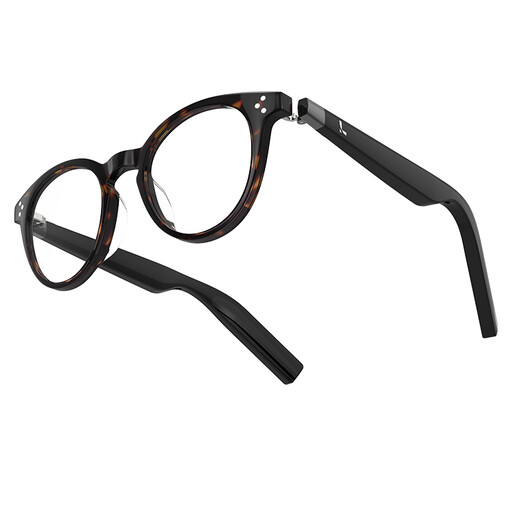
Why This Fits Their Persona: A practical starting point for users who want translation, calls, music and AI assistance without moving immediately to display-based eyewear. It supports iOS and Android phones and has a lightweight tortoise frame.
Its listing distinguishes open-ear audio, Bluetooth pairing and AI Note features rather than presenting the glasses as a fully independent display device.
128-language translation listed, dual speakers and microphones, prescription-lens compatibility and up to 12 hours of stated use.
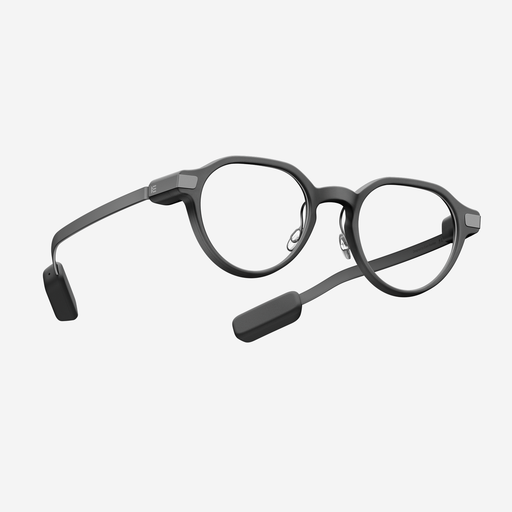
Why This Fits Their Persona: Suits professionals who prefer discreet visual prompts, notifications and navigation in addition to translation. The camera-free design may be preferable in meetings and shared workplaces.
The product information clearly identifies its Micro-LED display and camera-free construction, helping buyers distinguish it from audio-only glasses.
In-view display, camera-free design, 35+ listed translation languages and up to two days of regular-use battery according to the product information.
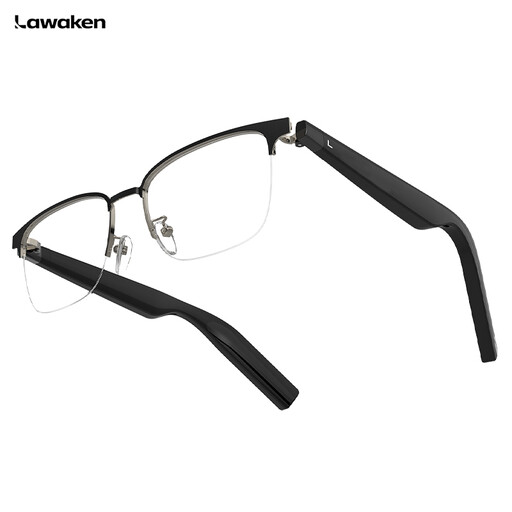
Why This Fits Their Persona: Designed for business travellers and daily users who want open-ear calls, music, multilingual support and meeting notes in a more formal frame style.
It lists prescription compatibility, two-phone connection support and privacy-related information, making key ownership considerations easier to check.
Bluetooth 5.3, simultaneous connection to two phones, dual microphones, IPX4/IP5X ratings and a stated 24-month limited replacement warranty.
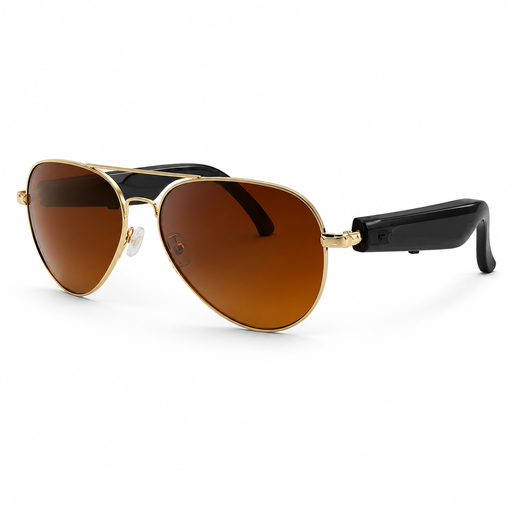
Why This Fits Their Persona: A match for travellers who prioritise translation, music and calls, with voice activation and compatibility with both major mobile platforms.
Its specifications state the required app pairing process, two-hour charging time and wireless operating range, rather than leaving setup requirements unclear.
Lists translation in more than 100 languages, ChatGPT access, voice wake-up, dual-microphone noise reduction and a 230mAh battery.
We have compiled a complete, real-time list of products that fully satisfy these strict selection criteria and UK safety regulations.
Before using your glasses:
Remember that AI responses and translations can contain errors. For contracts, medical information, legal discussions or safety-critical instructions, confirm important details through a qualified human interpreter or another reliable source.
Usually, a phone is needed for initial pairing and many AI functions. Translation, ChatGPT-style assistance and cloud summaries may also require the companion app, internet access or an active account. Check the individual product specifications before travelling.
Some frames are listed as prescription-compatible, including the Lawaken AI Chat City models. Prescription lenses are commonly supplied or fitted separately. Use a qualified optician and confirm lens type, frame dimensions and any manufacturer restrictions before ordering.
Running costs may include charging electricity, mobile data, app subscriptions, cloud AI services or translation allowances. A product listing may advertise a language count without confirming whether every function is free indefinitely. Review the app terms and any usage limits before purchase, particularly if you plan to use meeting recording or frequent multilingual translation.