
24/7 Customer Support

Free returns

Same-day & Next-day Delivery

Quality Guaranteed

Unlock Your Welcome Offers: FREE Delivery | Up to 80% OFF | Free 30-day JoyPlus trial
Download the APP
Choosing an AIO CPU cooler is not simply a matter of selecting the largest radiator or the most colourful lighting. UK PC builders often pay for features that do not suit their case, processor or daily workload. A cooler that looks impressive on a product page can still create installation problems, excessive noise or poor value.
This guide explains the practical checks to make before buying a 360mm AIO liquid cooler, 240mm AIO liquid cooler or alternative CPU air cooler, followed by recommendations for different types of builder.
A 360mm radiator has three 120mm fans and generally offers more radiator surface area than a 240mm model. However, it also needs a compatible case with sufficient top, front or side clearance. A larger radiator may be unsuitable if it interferes with the motherboard, graphics card, memory or front-panel fans.
A 240mm liquid CPU cooler can be a more practical choice for a mid-tower or compact gaming PC. Cooling results also depend on the pump, fans, mounting pressure, thermal paste, case airflow and processor power limits—not radiator size alone.
Noise levels may be measured under particular conditions and may not represent your complete system. Fan speed, pump profile, room temperature and case ventilation all influence what you hear. A quiet CPU cooler should therefore offer PWM control, allowing the motherboard to adjust fan speed according to CPU temperature.
Check whether the cooler uses 4-pin PWM fan connections and whether your motherboard has suitable CPU_FAN, SYS_FAN or PUMP_FAN headers. RGB lighting does not indicate cooling capability, so an ARGB CPU cooler or RGB CPU cooler should be assessed separately from its thermal hardware.
Socket support is essential. Modern systems may use Intel LGA 1851 cooler, Intel LGA 1700 cooler, AMD AM5 CPU cooler or AMD AM4 CPU cooler mounting. A product may support one socket family but not another, or require a particular bracket.
Also check your case’s maximum radiator length and thickness, GPU clearance, RAM height and pump-block clearance around the motherboard VRM heatsinks. For liquid cooling, inspect tubing orientation and radiator placement before purchasing. An AIO is pre-filled and normally maintenance-free, but it still contains a pump and liquid loop that should be checked during installation.
A 240mm AIO liquid cooler normally uses two 120mm fans, while a 360mm AIO liquid cooler uses three. Confirm the case supports the full radiator dimensions rather than relying only on the stated fan size. Radiator thickness and fan thickness also affect clearance.
For a large processor such as the AMD Ryzen 9 9950X, listed with a 170W default TDP and no included cooler, a high-performance CPU cooler with appropriate case airflow is a sensible consideration. Processor power limits, motherboard settings and workload duration still affect the required cooling capacity.
Check the manufacturer’s compatibility list against your exact CPU socket and motherboard. The recommendations below include models supporting combinations of LGA 1851, LGA 1700, AM5 and AM4, but socket support can vary between products.
AM5 users should also check whether the cooler uses the motherboard’s original backplate or supplies a dedicated mounting system. Apply thermal paste as instructed, tighten screws evenly and connect the pump and fans to the correct headers.
Fan speed and airflow figures are useful specification points, but they should be considered alongside noise output and control method. For example, the MSI MAG CORELIQUID E240 lists dual 120mm PWM fans operating from 500–2000 RPM, while the Cooler Master Hyper 212 Pro uses a 120mm PWM fan rated at 800–2000 RPM.
ARGB lighting normally requires a compatible 3-pin 5V ARGB header. Do not connect it to a 12V RGB header, as the different standards are not interchangeable. A CPU cooler with display may also require USB or additional software connections, so allow space for cable management.
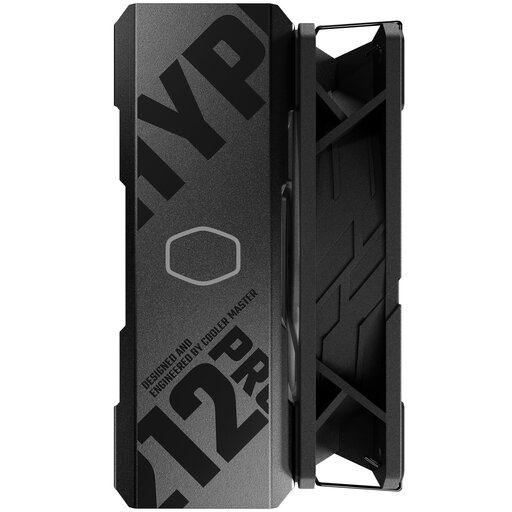
Why This Fits Their Persona: A straightforward CPU air cooler for first-time builders, office PCs and mainstream gaming systems where simple installation and lower complexity matter.
It avoids pump-related complexity and provides stated support for Intel LGA 1700 and AMD AM5/AM4, subject to case and motherboard clearance.
Four 6mm copper heatpipes, a 120mm PWM fan and a stated 19–30 dBA noise range.
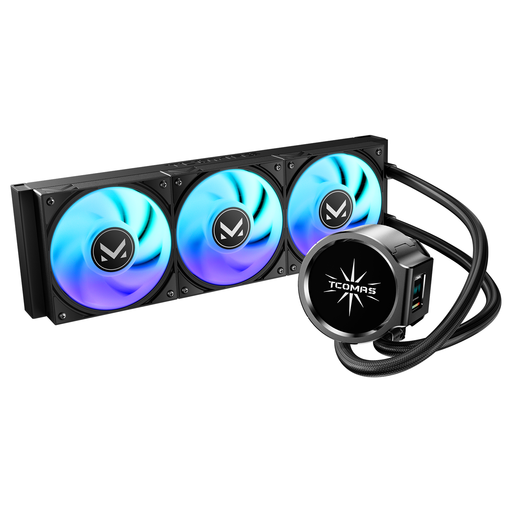
Why This Fits Their Persona: Suitable for builders who want a 360mm layout with dual-screen pump styling and ARGB fans for a carefully coordinated showcase PC.
Its product specification makes the display and radiator format clear, helping buyers distinguish aesthetic features from core cooling hardware.
Dual-screen pump design, ARGB fans and stated support for Intel LGA 1851/1700 and AMD AM5/AM4.
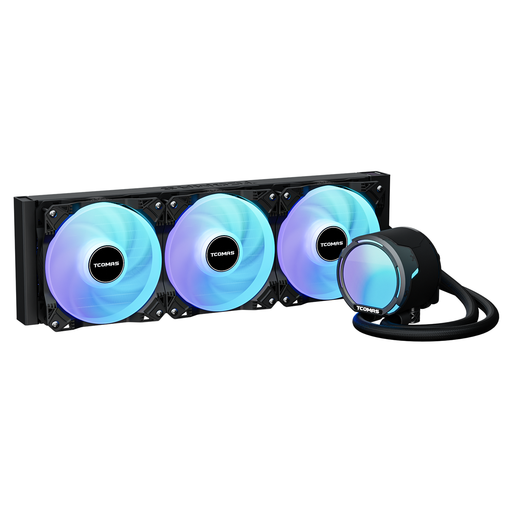
Why This Fits Their Persona: A 360mm option for gaming, rendering and sustained workloads where radiator capacity, airflow and broad modern socket support are priorities.
The listing provides specific airflow, fan-speed and pressure figures rather than relying only on broad “high-performance” language.
2500RPM PWM fans, listed 81.8CFM airflow and support for LGA 1851/1700/1200/115X plus AM5/AM4.
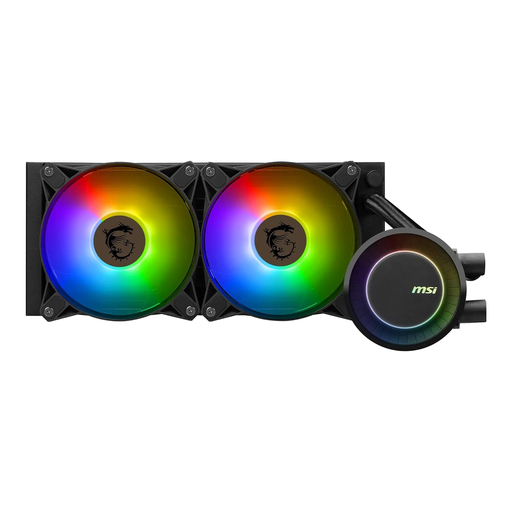
Why This Fits Their Persona: A practical 240mm choice for gamers and productivity users who want liquid cooling, addressable lighting and software synchronisation without moving to a 360mm case layout.
Its published socket list, PWM fan range and radiator dimensions make case planning more transparent before purchase.
240mm aluminium radiator, dual 120mm PWM fans and addressable RGB compatible with MSI Mystic Light.
Before fitting any CPU water cooler, shut down and unplug the PC. Confirm that the radiator is firmly mounted, the pump is connected and the fans can draw and exhaust air correctly. Run a BIOS check after installation to confirm pump and fan operation before installing software.
An AIO typically uses more components than an air cooler: pump, radiator, tubing and fans. Its electricity use is usually modest compared with the rest of a gaming PC, but fan and pump profiles can affect consumption and noise. Keep dust filters and radiator fins clean using suitable dry cleaning methods, and monitor temperatures or unusual pump noise over time.
For a lower-maintenance build, a compatible CPU cooler such as an air tower may be preferable. For sustained rendering or high-power processors, an adequately sized AIO may provide more flexibility—provided your case supports it.
We have compiled a complete, real-time list of products that fully satisfy these strict selection criteria and UK safety regulations.
The suitable size depends on your processor, case and noise preference. A 360mm model offers more radiator area but requires more internal space. A 240mm model can suit mainstream gaming PCs and smaller cases.
Lifespan varies by pump, fan quality, usage and operating conditions. Check the manufacturer’s warranty and inspect tubing, fittings, pump noise and temperatures periodically. Replace the cooler if temperatures change unusually or signs of leakage appear.
The pump and fans add a small amount of power consumption to the system. In practice, the larger cost consideration is usually the initial purchase price and eventual replacement, rather than day-to-day electricity use. A PWM profile can help balance cooling, noise and power.