Conservatory desk workers
If you work or take calls at the desk, look for airflow you can adjust without keeping the fan pointed at your face. Check how it sounds at the speed you expect to use, not just its stated minimum noise level.


Choose a compact air circulator if it can stand safely near the desk and direct air around your seated area; consider an adjustable pedestal model if the worktop is crowded or you need airflow above it. Check working noise and the route to a suitable socket before buying. A fan moves air but does not replace ventilation or shading when the conservatory overheats.
If you work or take calls at the desk, look for airflow you can adjust without keeping the fan pointed at your face. Check how it sounds at the speed you expect to use, not just its stated minimum noise level.
If screens, a keyboard and paperwork occupy the worktop, a floor-standing or height-adjustable fan may keep the desk clearer. Allow space for its base, chair movement and a safe cable route.
If you rearrange the conservatory or use it for activities beyond desk work, a convertible fan may suit both tabletop and floor placement. Check the supplied configuration before relying on cordless use.
Start with a stable place for the fan, then check whether its airflow reaches the area you want without disrupting work. Socket position and cable routing matter before you settle on a desk or floor model.
| Concern | What to check | Who this matters to |
|---|---|---|
| Air direction | Check vertical adjustment and horizontal oscillation for the exact model, particularly if it will stand away from the desk. | I want air moving around my seat and the nearby room, rather than a constant stream at face level. Around 36% of consumers would put controllable coverage first. |
| Working noise | Check which speed a stated noise figure describes and whether there are lower settings for desk use. | Calls and focused work are harder if the fan is distracting beside me; for around 29% of consumers, quiet working would be the primary need. |
| Clear workspace | Measure the available worktop or floor space, including room for the base and chair movement. | My desk is already occupied, but a floor fan cannot block the way past my chair. Keeping the workspace clear would come first for roughly 21% of consumers. |
| Power access | Check the supplied charging or mains arrangement and plan a cable route; confirm whether a battery is included. | The socket is awkward to reach, so I need a way to position the fan without an unsafe lead across the room. About 14% of consumers would prioritise power access and repositioning. |
A fan intended for airflow close to one person is not necessarily suited to directing air around a larger desk area.
Decide how far from the fan you need air movement, then check the exact model’s head adjustment, oscillation and possible positions.
Meaco’s stated minimum of 29 dB for the MeacoFan 1056 describes a low-noise condition, not its sound at every speed. Stronger airflow may require a different setting.
If you take calls at the desk, check which setting the figure covers and whether the available speeds let you reduce airflow when needed.
Electrical Safety First warns against overloaded or daisy-chained extensions. A cable caught by a chair or door can also be damaged.
Use a suitable extension only when necessary, fully unwind a cable reel, and keep the lead clear of moving furniture and walkways.
Air movement does not by itself address sunlight entering through glazing or a lack of fresh-air ventilation.
Use the fan to move air around the desk, and consider shading and openable ventilation separately if heat build-up remains the problem.
An option to examine if you want a directional air circulator for desk-side or floor placement.
Relevant if you want to switch between table-height and standing placement.
A personal desk-fan option if a bladeless format and app control matter to you.
Worth examining if a highly adjustable fan head is important to your room layout.
These rechargeable personal desk fans suit airflow close to a workspace. If you need air directed across the desk and farther into the conservatory, check the exact model’s adjustment and oscillation before choosing either one.
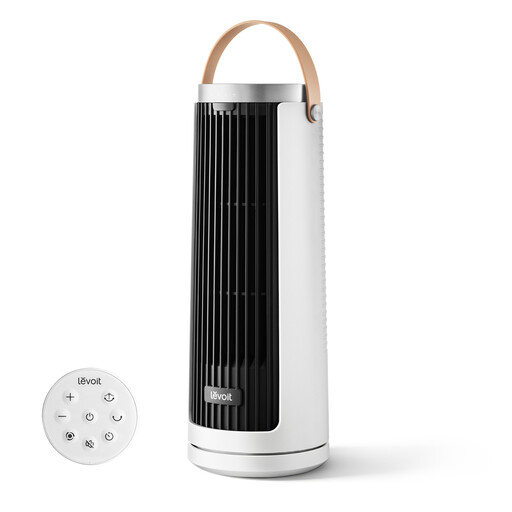 No image available
Consider this portable fan for personal airflow near a desk when you want to position the fan without a mains cable at the worktop.
Its listed features include USB Type-C recharging and multiple airflow modes. If broader circulation or quiet calls matter, check its directional movement and sound at your intended setting; also confirm battery runtime and the supplied charging arrangement.
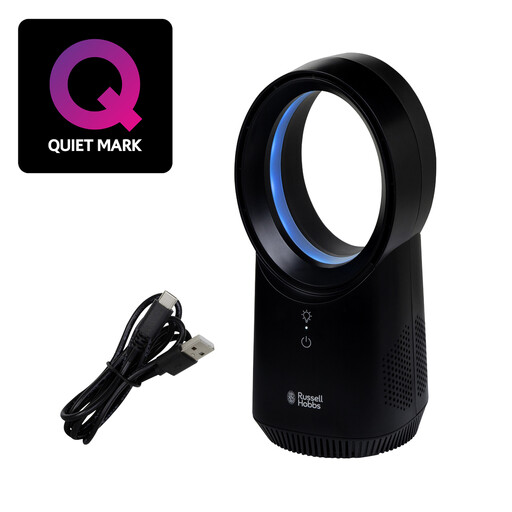 No image available
Consider this compact wireless desk fan when personal airflow and a clear route around the worktop matter more than moving air through the wider room.
The listed variant has a bladeless design, three speed settings and USB charging. Check its airflow direction, sound during calls, battery runtime and supplied charging arrangement for your intended use.
Choose a desktop fan if it has a stable place near your seat and you mainly want nearby airflow. An adjustable pedestal fan can keep a crowded worktop clear or aim air over it, provided its base and cable do not obstruct movement.
An air circulator moves air but should not be relied on to address heat build-up by itself. If the room remains too hot, consider shading and openable ventilation alongside the fan.
Use a suitable extension only when the fan cannot safely reach the socket directly. Electrical Safety First advises against overloading or daisy-chaining extensions and says cable reels should be fully unwound; keep the cable away from chair wheels and doors.
Check the exact fan’s charging connection, what charging equipment is supplied and whether its runtime suits how long you work at the desk. Confirm the supplied electrical arrangement is suitable for where you intend to charge it, particularly if nearby sockets are limited.