
24/7 Customer Support

Free returns

Same-day & Next-day Delivery

Quality Guaranteed

Unlock Your Welcome Offers: FREE Delivery | Up to 80% OFF | Free 30-day JoyPlus trial
Download the APP
Building or upgrading a high-performance PC in 2026 means managing one critical factor: heat. As CPUs and graphics cards become more powerful, they generate more warmth, which can lead to thermal throttling and reduced performance precisely when you need it most. A solid front panel might look sleek, but it can suffocate your components. This is where a dedicated airflow PC case becomes essential.
Navigating the market can be a challenge, with countless options all promising superior cooling. This guide is designed to help you understand the key features that genuinely matter for thermal performance. We will look at what to consider before you buy and highlight a few recommended models that balance cooling, compatibility and aesthetics for UK builders.
Before settling on a case, it's wise to consider a few practical points. Getting these right will ensure your new build not only runs cool but is also a pleasure to assemble and look at.
The single most impactful feature for an airflow-focused build is the front panel design. A mesh front panel PC case allows for direct, unobstructed air intake, feeding cool air to your internal components. Cases with solid glass or plastic fronts often rely on small side vents, which can restrict airflow and lead to higher internal temperatures. While aesthetics are subjective, for pure performance, a mesh design is a clear functional advantage.
PC cases come in various form factors, with the most common being the mid tower case. These typically support standard ATX case motherboards, offering a good balance of space for components and cooling hardware without being overly large. If you're planning a more compact build, an MATX PC case is a great alternative.
Regardless of size, always check three key clearances:
A great case is more than just a box. Look for features that make the building process easier, such as ample cable management channels, tool-free drive bays and removable dust filters. For those who want to display their hardware, a tempered glass computer case side panel is a popular choice. Finally, consider the overall look. Whether you prefer a stealthy all-black build or a clean white PC case, the right chassis can be the centrepiece of your setup.
Here are a few options that deliver on the principles of great airflow, thoughtful design and solid value for PC enthusiasts in the UK.
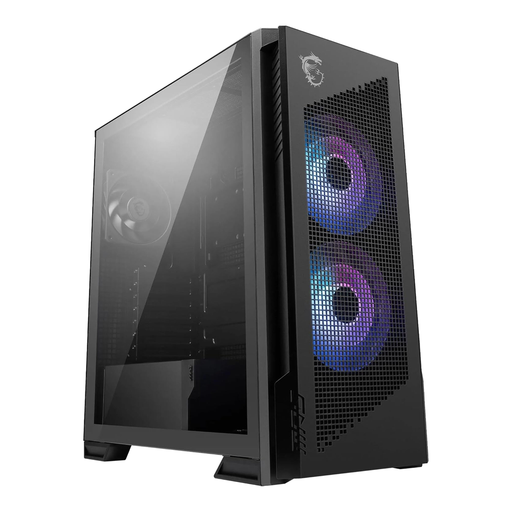
Why It Stands Out The MSI MPG Velox 300R is built from the ground up for maximum cooling efficiency. Its defining feature is the full mesh front panel, designed to draw in as much cool air as possible. This makes it an excellent foundation for a high-end gaming or content creation rig where component temperatures are a primary concern.
Pros:
Who is it for? Gamers and professionals building a powerful system with top-tier components who need a no-compromise cooling solution.
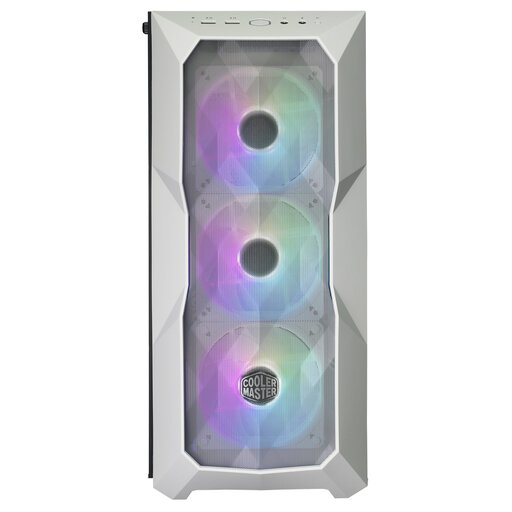
Why It Stands Out This Cooler Master case is a popular choice for builders who want both performance and style. The TD500 Mesh V2 combines a high-airflow front panel with a striking white PC case design. It comes with three pre-installed 120mm PWM fans, providing excellent cooling straight out of the box.
Pros:
Who is it for? PC builders who prioritise a clean, white aesthetic without sacrificing thermal performance. It's a versatile mid tower case suitable for both high-end gaming rigs and professional workstations.
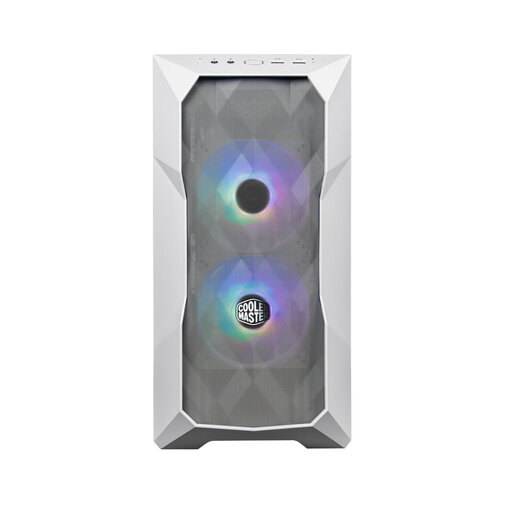
Why It Stands Out For those with limited desk space, the TD300 Mesh offers the same airflow-focused philosophy as its larger sibling but in a more compact MATX PC case form factor. It proves that you don't need a massive tower for great cooling, making it ideal for streamlined gaming setups.
Pros:
Who is it for? Builders creating a space-conscious gaming PC or workstation who need effective cooling for powerful components in a smaller footprint.
These recommendations cover a range of common needs, but every build is unique. If you're looking for a different size, colour or specific feature set, there are many other excellent choices available.
Explore our full collection of PC cases and find the perfect foundation for your next build in our Electronics enclosure category.
1. Is a mesh front panel PC case always better for cooling? For thermal performance, a mesh front panel generally provides a significant advantage. It allows fans to draw cool, ambient air directly over your components with minimal restriction. Cases with solid or glass fronts often have to pull air through smaller side vents, which can be less efficient and result in higher internal temperatures, especially with heat-intensive hardware.
2. How do I know if my graphics card and CPU cooler will fit in a new case? The most reliable method is to check the technical specifications on the case's product page. Look for "Maximum GPU Length" and "Maximum CPU Cooler Height". Compare these dimensions to the specifications of the components you plan to use. It's always a good idea to leave a few millimetres of clearance for an easier installation.
3. Do I need a mid tower case or can I use a smaller one? This depends on your components and space constraints. A mid tower case (usually for ATX motherboards) offers more room, making it easier to build in and providing more options for large components and cooling solutions like 360mm radiators. A smaller MATX PC case is excellent for saving desk space but requires more careful planning to ensure all your parts fit and that there is still adequate airflow to prevent overheating.