Home-office record keepers
If you update plot records, budgets, emails and spreadsheets mainly at a desk, consider the screen, memory and connections needed for your usual working setup.


A Windows laptop with enough memory for your usual spreadsheets, documents and open apps is a practical starting point for managing allotment records at home; check the exact configuration and the connections your desk setup needs. A basic laptop may suit lighter administration, while a MacBook or Chromebook depends on your software and collaborators. If you take files to the plot, prepare and test offline access before relying on it there.
If you update plot records, budgets, emails and spreadsheets mainly at a desk, consider the screen, memory and connections needed for your usual working setup.
If plans or task lists travel with you, consider carrying weight and whether you can open the files you need without a connection. Google Docs Editors Help describes an offline workflow that needs setting up in advance.
If you keep plot-holder contact or tenancy information, consider who can access the laptop and how records are protected, backed up and managed.
Start with the applications and files you use at home, then consider what must work during a plot visit and whether you handle other people’s personal information.
| Concern | What to check | Who this matters to |
|---|---|---|
| Home-office records | Compare the exact RAM, storage, display and ports with your spreadsheets, open apps and desk setup. Microsoft’s Windows 11 minimum of 4 GB RAM and 64 GB storage is an installation requirement, not a workload target. | If I regularly move between plot lists, budgets and email, I want a screen and configuration that fit that routine. Around 36% of consumers put desk-based records and multitasking first. |
| Plot visits | Check listed carrying weight and battery claims. For Google files, set up offline access and test essential documents before leaving home. | When I take plans to the plot, I need them to open even if connectivity fails. Roughly 29% of consumers prioritise portability and access to files away from the desk. |
| Personal information | Check sign-in protection, updates and backups, alongside your committee’s access and retention arrangements. GOV.UK says people responsible for using personal data must follow data-protection principles. | If I hold plot-holder contacts, I need to control access rather than rely on a laptop feature alone. Around 21% of consumers place responsible handling of personal information first. |
| Basic administration | Check that the exact model runs your required software and has enough storage for your files; specifications can differ within a range. | If my work is mostly email, web pages and a few simple documents, I may accept less capacity than a heavier-use setup requires. About 14% of consumers prioritise a basic configuration for straightforward tasks. |
Microsoft’s published minimums establish installation eligibility, not how comfortably your spreadsheets, browser tabs and meetings will run together.
Compare the exact memory and storage with the apps you use at the same time and the files you keep locally.
Google Docs Editors Help says offline use requires advance setup; files you need may also have to be made available offline.
Prepare essential files while connected, then test opening and editing them without a connection before a plot visit.
A laptop feature does not determine who should have access to plot-holder information or how long records should be kept. GOV.UK says people responsible for using personal data must follow data-protection principles.
Protect sign-in access, keep the system updated and agree how the committee manages access, backups and retention.
Memory, storage and bundled items can vary by configuration. HP states that a charger is not included with its cited ProBook 440 G11 DD7V9EA#ABU listing; that detail should not be applied to every ProBook.
Check the product code, operating system, ports, charger inclusion and warranty for the exact model you are considering.
The ProBook 440 G11 line is a business-oriented Windows option for home-office administration.
The ThinkPad E14 Gen 6 is a 14-inch business-laptop line to consider if its keyboard-focused format suits your desk work.
The Aspire Go 14 line includes a portable Windows configuration for simple documents and web-based administration.
The MacBook Air is a macOS route if your office tools and any shared committee workflows work on that platform.
These laptops offer Windows, ChromeOS and macOS options for allotment administration. Choose by the applications you need at home, then check how you will carry and access files at the plot.
 No image available
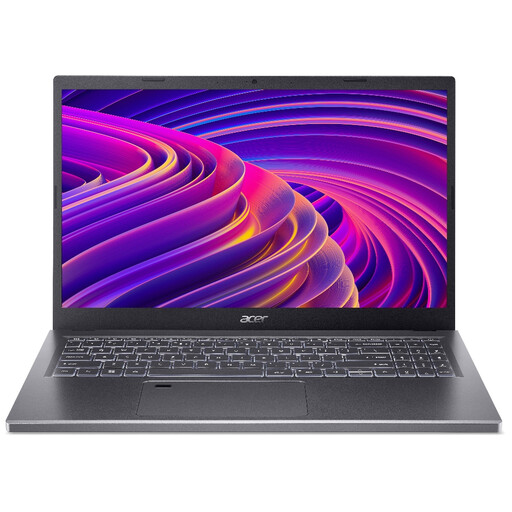
Consider this model if your home-office work calls for a 15.6-inch screen and you can accommodate that size when travelling to the plot.
The product name specifies a Full HD 1920 × 1080 display, AMD Ryzen 5 7530U processor, 16 GB RAM and a 512 GB SSD.
Confirm the Windows 11 edition and whether S Mode restricts installation of any applications you need.
 No image available
This 14-inch option is worth considering for records and documents if your required applications run on its Windows and Snapdragon X configuration.
The product name specifies 16 GB RAM and a 512 GB SSD.
Check compatibility with any specialist desktop software and the battery life you need away from the desk.
 No image available
Consider the convertible design if you want a laptop that can also be used in a folded-back format for viewing plans.
The product name specifies 16 GB RAM, a 1 TB SSD and Windows 11 Home.
Check expected battery life before relying on it during longer visits away from a socket.
 No image available
This ChromeOS model is an option for browser-based records; check it against any Windows-only applications your allotment work requires.
The product name specifies a 14-inch WUXGA 1920 × 1200 display, Intel Core 5 120U processor, 8 GB RAM and a 512 GB SSD.
For Google documents needed at the plot, set up offline access and test the files before travelling.
 No image available
Consider this model if your record-keeping applications and collaborators’ workflows are compatible with macOS.
The product name specifies an M5 chip with a 10-core CPU and 10-core GPU, 16 GB memory and a 1 TB SSD.
Check the external-display arrangement you need at home and the carrying weight and battery life that matter for plot visits.
No: the deciding factor is whether your required applications and shared files work on the operating system you choose. If you depend on Windows-only software, check that software before considering macOS or ChromeOS.
Yes, if you prepare offline access and the necessary files beforehand. Google Docs Editors Help says setup requires an internet connection, Chrome or Edge, non-private browsing, the Google Docs Offline extension and enough device storage; test your files without a connection before leaving home.
Not for every workload: compare 16 GB with the spreadsheets, browser tabs and other apps you expect to use together. Microsoft’s 4 GB Windows 11 minimum concerns installation eligibility and should not be treated as a recommendation for comfortable multitasking.
Protect access to those records and establish who is responsible for using them. GOV.UK explains that people responsible for using personal data must follow data-protection principles; the group’s actual arrangements determine its responsibilities, so a laptop security feature alone is not a complete process.