Bright-window desk planners
If you use planting calendars or allotment records beside a window, consider both the screen and where it will sit. The Health and Safety Executive advises arranging screens and lighting to avoid reflections and glare.


Start with the desk position: arrange the screen to avoid reflections from the window, then look for a matte or anti-glare surface and enough adjustment to place it comfortably. Choose QHD if dense crop plans and spreadsheets are your priority; Full HD can suit simpler records, while USB-C is useful only if its video and charging capabilities match your laptop.
If you use planting calendars or allotment records beside a window, consider both the screen and where it will sit. The Health and Safety Executive advises arranging screens and lighting to avoid reflections and glare.
If you keep several columns, plans or documents visible, a QHD display is worth considering for its additional pixels. LG and Dell list 2560 × 1440 resolution for their respective 27U631A-B and P2425D models; check that the physical screen size and text scaling suit you too.
If most tasks are crop notes, online research and occasional spreadsheets, Full HD may be sufficient. BenQ's GW2791 and the Joybuy-listed KOORUI MB27V29FS2 are Full HD examples, but screen positioning still matters at a bright-window desk.
Check the window-to-screen angle before choosing a display finish. Then decide how much spreadsheet space you need and whether the stand and connections fit your desk and computer.
| Concern | What to check | Who this matters to |
|---|---|---|
| Window reflections and screen position | Look for a matte or anti-glare surface and check whether the stand or a compatible mount lets you angle the screen away from reflected light. | If the window is reflected on my screen during planning, I need room to change its position rather than rely on its finish alone. Around 50% of consumers put reflection management first. |
| Space for crop plans | Compare native resolution and screen size; check your computer's video output and whether text remains comfortable at your preferred scaling. | When I keep a planting plan beside several spreadsheet columns, I want enough visible space to work without constant rearranging. For around 30% of consumers, that workspace is the primary concern. |
| Simple records and setup | Check the available connections, screen finish and positioning options before choosing a Full HD display for basic tasks. | For crop notes and occasional research, I would rather keep the setup straightforward than choose resolution or connections I will rarely use. Keeping basic record-keeping simple comes first for around 20% of consumers. |
A matte or anti-glare surface does not eliminate a reflection from a poorly placed window. The Health and Safety Executive advises adjusting screens and lighting to avoid reflections and glare.
Check the intended screen position at the brightest time you normally use the desk. If the position is constrained, consider the stand's adjustment or compatibility with a suitable mount.
Physical size and pixel count are different considerations: BenQ lists 1920 × 1080 for its 27-inch GW2791, while LG lists 2560 × 1440 for its 27-inch 27U631A-B. The latter provides more pixels for arranging columns and windows, though your preferred text size also matters.
If you routinely compare plans side by side, check the native resolution rather than judging workspace from diagonal size alone.
USB-C video and power delivery need separate checks. LG lists up to 15W power delivery for the 27U631A-B, which should not be assumed to meet every laptop's charging requirement.
Confirm that your laptop supports video over USB-C and compare its charging requirement with the monitor's stated power delivery.
You may still need a separate laptop charger or a suitable dock.
Dell's Pro 24 Plus P2425D is a compact QHD option for planning work where screen adjustment matters.
LG's 27U631A-B offers a 27-inch QHD IPS display with USB-C video connectivity for a compatible computer.
BenQ's GW2791 is a 27-inch Full HD IPS option for basic records and mixed home tasks.
The Joybuy-listed MB27V29FS2 is a 27-inch Full HD IPS option for straightforward planning tasks.
These monitors cover QHD and 4K options for detailed plans as well as Full HD choices for simpler records. For a desk beside a bright window, assess each screen's position and finish alongside its resolution.
 No image available
Consider this model if dense crop plans make WQHD workspace a priority. Check whether its stand allows the position you need beside the window, and confirm USB-C video and charging compatibility with your laptop before relying on one cable.
 No image available
This is a Full HD option for crop notes, web research and occasional spreadsheets. BenQ specifies a matte 27-inch IPS screen; its Full HD resolution provides fewer pixels for dense plans than a QHD display.
 No image available
Consider the larger screen if it fits your planning desk and preferred viewing distance. Its product name specifies a 31.5-inch IPS display; check the exact native resolution and stand movement before deciding whether it meets your spreadsheet and window-positioning needs.
 No image available
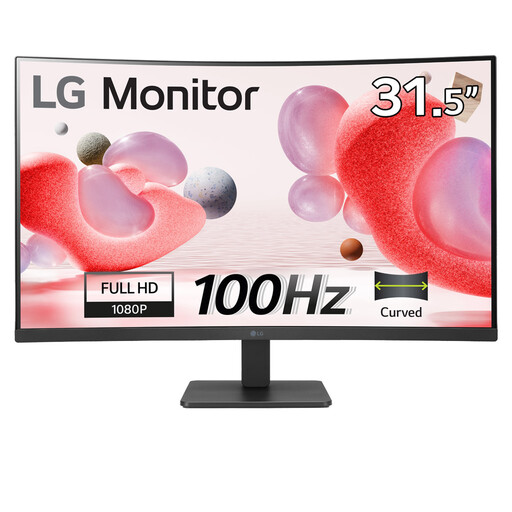
This 32-inch curved VA model is an option for basic records if its size suits your desk. Its Full HD resolution is worth weighing against your need to view dense plans; check the stand's adjustment before choosing it for a fixed position beside the window.
 No image available
The 27-inch 4K UHD format is worth considering for detailed plans if your computer and preferred text scaling suit it. Check the screen finish for your bright-window position, and confirm USB-C charging capability separately if you intend to connect a laptop that way.
Not necessarily: start by positioning the screen to avoid reflected light. The Health and Safety Executive advises adjusting screens and lighting to avoid reflections and glare; a matte or anti-glare finish and useful stand adjustment can help, but neither replaces a workable screen-to-window angle.
QHD is worth considering when you regularly compare dense spreadsheets or keep several planning windows visible. The cited LG 27U631A-B and Dell P2425D offer 2560 × 1440 pixels, compared with 1920 × 1080 on BenQ's GW2791; Full HD can still suit notes and occasional tables.
Only if the monitor's power delivery meets your laptop's requirements; a USB-C video connection alone does not establish that. LG lists up to 15W power delivery for the 27U631A-B, so check both your laptop's USB-C video support and its charging requirement before planning a one-cable setup.
Check a local electrical-equipment recycling service or an available retailer take-back option rather than putting the monitor in general waste. UK government guidance describes the waste electrical and electronic equipment framework as encouraging recovery, reuse and recycling; confirm that the particular service accepts monitors before taking one there.