
24/7 Customer Support

Free returns

Same-day & Next-day Delivery

Quality Guaranteed

Unlock Your Welcome Offers: FREE Delivery | Up to 80% OFF | Free 30-day JoyPlus trial
Download the APP
Tired of that bulky desktop tower taking up valuable space on or under your desk? You're not alone. Many of us in the UK are looking for a more streamlined setup for our home office, study or living room without sacrificing the power we need for work and play. This is where the AMD mini PC comes in—a compact desktop computer that packs a surprising punch.
As a Joybuy Product Recommendation Officer, my role is to help you navigate the crowded market. This guide cuts through the technical jargon and marketing hype to provide clear, practical advice, helping you find a small form factor PC that fits your needs and budget. We will explore what makes these devices tick and look at a few standout models.
Choosing the right mini PC involves balancing performance, connectivity and price. Here are a few key considerations to keep in mind during your search.
The processor, or CPU, is the brain of your computer. AMD's Ryzen series offers excellent performance across different price points. For a home office mini PC, a Ryzen 3 or Ryzen 5 processor provides more than enough power for web browsing, video calls and office applications. If your needs include light gaming, photo editing or heavy multitasking, a Ryzen mini PC with a Ryzen 7 processor will deliver a much smoother experience. The integrated Radeon graphics in these chips are particularly capable, handling tasks that would challenge other integrated solutions.
A mini PC's small size shouldn't limit its connectivity. For a productive setup, look for a model that can support multiple monitors. Many modern units offer triple display desktop capabilities through a combination of HDMI, DisplayPort and USB-C ports. This is a game-changer for multitasking. Also, consider the networking options. WiFi 6 offers faster, more stable wireless performance, while a 2.5G Ethernet port provides a rock-solid wired connection, essential for large file transfers and lag-free streaming.
For most users in 2026, a mini PC with 16GB of RAM and a 512GB SSD is the ideal configuration. 16GB of RAM ensures you can run multiple applications and browser tabs without slowdowns. A 512GB Solid State Drive (SSD) offers ample space for your operating system, programs and files, with significantly faster boot times and application loading compared to older hard drives. Look for models with an M.2 NVMe SSD, which is the current standard for high-speed storage.
Here are a few models that offer a compelling combination of features, performance and value.
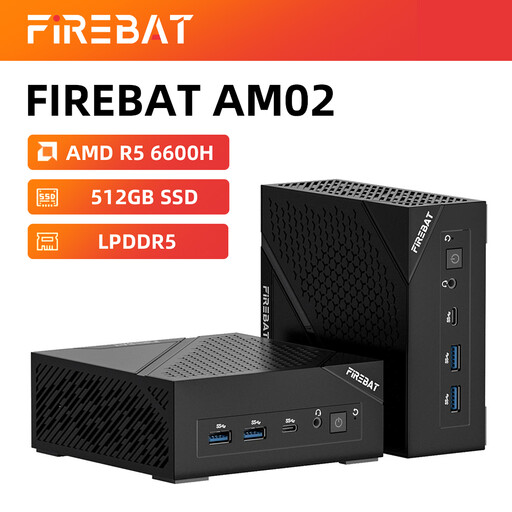
Why It Stands Out The FIREBAT AM02L is an excellent all-rounder that balances modern performance with great connectivity. The AMD Ryzen 5 6600H processor, combined with fast LPDDR5 RAM, makes it highly responsive for everyday tasks and capable enough for some light gaming.
Pros
Who is it for? This is a superb choice for home office professionals, students and casual users who want a reliable and future-proof machine for productivity, media consumption and light gaming on titles like League of Legends or CS2.
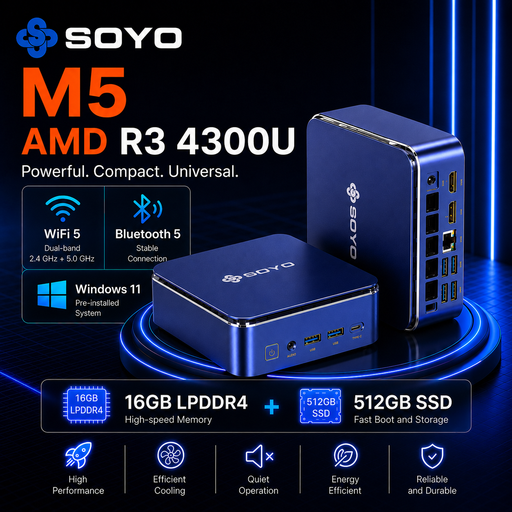
Why It Stands Out The SOYO M5 is a testament to efficiency and value. It focuses on providing a stable and capable workstation experience in an extremely compact and low-power package, making it an ideal productivity hub. Its standout feature is the ability to drive three displays simultaneously.
Pros
Who is it for? Perfect for office environments, educational use or anyone needing a reliable and cost-effective machine for multitasking across several screens. If your work involves spreadsheets, documents and web-based applications, the SOYO M5 is a very practical choice.
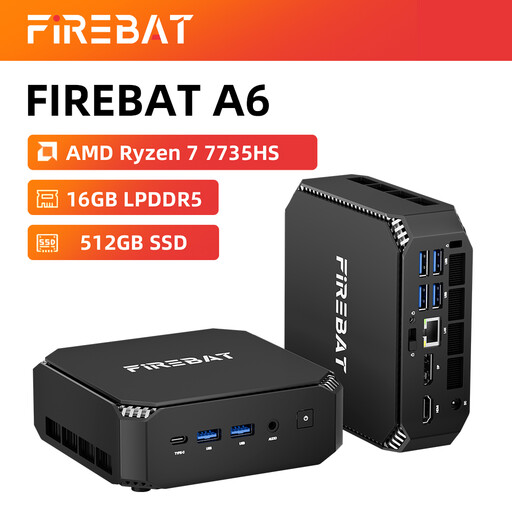
Why It Stands Out This FIREBAT model steps up the performance significantly with its powerful AMD Ryzen 7 7735HS processor and integrated Radeon 680M graphics. This combination makes it a highly capable small form factor PC for gaming and more demanding creative tasks, without the need for a dedicated graphics card.
Pros
Who is it for? This machine is aimed at casual gamers, content creators and power users who need strong CPU and GPU performance in a compact, quiet and stylish package. It's an excellent alternative to a larger gaming desktop for those who value space.
While a mini PC offers incredible flexibility, some users may prefer an even cleaner, more integrated setup. If a single-cable, clutter-free desk is your ultimate goal, an all-in-one computer, which builds the PC directly into the monitor, could be the perfect fit.
If this sounds appealing, you might want to explore our range of all in one monitor options for a complete, streamlined workstation.
1. Are AMD mini PCs good for gaming? It depends on the model. An AMD mini PC with a Ryzen 7 processor and Radeon 680M or 780M graphics can be a surprisingly capable small form factor PC for gaming. It can handle many popular e-sports and AAA titles at 1080p with respectable settings. Models with Ryzen 3 or 5 processors are better suited for lighter gaming and older titles.
2. Can a mini PC replace a full-sized desktop? For the vast majority of users—including those working from home, students and families—the answer is yes. A modern Ryzen mini PC offers performance that is on par with, or even better than, many older desktop towers. Only high-end professionals like 3D artists or hardcore gamers who require maximum expandability and top-tier dedicated graphics cards might still prefer a traditional tower.
3. How much power does a Ryzen mini PC use? One of their biggest advantages is energy efficiency. A typical mini PC consumes significantly less electricity than a standard desktop, often idling at just 10-15 watts. This can lead to noticeable savings on your energy bill, making it a smart and sustainable choice for a device that is used for many hours each day.