
24/7 Customer Support

Free returns

Same-day & Next-day Delivery

Quality Guaranteed

Unlock Your Welcome Offers: FREE Delivery | Up to 80% OFF | Free 30-day JoyPlus trial
Download the APP
Navigating the market for an Android 15 tablet can feel overwhelming. With so many options available, it's easy to fall for marketing hype and end up with a device that doesn't meet your needs. Many UK shoppers, looking for a cheap tablet UK deal, find themselves disappointed by poor performance or hidden costs.
As a Joybuy Product Recommendation Officer, my role is to help you see past the flashy advertisements and focus on what truly matters. Before you make a decision, be aware of these common pitfalls:
To find a reliable and cost-effective tablet, you need to understand a few key features. Here’s a straightforward breakdown of what to look for.
While a large screen tablet is great for movies, the quality is more important than the size.
How you plan to use your tablet determines the connectivity you need.
To help you find the right fit, we've matched some current models to different user needs, keeping the common pitfalls and key parameters in mind.
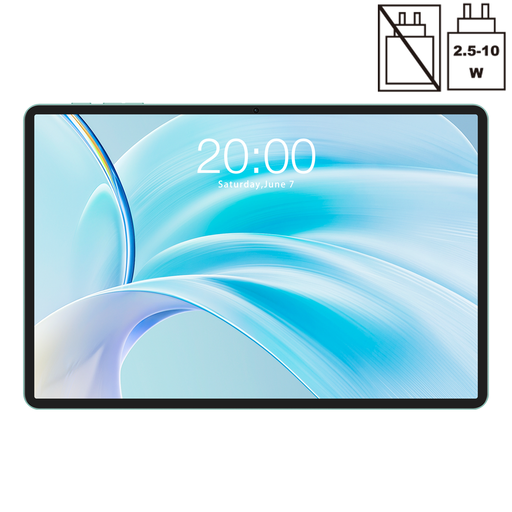
Why This Fits Their Persona: Ideal for families who need a versatile device for streaming at home and entertainment on the go. The 11-inch screen is great for sharing and 4G LTE means it stays connected on car journeys or holidays.
This tablet comes with Widevine L1 certification, ensuring you can stream your favourite shows from Netflix and other services in crisp high definition, avoiding the blurry-screen disappointment.
Features a smooth 90Hz display for fluid scrolling and video, plus dual connectivity with both 5G WiFi and a Dual SIM 4G LTE slot for ultimate flexibility.
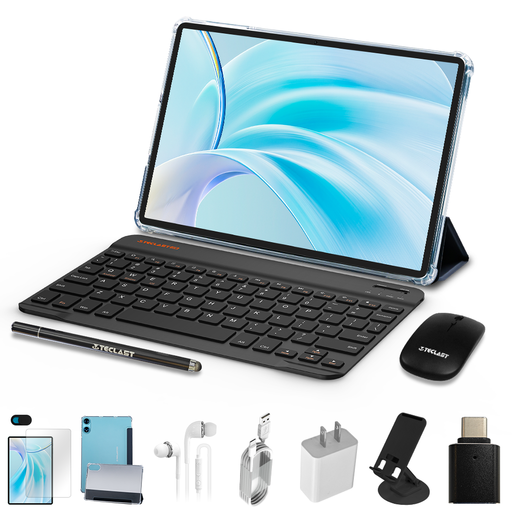
Why This Fits Their Persona: Perfect for students or anyone needing a light productivity machine on a budget. This bundle turns a capable tablet into a mini-laptop for taking notes in lectures, writing essays and managing emails.
This bundle directly counters the hidden cost pitfall. It includes the protective case, Bluetooth keyboard and mouse, so you have a complete setup from day one without needing to buy extra accessories.
An all-in-one productivity solution. The included tablet with keyboard and mouse makes it a versatile tool for both work and entertainment, offering excellent value.
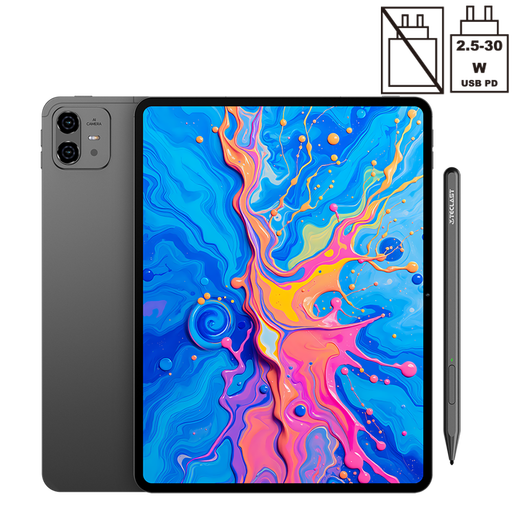
Why This Fits Their Persona: A fantastic entry point for hobbyist digital artists and note-takers. It's a purpose-built tablet for drawing, featuring a large, high-resolution screen and a pressure-sensitive stylus for creative work.
Unlike generic tablets where a compatible stylus is an expensive afterthought, this model is designed for drawing and includes a stylus that supports 4096 levels of pressure sensitivity, providing an authentic drawing experience.
The combination of a large 12.7-inch 2K display, a powerful Helio G99 processor and the included pressure-sensitive stylus makes it a strong creative tool.
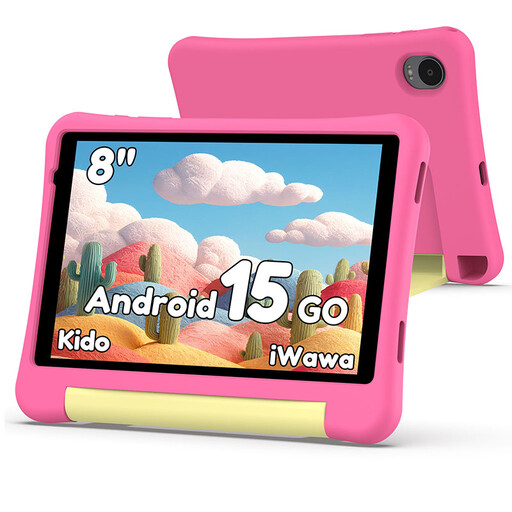
Why This Fits Their Persona: This is an excellent first tablet for a child. It's a purpose-built children's tablet that prioritises safety and durability, giving parents peace of mind while their kids explore, learn and play.
It includes a robust protective case to guard against drops and bumps. More importantly, the built-in Child Lock software allows parents to manage screen time and filter content, avoiding the risk of unsupervised access.
A complete, child-safe package at a very accessible price point. The combination of the durable case and comprehensive parental controls makes it a worry-free choice.
We have compiled a complete, real-time list of products that fully satisfy these strict selection criteria and UK safety regulations.
A: Widevine is a DRM technology owned by Google. It has different security levels, and Widevine L1 is the highest. Streaming platforms like Netflix, Prime Video and Disney+ require a device to have Widevine L1 certification to play their content in High Definition (HD) or 4K. Many budget tablets only have Widevine L3, which limits streaming to Standard Definition (around 480p). If you want to watch clear, sharp video, checking for L1 certification is crucial.
A: While a 4G LTE tablet with a SIM card slot can make and receive calls over the internet using apps like WhatsApp, Skype or Zoom, most are not designed to replace your primary mobile phone for standard voice calls over the cellular network. The main benefit is having mobile data for browsing, streaming and navigation when you are away from a Wi-Fi network.
A: For casual use like browsing, social media, and streaming, 64GB is a reasonable starting point. If you plan to download lots of apps, games or offline videos for travel, 128GB is a much safer bet. Always look for a model with a MicroSD card slot, as this allows you to expand the storage affordably later on.