
24/7 Customer Support

Free returns

Same-day & Next-day Delivery

Quality Guaranteed

Unlock Your Welcome Offers: FREE Delivery | Up to 80% OFF | Free 30-day JoyPlus trial
Download the APP
For digital artists, illustrators and design students in the UK, finding the right tools can feel like a balancing act. You need a device with a responsive screen, accurate stylus performance and enough power to handle creative apps, but the high price tags of flagship brands can be a significant barrier. The good news is that you no longer have to choose between features and affordability.
As the Joybuy Product Recommendation Officer, my role is to help you navigate the market and find products that deliver genuine value. This guide focuses on capable Android drawing tablets that provide the features you need to create without the premium cost. We will explore what makes a great digital art tablet and highlight a few standout options available today.
Choosing the right device involves more than just looking at the price. Here are a few key factors to consider to ensure your new tablet can keep up with your creative workflow.
Your screen is your canvas. For detailed illustration work, a larger display is often preferable. A 12 inch drawing tablet or bigger provides ample space, reducing the need for constant zooming and panning. Pay attention to the resolution; a Full HD (1920x1080) or 2K display ensures your lines look sharp and colours appear vibrant. A graphic tablet with screen functionality, where you draw directly on the display, offers a more intuitive experience than traditional graphics tablets that connect to a separate monitor.
The stylus is your most important tool. A tablet with stylus for drawing included in the box offers immediate value and guaranteed compatibility. The key specification to look for is pressure sensitivity, measured in levels. A 4096 pressure sensitivity tablet can register subtle changes in pressure, allowing you to vary your line weight from a faint whisper to a bold stroke, much like a real pencil or brush. This level of control is crucial for expressive and professional-looking digital art.
Creative applications like Clip Studio Paint, Krita or Infinite Painter require a decent amount of processing power and RAM to run smoothly, especially when working with large files or multiple layers. Look for a tablet with a modern octa-core processor and at least 6GB of RAM (with 8GB or more being ideal for more demanding work). Ample internal storage (128GB or more) is also important for storing your projects and a library of reference images.
Based on the features that matter most to artists, here are our recommendations for capable and budget-conscious Android tablets.
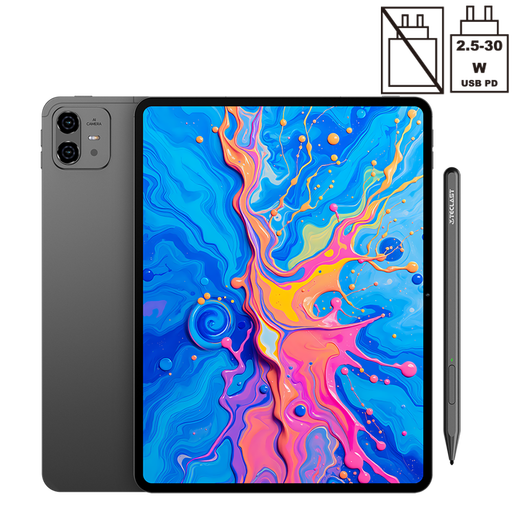
Why It Stands Out: The TECLAST ArtPad Pro is purpose-built for creatives. Its main draw is the combination of a large 12.7-inch 2K display and an included T-Pen stylus that supports 4096 levels of pressure sensitivity. This pairing provides the precision and screen real estate that digital artists need for serious work. Under the hood, the Helio G99 octa-core processor combined with a substantial 20GB of RAM (8GB physical + 12GB virtual) ensures that even complex projects with many layers run without lag.
Pros:
Who is it for? This is an excellent choice for graphic design students, hobbyist illustrators and professional artists looking for a powerful and affordable Android tablet for artists that can serve as their primary digital sketchbook or a capable secondary device.
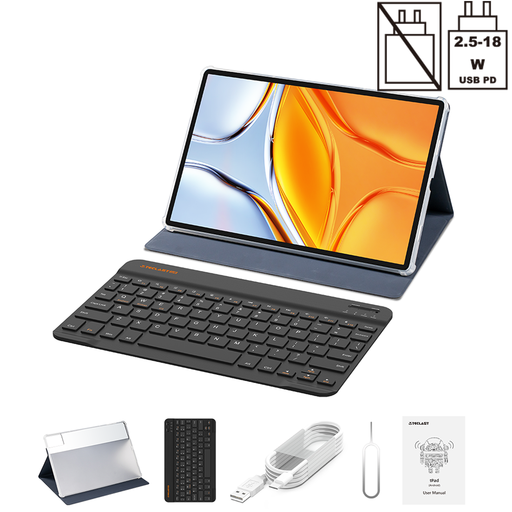
Why It Stands Out: If screen size is your top priority, the TECLAST T70 is hard to ignore. Its massive 14-inch display offers a truly expansive canvas that feels closer to a traditional sketchbook. While it doesn't come with a pressure-sensitive stylus in the box, its powerful MediaTek Helio G99 processor and 20GB of RAM (8GB + 12GB virtual) make it a performance powerhouse. This tablet excels at multitasking and can handle demanding creative software with ease, making it a versatile tool for both art and general productivity.
Pros:
Who is it for? Artists and designers who prioritise a large digital canvas above all else. It's also a great option for those who need a versatile device for media consumption, productivity and creative work, and who may already own a compatible universal active stylus.
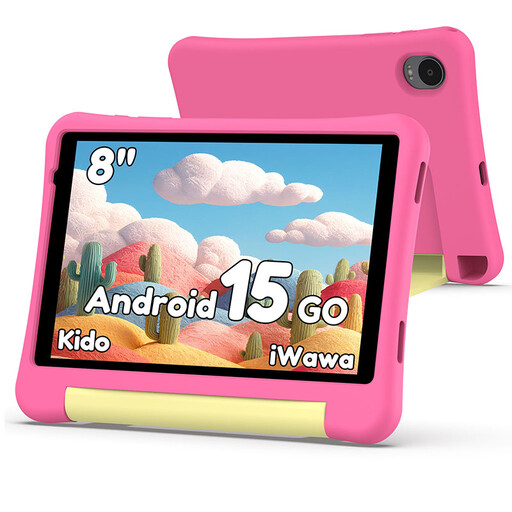
While not a dedicated drawing tablet for professionals, the Alldocube Kido is a noteworthy option for a very specific purpose: introducing a young, aspiring artist to the world of digital creativity. Its 8-inch screen, durable case and simple interface make it an accessible first digital art tablet. It's a fantastic, ultra-budget way to let a child explore drawing apps without handing over a more expensive device.
The world of Android tablets is vast, with models suited for every need and budget. If the recommendations above aren't quite what you're looking for, or if you'd like to explore a wider range of sizes and specifications, we have more to see.
Discover our full collection of tablets and find the perfect device for your creative journey.Explore All Tablets on Joybuy UK
Technically, yes. Most Android tablets support basic drawing with a simple capacitive stylus. However, for serious digital art, you need a tablet that supports an active stylus with pressure sensitivity. This feature is what allows you to create varied and dynamic lines, which is essential for illustration and design work.
Yes, 4096 levels of pressure sensitivity is considered an excellent standard for both hobbyist and professional artists. It provides a high degree of control and nuance, allowing for a very natural drawing experience that closely mimics traditional art tools.
Finding a good budget drawing tablet is easier than ever. While premium models can cost over ?1,000, highly capable Android tablets with large screens, powerful processors and included pressure-sensitive styluses can often be found in the ?200-?400 range. This price point offers a fantastic balance of performance and value for students and artists.