
24/7 Customer Support

Free returns

Same-day & Next-day Delivery

Quality Guaranteed

Unlock Your Welcome Offers: FREE Delivery | Up to 80% OFF | Free 30-day JoyPlus trial
Download the APP
Navigating the world of Android tablets can feel overwhelming. With so many models available, it’s difficult to know which one offers the right balance of features, performance and value for your specific needs. Whether you're searching for a device for family entertainment, a portable screen for streaming movies or a digital canvas for your creative projects, this guide is designed to help you make an informed choice.
As a Joybuy Product Recommendation Officer, my role is to filter through the options and provide clear, practical advice. Here, we’ll break down what to look for and highlight some of our top recommendations for 2026.
Choosing the right device comes down to understanding your primary use case. Here are a few key factors to consider.
The screen is your window to everything the tablet does, so its size and quality are paramount. A smaller tablet (around 8-9 inches) is highly portable, easy for children to hold and ideal for reading or casual browsing on the go. A large screen tablet (11 inches or more) provides a more immersive experience, making it a great choice for streaming movies or for use as a light productivity tool. Look for displays with at least a Full HD (1920x1080) resolution for crisp, clear images.
A tablet's performance is determined by its processor and RAM. For everyday tasks like web browsing, social media and video streaming, 4GB of RAM is generally sufficient. If you plan on multitasking, playing demanding games or using creative applications, consider a model with 8GB of RAM or more. For storage, 64GB is a good starting point, but if you intend to download lots of apps, movies or large files, look for 128GB, 256GB or a model with a microSD card slot for easy expansion.
Do you need your tablet for a specific purpose? If you're a budding artist or a student who takes a lot of notes, an Android tablet with stylus support is essential. Look for features like pressure sensitivity for a more natural drawing experience. For families, a dedicated tablet for kids mode with parental controls and curated content is a must-have feature. These considerations will help you find the best value Android tablet for your household.
Based on a balance of features, user needs and overall value, here are a few standout models to consider.
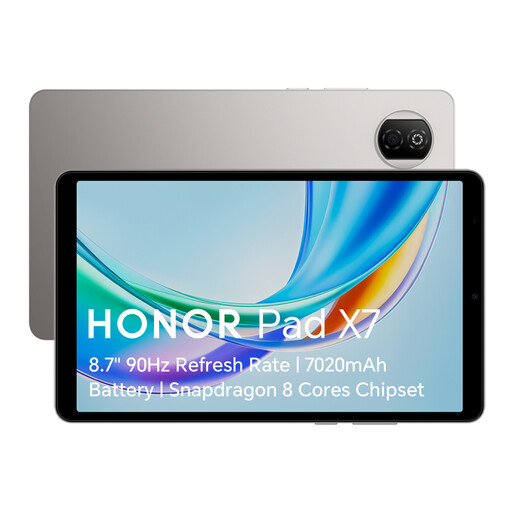
Why It Stands Out: The HONOR Pad X7 is a thoughtfully designed family tablet that combines portability with features that cater to both adults and children. Its compact form factor and durable build make it an excellent companion for travel or use around the home.
The device places a strong emphasis on user well-being. It includes multiple eye comfort modes, such as a T?V Rheinland certified Low Blue Light mode and an E-Book mode, which help reduce eye strain during long reading or viewing sessions. This makes it a responsible choice for young learners.
Pros:
Who is it for? This is an ideal first tablet for children or a reliable secondary device for anyone needing a portable screen for media consumption, reading and light browsing. It’s a strong contender for the best affordable android tablet for general household use.
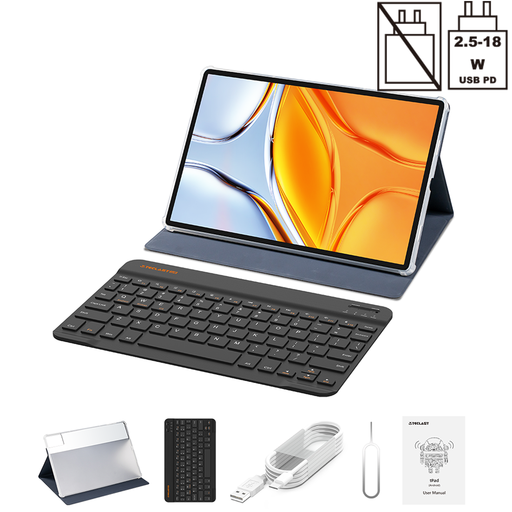
Why It Stands Out: If screen size is your top priority, the TECLAST T70 is hard to ignore. Its massive 14-inch Full HD display transforms it into a portable cinema, perfect for anyone who loves streaming movies and TV shows.
Beyond entertainment, it comes bundled with a Bluetooth keyboard, turning it into a capable device for writing emails, editing documents and web conferencing. The powerful MediaTek Helio G99 processor and generous RAM allocation ensure smooth multitasking, while the huge 10,000mAh battery provides enough power for a full day of work or play.
Pros:
Who is it for? This large screen tablet is perfect for media enthusiasts, students and professionals who want a versatile device for both entertainment and light productivity without the high cost of a traditional laptop.
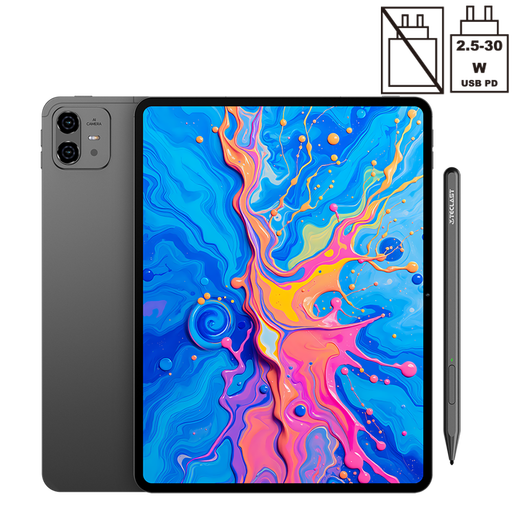
Why It Stands Out: The TECLAST ArtPad Pro is a purpose-built drawing tablet with screen that brings creative tools to a more accessible price point. Its key feature is the support for 4096 levels of pressure sensitivity with the included stylus, allowing for nuanced and precise lines when drawing or writing.
The large 12.7-inch 2K display provides a spacious and detailed canvas for your work. Combined with the powerful Helio G99 processor and 256GB of storage, it’s well-equipped to handle creative software and large project files, making it a fantastic Android tablet with stylus for aspiring artists and diligent students.
Pros:
Who is it for? This tablet is aimed squarely at digital artists, designers and students who need a reliable device for drawing, sketching and note-taking. It offers pro-level creative features without the premium price tag.
If our top recommendations don't quite match what you're looking for or if you specifically need a device with mobile data connectivity for use on the move, there are many other models to discover.
Explore our wider selection of 4G tablets to find the perfect fit for your connected lifestyle.
1. What is a good amount of storage for an Android tablet? For most users, 64GB is a reasonable starting point for apps, photos and some downloaded media. However, if you plan to store many large files like high-resolution movies or extensive game libraries, 128GB or 256GB is a safer bet. Alternatively, choose a tablet with a microSD card slot, which allows you to expand storage affordably.
2. Can an Android tablet replace a laptop? For many tasks, yes. With the addition of a keyboard and mouse, an Android tablet can handle web browsing, email, word processing and video calls very effectively. Models like the TECLAST T70, which include a keyboard, are particularly well-suited for this. However, for specialised software or heavy-duty multitasking, a traditional laptop may still be more suitable.
3. Are affordable Android tablets good for children? Absolutely, provided you choose the right one. A good tablet for kids should have a durable build, a manageable size and, most importantly, comprehensive parental controls. The HONOR Pad X7 is a great example, with its dedicated Kids Corner that allows parents to manage screen time, filter content and ensure a safe digital environment.