
24/7 Customer Support

Free returns

Same-day & Next-day Delivery

Quality Guaranteed

Unlock Your Welcome Offers: FREE Delivery | Up to 80% OFF | Free 30-day JoyPlus trial
Download the APP
Navigating the world of Android tablets can feel overwhelming. With endless specifications and enticing marketing, it's easy to end up with a device that underperforms or doesn't fit your needs. As a Joybuy Product Recommendation Officer, my role is to help you see past the hype and focus on what truly matters for UK users. This guide will highlight common purchasing pitfalls and clarify the essential features to look for, ensuring your next tablet is a valuable addition to your daily life, not a source of frustration.
Before you start comparing models, be aware of these common marketing tactics and design flaws that can lead to a disappointing purchase.
To make an informed choice, focus on these three non-negotiable parameters. They are the true indicators of a tablet's performance and usability.
The screen is your main point of interaction, so its quality is paramount. While a large 11 inch tablet or a compact 10 inch tablet might be your preference, look deeper at the specifications:
An octa-core processor is standard, but not all are created equal. More important is the amount of physical RAM it's paired with. For 2026, here is a simple guide:
Always prioritise physical RAM over virtual RAM for a true measure of multitasking capability.
Decide where you will use your tablet most.
Based on these practical criteria, here are a few options from our catalogue matched to specific user needs.

Why This Fits Their Persona: This is an ideal first tablet for a child. It's designed with safety and durability in mind, featuring a robust child lock for content management and a protective case to guard against drops. It's a worry-free entry into the digital world for kids.
It doesn't rely on misleading specs. The 3GB of RAM and 32GB of storage are clearly stated and are sufficient for the educational apps and games a young child would use. The value is in the parental controls and rugged design, not inflated numbers.
Includes a durable protective case and features comprehensive child lock software, providing peace of mind for parents straight out of the box.
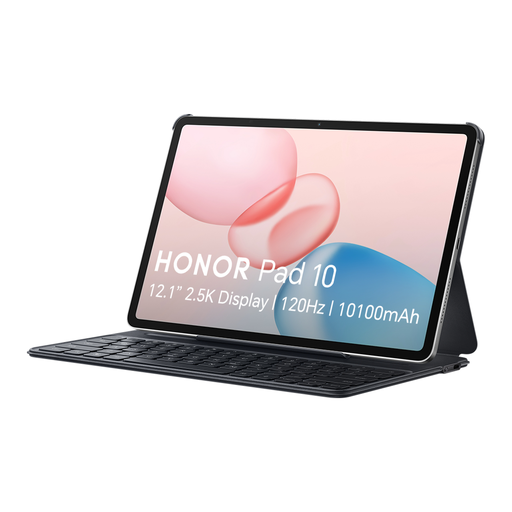
Why This Fits Their Persona: This is a productivity-focused package. The inclusion of a tablet with keyboard makes it ready for writing essays, reports and emails from day one. With 8GB of physical RAM and 256GB of storage, it's well-equipped for demanding study and work applications.
It provides a complete, balanced solution. By bundling the keyboard, it avoids the hidden cost and compatibility issues of buying one separately. The 8GB of physical RAM is clearly stated and provides genuine multitasking performance, steering clear of the virtual RAM gimmick.
The included keyboard transforms it into a capable work and study machine. It also features six speakers with spatial audio for an immersive media experience after a long day of work.
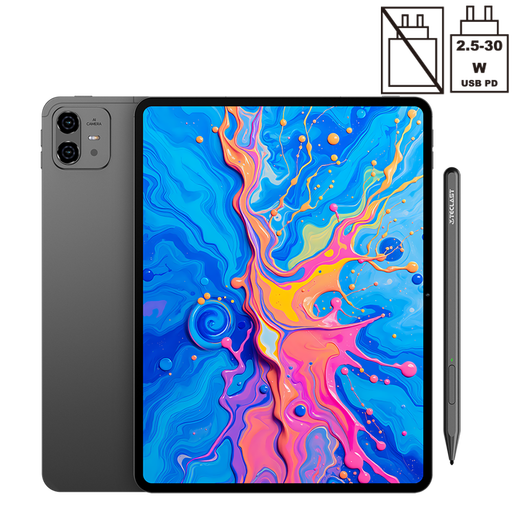
Why This Fits Their Persona: This is a purpose-built drawing tablet. The large 12.7-inch 2K screen provides a generous canvas, and its support for 4096 levels of pressure sensitivity with the included stylus allows for nuanced and precise creative work, from sketching to digital painting.
It focuses on a specific, verifiable creative feature rather than vague claims. The 10,000mAh battery is a tangible specification that directly addresses the needs of artists who require long, uninterrupted sessions, avoiding the "all-day battery" ambiguity.
Includes a pressure-sensitive stylus pen, making it a complete creative tool straight out of the box. It also features Dual SIM 4G LTE, allowing artists to work and share from anywhere.
We have compiled a complete, real-time list of products that fully satisfy these strict selection criteria and UK safety regulations.
Here are answers to a few common questions UK buyers have about Android tablets.
For most users, 6GB to 8GB of physical RAM is the ideal amount for a smooth experience. This allows you to switch between apps like your browser, email and a video player without noticeable lag. 4GB is acceptable for very light use or for a child's device, while 12GB or more is beneficial for intensive gaming or professional creative applications. Be cautious of "virtual RAM" and always check the physical RAM specification.
While most touchscreens will respond to a basic, rubber-tipped stylus, a true drawing tablet experience requires specialised hardware. Look for models that explicitly state support for pressure sensitivity (measured in levels, e.g., 4096) and palm rejection. These features allow the tablet to register how hard you press for thicker or thinner lines and ignore your hand resting on the screen. Models like the TECLAST ArtPad Pro are designed specifically for this purpose.
This depends entirely on your usage. If your tablet will never leave your home's Wi-Fi network, then a Wi-Fi-only model is the more economical choice. However, if you are a student who needs to research on campus, a professional who works on the go or someone who wants to stream video on a long train journey, the convenience of a 4G LTE tablet is invaluable. It provides a secure and reliable internet connection without having to hunt for public Wi-Fi.