
24/7 Customer Support

Free returns

Same-day & Next-day Delivery

Quality Guaranteed

Unlock Your Welcome Offers: FREE Delivery | Up to 80% OFF | Free 30-day JoyPlus trial
Download the APP
Searching for a device that can handle work, creativity and entertainment without the premium price tag can be a challenge. You need the typing efficiency of a laptop and the creative freedom of a drawing pad, but all in one portable package. An Android tablet with keyboard and pen offers this versatility, but navigating the specifications to find real value can be time-consuming.
This guide is designed to help you understand the key features to look for and to highlight some excellent all-in-one packages. We will focus on options that provide the tablet, stylus and keyboard straight out of the box, so you can get started immediately without worrying about hidden costs or compatibility issues.
Before diving into specific models, here are a few practical points to consider that will help you make an informed choice.
The screen is your primary window to everything you do. A 2K resolution (around 2000 pixels wide) on an 11-inch Android tablet or larger provides sharp, clear visuals, making it comfortable for reading text, watching films or editing photos. For creative work, the stylus is just as important. Look for specifications like 4096 levels of pressure sensitivity. This feature allows the tablet to register subtle changes in pressure, giving you finer control over line thickness and opacity, which is essential for a good experience with a budget drawing tablet.
A tablet's performance is determined by its processor, RAM and storage. An Octa-Core processor is well-suited for handling everyday multitasking. Pay attention to RAM – many modern tablets use virtual RAM expansion, which borrows from storage to boost performance when you have many apps open. For connectivity, having both tablet with cellular and wifi capabilities (like Dual SIM 4G LTE) gives you the freedom to stay connected anywhere, not just at home. The latest Android 15 tablet models also offer the most up-to-date features and security.
The main appeal of these bundles is value. Purchasing a tablet, a compatible keyboard, a pressure-sensitive stylus and a protective case separately can quickly add up. A bundle that includes everything ensures all components work together seamlessly and often represents a significant saving, making it an ideal choice for a tablet for students or anyone on a budget.
Here are a few recommendations that deliver on performance, features and value by including the essential accessories from the start.
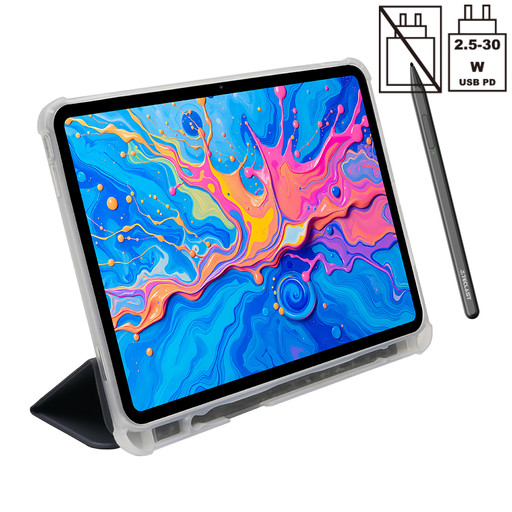
Why It Stands Out: The ArtPad Pro is built around a large 12.7-inch 2K display, making it an excellent canvas for digital art and an immersive screen for media. Its support for 4096-level pressure sensitivity with the included T-Pen makes it a strong contender for aspiring artists.
Pros:
Who is it for?
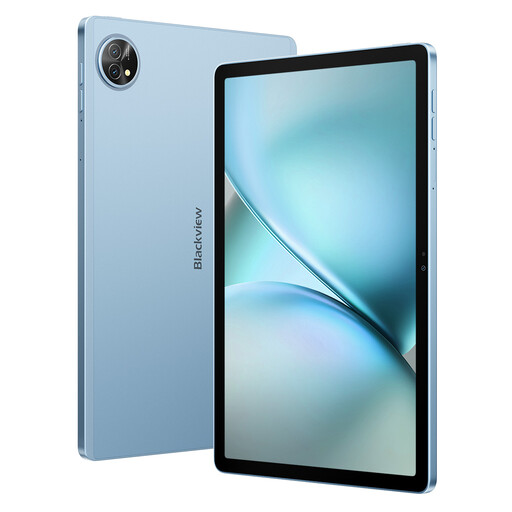
Why It Stands Out: The Blackview Zeno 10 strikes a balance between portability and productivity. Its 11-inch 2K display features a 90Hz refresh rate for noticeably smoother scrolling and animations. The standout feature is its PC Mode, which transforms the Android interface into a more familiar desktop-like environment, boosting its credentials as a productivity tablet.
Pros:
Who is it for?
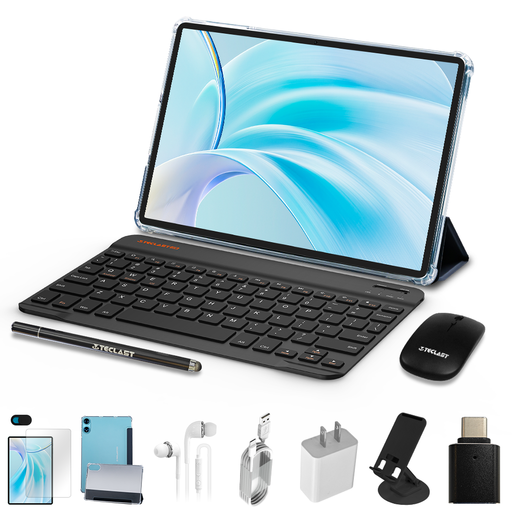
Why It Stands Out: This bundle is all about maximum value. For a highly accessible price, it provides not just the tablet, but a protective case, a Bluetooth keyboard and a mouse. It’s a complete starter kit, making it a fantastic cheap tablet with stylus UK option for those on a tight budget.
Pros:
Who is it for?
While these bundles offer fantastic value, you might already own a tablet and be looking to upgrade its functionality. If you need to find a keyboard to match your current device, you can explore a wide range of standalone options.
Not necessarily. There are two main types: passive (or capacitive) styluses, which work on any touchscreen like a finger, and active styluses, which contain electronics and offer features like pressure sensitivity and shortcut buttons. Active styluses require specific screen technology to function correctly. The benefit of buying a bundle is that the included pen is guaranteed to be compatible and optimised for the tablet.
For many tasks, yes. A productivity tablet is excellent for writing documents, managing emails, creating presentations and browsing the web. Features like the PC Mode on the Blackview Zeno 10 make the experience even closer to a laptop. However, for professionals who rely on specialised, power-intensive desktop software (like advanced video editing or CAD), a dedicated laptop may still be more suitable.
Widevine is a content protection system used by streaming services. Widevine L1 is the highest level of certification, and it means the device is trusted to play video content in high definition (HD), Full HD or even 4K. Tablets with a lower certification (L2 or L3) are often restricted to streaming in standard definition (480p), so L1 is a crucial feature for anyone who enjoys watching films and series on their device.