
24/7 Customer Support

Free returns

Same-day & Next-day Delivery

Quality Guaranteed

Unlock Your Welcome Offers: FREE Delivery | Up to 80% OFF | Free 30-day JoyPlus trial
Download the APP
Searching for an Android tablet with a keyboard can feel like navigating a minefield of confusing specifications and exaggerated claims. You want the versatility of a laptop without the hefty price tag, but it's easy to end up with a device that fails to deliver on its promises. As a Product Recommendation Officer at Joybuy, my role is to help you sidestep these issues and find a device that genuinely suits your needs.
Before you add anything to your basket, let's look at the common pitfalls that many UK buyers encounter.
To ensure you get an affordable tablet for work or study that performs well, focus on these core features rather than just the marketing headlines.
The term "Octa-Core" is ubiquitous, but not all eight-core processors are created equal. The specific model of the processor determines the tablet's overall speed and responsiveness.
A tablet's screen is its main feature, so don't overlook the details.
A tablet with a detachable keyboard offers fantastic flexibility. When assessing a bundle, consider the quality of the accessories. The keyboard should feel sturdy and comfortable to type on. A protective case is essential for longevity and an included stylus is a bonus for note-taking or creative work.
Based on these practical criteria, here are some options matched to different user needs.
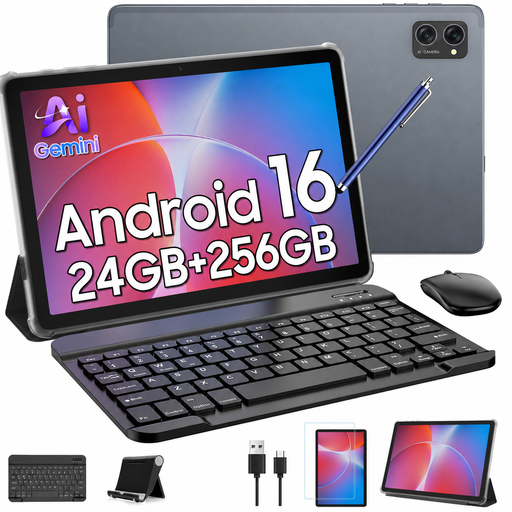
Why This Fits Their Persona: This is an ideal all-in-one package for students or families needing a functional device without a large financial outlay. It covers all the bases for homework, browsing and entertainment straight out of the box.
It explicitly includes Widevine L1 support, ensuring you can watch your streaming services in HD. The bundle includes a keyboard, mouse and stylus, providing a complete setup from the start.
Excellent value with a full suite of accessories included. The 256GB of internal storage is generous for this price point, offering ample space for apps and files.

Why This Fits Their Persona: Perfect for those who prioritise a large, high-quality screen for watching films, browsing photos or light creative work. The large battery supports extended viewing sessions.
This tablet features a large 12.7-inch 2K display and Widevine L1, directly addressing the need for a high-quality viewing experience and avoiding the pitfall of poor streaming quality.
The Helio G99 processor offers smooth performance for media and multitasking. Its 10,000mAh battery provides excellent endurance for on-the-go use.
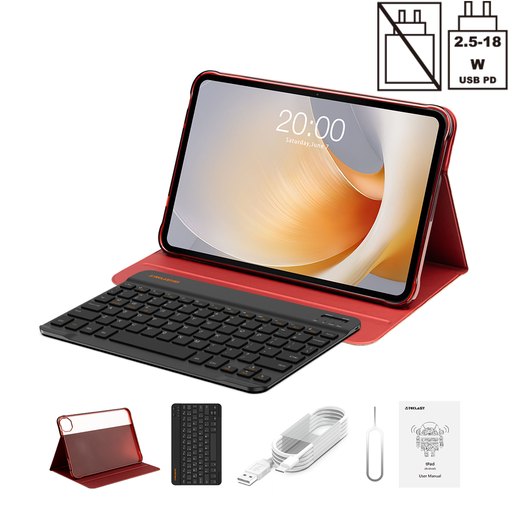
Why This Fits Their Persona: For those needing a larger digital canvas for work or study, this tablet's expansive screen and smooth refresh rate make multitasking with documents, emails and web pages much more comfortable.
Instead of just a basic screen, it offers a 120Hz refresh rate, a feature usually found on more expensive devices. This provides a much smoother scrolling and user experience, avoiding the choppy feel of lower-spec tablets.
The huge 13.4-inch display is excellent for productivity. The Helio G99 processor is capable of handling multiple apps, making it a solid, affordable tablet for work.
We have compiled a complete, real-time list of products that fully satisfy these strict selection criteria and UK safety regulations.
For many students, yes. It's an excellent tool for taking notes in lectures, writing essays, conducting research and joining online classes. They are lightweight and have long battery life. However, for courses that require specialised, power-hungry software (like advanced video editing, 3D modelling or complex coding), a traditional laptop would still be more suitable.
Generally, yes. Most modern Android tablets can connect to any standard Bluetooth keyboard. However, the benefit of buying a bundled or purpose-built keyboard case is the integrated design. It provides protection, a built-in stand and a perfect fit, making the device much more portable and convenient than carrying a separate tablet and keyboard.
With proper care, you can expect a budget tablet to serve you well for 2-4 years. The lifespan is typically determined by battery degradation and the end of software updates. The physical keyboard's durability depends on its build quality; a well-made detachable keyboard should last just as long as the tablet itself. Avoid exposing the device to extreme temperatures and keep the charging port clean to maximise its lifespan.