
24/7 Customer Support

Free returns

Same-day & Next-day Delivery

Quality Guaranteed

Unlock Your Welcome Offers: FREE Delivery | Up to 80% OFF | Free 30-day JoyPlus trial
Download the APP
The line between a tablet and a laptop is becoming increasingly blurred. For many of us, the power and portability of a tablet are more than enough for daily tasks, from drafting emails and attending video calls to streaming films and sketching ideas. The challenge, however, is finding a device that delivers on performance without the premium price tag, especially when you need the added functionality of a physical keyboard.
This guide is designed to help you navigate the options. We will look at the key features to consider when choosing an Android tablet with keyboard and present a few recommendations that offer a compelling balance of features, accessories and value for money.
Before diving into specific models, here are a few practical points to consider during your search.
The screen is your primary window into the device, so its quality is paramount. Look for a resolution of at least Full HD (1920x1080) to ensure sharp text and vibrant images. Many modern tablets now offer 2K resolution for even greater clarity. An 11 inch tablet with stylus support offers a great balance between portability and a comfortable workspace. Also, consider the refresh rate; a 90Hz or higher display provides noticeably smoother scrolling and a more responsive feel, which is a welcome feature for both productivity and entertainment.
An octa-core processor is the standard for smooth multitasking on modern Android tablets. Pay close attention to RAM, which affects how many apps you can run simultaneously. A minimum of 4GB is advisable, but 6GB or 8GB is better for future-proofing. Many devices now offer RAM expansion, which uses a portion of the internal storage to boost performance when needed. For storage, 128GB is a good starting point, but if you plan to download lots of apps, films or files, look for 256GB or a model with a microSD card slot for expansion.
While all tablets come with Wi-Fi, not all offer cellular connectivity. A cheap tablet with a SIM card slot can be incredibly useful for students, commuters and frequent travellers. It allows you to stay connected to the internet using a 4G or 5G mobile data plan, freeing you from the need to hunt for public Wi-Fi hotspots. This feature provides true portability for working or studying from anywhere.
Here are our handpicked selections for those seeking a complete tablet package. Each one includes a keyboard and offers a distinct set of features to suit different needs and budgets.
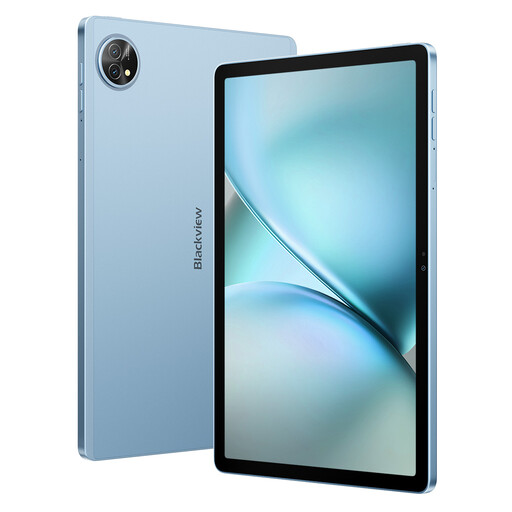
Why It Stands Out: The Blackview Zeno 10 is an impressive all-rounder that packs premium features into an accessible package. Its 11-inch 2K display with a 90Hz refresh rate is bright and fluid, making it a pleasure to use for work and media. The inclusion of PC Mode transforms the Android interface into a more familiar desktop-like environment, boosting productivity when the keyboard is attached.
Pros:
Who is it for? This is an excellent choice for students and mobile professionals who need a versatile and powerful device that can handle multitasking, streaming and light work without compromise.

Why It Stands Out: For those with a creative streak, the TECLAST ArtPad Pro is a standout option. Its expansive 12.7-inch 2K display provides a large canvas for drawing and design. The included stylus supports 4096 levels of pressure sensitivity, offering precise control for detailed work, making it a capable drawing tablet for beginners.
Pros:
Who is it for? Digital artists, note-takers and designers looking for a large-screen tablet with capable creative tools at a fraction of the cost of premium brands.
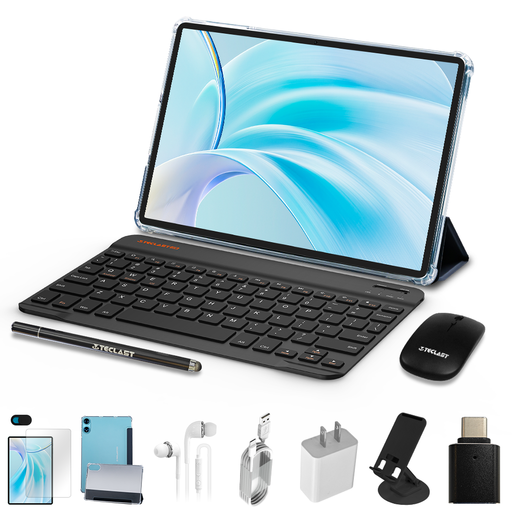
Why It Stands Out: This bundle represents exceptional value, making it a top contender for a budget tablet UK shoppers will appreciate. For a very modest price, you get not just a tablet and keyboard, but also a protective case and a Bluetooth mouse, creating a complete mini-workstation straight out of the box.
Pros:
Who is it for? Families, younger students or anyone needing a reliable secondary device for browsing, watching videos and handling light productivity tasks without breaking the bank.
While these three models offer fantastic value, they are just a snapshot of what is available. If you have different requirements or simply want to browse a wider range, you can explore our full collection.
Explore More Android Tablets with Keyboards
For many common tasks, yes. An Android tablet with a keyboard is excellent for writing documents, managing emails, browsing the web, attending video meetings and consuming media. They are typically lighter, more portable and have better battery life than most laptops. However, for specialised software (like advanced video editing or complex coding) or heavy-duty multitasking, a traditional laptop may still be more suitable.
For a good tablet for students, prioritise a long battery life to last through a day of lectures, a clear screen that is comfortable for reading textbooks and sufficient storage (128GB or more) for apps and documents. A bundle that includes a keyboard is highly cost-effective, as it provides the necessary tool for writing essays and taking notes without a separate purchase.
A tablet with a SIM card slot offers the freedom to connect to the internet from almost anywhere, without needing to rely on Wi-Fi. This is particularly useful for students who study on campus, professionals who commute or anyone who travels frequently. It ensures you can always access online resources, emails and cloud documents, making it a worthwhile feature for those who value constant connectivity.