
24/7 Customer Support

Free returns

Same-day & Next-day Delivery

Quality Guaranteed

Unlock Your Welcome Offers: FREE Delivery | Up to 80% OFF | Free 30-day JoyPlus trial
Download the APP
Finding a device that blends the portability of a tablet with the productivity of a laptop can be a challenge. For many, the ideal solution is an Android tablet with a keyboard, offering a versatile setup for work, study and entertainment. The real value, however, often lies in finding an all-in-one tablet bundle that includes a keyboard and case straight out of the box, saving you the hassle and expense of sourcing accessories separately.
As the Joybuy Product Recommendation Officer, my role is to help you navigate the options. This guide will walk you through key features to consider and present a few carefully selected models that offer a complete package for different needs and budgets.
Before diving into specific products, let's outline a few practical points to help you make an informed choice.
The display is your primary window into the device. A large screen tablet (12 inches or more) is excellent for multitasking, watching films or detailed creative work, offering an immersive experience similar to a small laptop. Conversely, a more compact 11-inch screen provides a better balance for portability and on-the-go use. Pay attention to the resolution (e.g., 2K for sharper images) and refresh rate. A higher refresh rate, such as 90Hz or 120Hz, results in noticeably smoother scrolling and a more responsive feel.
A tablet's performance is determined by its processor, RAM and storage. An Octa-Core processor is standard for handling everyday tasks smoothly. RAM (Random Access Memory) is crucial for multitasking. While 4GB can suffice for basic use, a tablet for students or professionals who juggle multiple apps will benefit from 8GB or more. Some modern tablets also use virtual RAM to boost performance. Storage (e.g., 128GB or 256GB) dictates how many apps, photos and documents you can save on the device.
Opting for a tablet with keyboard and case included is one of the smartest ways to get a functional setup while managing costs. These bundles ensure compatibility and protect your investment from day one. Some packages go even further, including a stylus for note-taking or a mouse for a true desktop-like experience, making them a fantastic affordable Android tablet option for those who want everything in one box.
Here are a few all-in-one Android tablet packages that stand out for their features and included accessories.
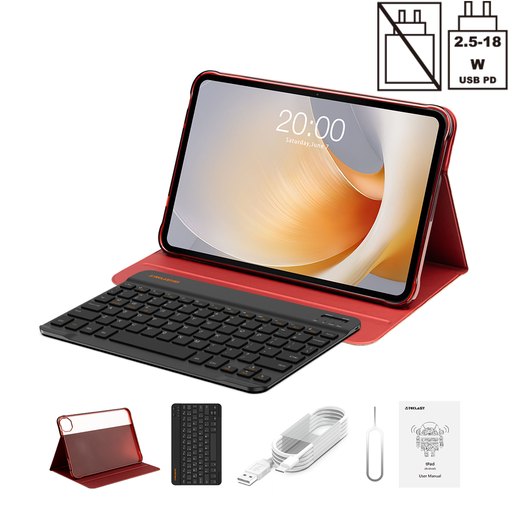
Why It Stands Out: The TECLAST T65 Plus is built around its expansive 13.4-inch display, which is further enhanced by a fluid 120Hz refresh rate. This combination makes it an exceptional device for media consumption and split-screen productivity. Powered by the capable MTK Helio G99 Octa-Core processor and a substantial 20GB of RAM (8GB physical + 12GB virtual), it handles demanding apps and multitasking with ease.
Pros:
Who is it for? This is an excellent choice for users who prioritise screen real estate. It’s well-suited for professionals who need a portable presentation tool, students working on complex research projects or anyone wanting a cinematic experience from their tablet.

Why It Stands Out: The ArtPad Pro is designed for both creativity and productivity. Its main appeal is the inclusion of a stylus with 4096 levels of pressure sensitivity, making it a great tool for digital drawing and note-taking on its sharp 12.7-inch 2K display. It shares the same powerful Helio G99 processor and 20GB RAM configuration as the T65 Plus but adds a massive 10,000mAh battery for extended use between charges.
Pros:
Who is it for? This is the perfect all-in-one tablet bundle for digital artists, designers and students who prefer handwriting notes. Its combination of a high-quality screen, stylus and long battery life makes it a versatile workhorse for creative and academic tasks.
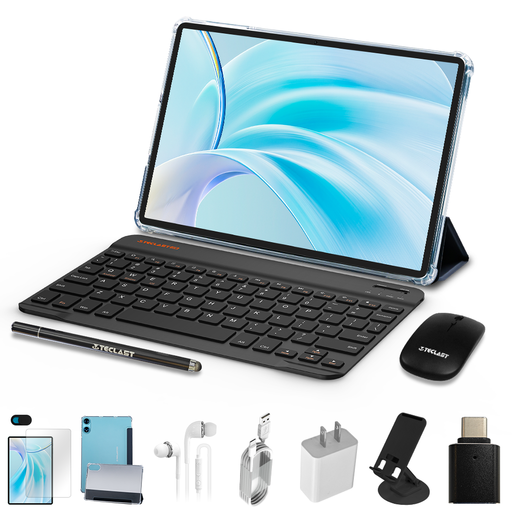
Why It Stands Out: The TECLAST P50 represents outstanding value by providing a complete productivity setup at an accessible price point. This bundle not only includes a keyboard and case but also adds a Bluetooth mouse. The 11-inch display with a 90Hz refresh rate offers a smooth experience in a portable form factor. While its 4GB RAM and 128GB storage are more modest, they are perfectly adequate for everyday tasks like writing documents, browsing the web and streaming video.
Pros:
Who is it for? This is the ideal affordable Android tablet for those seeking maximum functionality without a large investment. It’s a great first tablet for students, a reliable secondary device for professionals or a shared family tablet for homework and entertainment.
While these bundles offer fantastic convenience, you might already own a tablet or have a specific accessory in mind. If you're looking to pair a keyboard with a different device or simply want to explore more options, browse our full selection of keyboard cases to find the perfect match.
Can you use an Android tablet as a laptop replacement? For many common tasks—such as writing emails, browsing the web, attending video calls and streaming media—an Android tablet with keyboard is a perfectly capable and lightweight laptop alternative. However, for specialised software common in fields like intensive video editing or complex programming, a traditional laptop may still be required.
Is 4GB of RAM enough for a tablet in 2026? It depends on your usage. For basic activities like reading, light document editing and watching videos, 4GB of RAM can be sufficient. For heavier multitasking, such as keeping numerous browser tabs and applications open simultaneously, aiming for 8GB or more is advisable to ensure a smoother experience.
What are the benefits of buying a tablet with the keyboard included? The primary benefits are guaranteed compatibility and cost savings. An all-in-one tablet bundle ensures the keyboard and case are designed to fit your device perfectly and function without issue. This saves you the time and potential frustration of searching for third-party accessories that may or may not work as expected.