
24/7 Customer Support

Free returns

Same-day & Next-day Delivery

Quality Guaranteed

Unlock Your Welcome Offers: FREE Delivery | Up to 80% OFF | Free 30-day JoyPlus trial
Download the APP
Finding a device that can handle work, creative projects and entertainment without requiring a hefty investment can be a challenge. Many are searching for a versatile Android tablet with stylus and keyboard included, offering a complete package straight out of the box. This guide is designed to help you navigate the available options, focusing on models that deliver on performance and value for UK users.
As the Joybuy Product Recommendation Officer, my role is to sift through the market and present practical choices that meet specific needs, whether you're a student, a budding artist or a professional on the move.
Before diving into specific models, let's consider a few key features that make a significant difference in day-to-day use.
The display is your primary window to everything you do. A large screen android tablet, particularly one around the 12-inch mark, provides ample space for multitasking with split-screen apps, sketching detailed designs or enjoying films. Look for a resolution of at least Full HD (1920x1080), with 2K (around 2000x1200) being a noticeable step up in sharpness. A higher refresh rate, such as 90Hz, also contributes to a smoother, more responsive feel when scrolling and drawing.
A tablet's usability for productivity hinges on its performance. An octa-core processor is standard, but the amount of RAM is crucial for smooth multitasking. Many modern tablets offer RAM expansion, which uses a portion of the internal storage as virtual memory. For those needing a laptop substitute, an android tablet with PC mode is a game-changer. This feature transforms the standard Android interface into a desktop-like environment with a taskbar and windowed apps, making it ideal for a tablet for students or mobile workers.
The main appeal of these bundles is getting a tablet with pen included and a keyboard. This saves you the hassle and expense of finding compatible accessories. For true mobility, consider a 4G LTE tablet. Having a SIM card slot allows you to stay connected to the internet wherever you are, without relying on Wi-Fi. This is invaluable for remote work, commuting or studying outside the home.
Here are a few models that offer a compelling combination of features, performance and included accessories, making them excellent considerations for anyone seeking a budget android tablet UK.
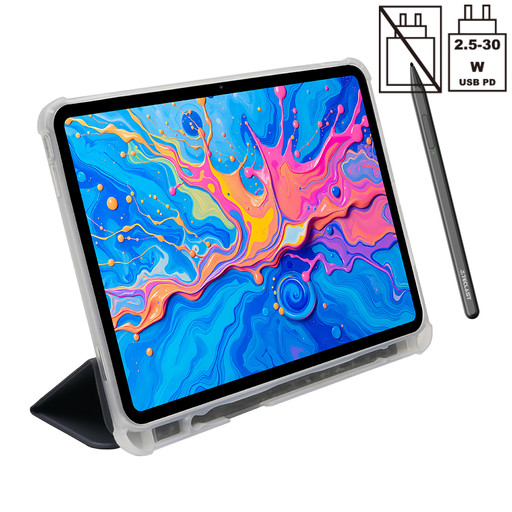
Why It Stands Out: The ArtPad Pro is built for creators and multitaskers. Its expansive 12.7-inch 2K display provides a huge canvas for drawing and a cinematic view for media. The included T-Pen stylus supports 4096 levels of pressure sensitivity, offering nuanced control that makes it a great drawing tablet for beginners.
Pros:
Who is it for? This tablet is ideal for digital art hobbyists, students who need a large screen for note-taking and research and media lovers who want an immersive viewing experience.
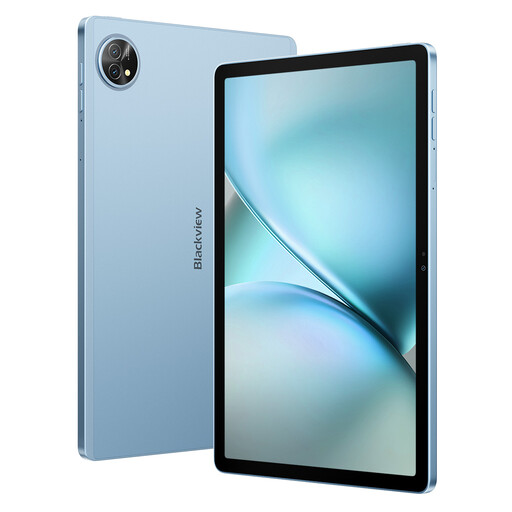
Why It Stands Out: The Zeno 10 strikes a fine balance between portability and performance. The 11-inch 2K display with a 90Hz refresh rate feels incredibly fluid, while the dedicated PC Mode provides a serious productivity boost. It’s a complete package with both a keyboard and stylus included.
Pros:
Who is it for? A great choice for mobile professionals and students who need a versatile device that can quickly switch between tablet and laptop-style functionality.
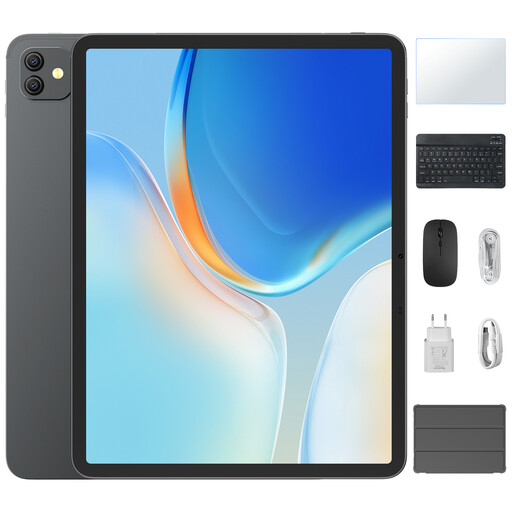
Why It Stands Out: Similar to the ArtPad Pro, the Link 8 offers a very large 12.7-inch display, but adds a smooth 90Hz refresh rate for enhanced responsiveness. It also includes the productivity-enhancing PC Mode and comes as a full set with a keyboard and stylus.
Pros:
Who is it for? Users who prioritise a large, smooth screen for multitasking and media consumption, and who want the flexibility of a desktop-like interface for productivity tasks.
The models above represent just a few of the excellent value packages available. If you're still exploring or have different requirements, you can browse a wider selection of devices.
[Explore our full range of tablets with keyboard and pen included](https://www.joybuy.co.uk/explore/tablet-with-keyboard-and-pen/fGVe7jml)
1. Can a budget Android tablet replace a laptop for a student? For many students, the answer is yes. With features like an android tablet with PC mode, an included keyboard and access to productivity apps like Google Docs and Microsoft Office, these tablets can handle essay writing, research, online lectures and presentations. They offer a lightweight and versatile alternative to a traditional laptop.
2. What should I look for in a drawing tablet for beginners? For a beginner, the most important features are a responsive stylus and good pressure sensitivity. A tablet with pen included that supports at least 2048 levels of pressure sensitivity (with 4096 being even better) will allow for natural-feeling variations in line thickness. A large, high-resolution screen also provides a better canvas to work on.
3. Is 4G LTE necessary for a tablet in the UK? A 4G LTE tablet is not essential for everyone, but it offers significant freedom. If you plan to work, study or stream content while commuting or in places without reliable Wi-Fi (like parks or cafes), having a 4G connection is incredibly convenient. It ensures you can stay productive and connected without having to tether to your phone.