
24/7 Customer Support

Free returns

Same-day & Next-day Delivery

Quality Guaranteed

Unlock Your Welcome Offers: FREE Delivery | Up to 80% OFF | Free 30-day JoyPlus trial
Download the APP
Finding a versatile tablet that can handle everything from work presentations and creative projects to streaming your favourite series can be a challenge. The market is filled with options, and it's not always easy to find a device that balances features, performance and price. An Android tablet with stylus offers a fantastic solution, combining the flexibility of the Android OS with the precision of a pen for note-taking, drawing and navigating.
As your Joybuy Product Recommendation Officer, my role is to help you navigate the choices. This guide will walk you through key features to consider and highlight a few noteworthy models that deliver on functionality without the premium price tag.
Before diving into specific products, let's look at a few important features. Keeping these in mind will help you select a tablet that truly fits your lifestyle.
The screen is your window to everything you do. For a great visual experience, look for a display with at least Full HD (1920x1080) resolution. A large screen tablet (11 inches or more) is ideal for multitasking and provides a bigger canvas for creative work. If you plan on using your device as a drawing tablet, pay close attention to stylus features like pressure sensitivity. This allows you to create varied line weights, just like with a real pen or brush. A higher refresh rate, such as 90Hz, also contributes to a smoother, more responsive feel when scrolling and drawing.
How you connect to the internet is crucial. While most tablets offer Wi-Fi, a 4G LTE tablet with a SIM card slot gives you the freedom to work, study or stream from almost anywhere. This is particularly useful for students attending lectures on different campuses or professionals who travel frequently. Also, check for modern Wi-Fi standards like Wi-Fi 5 or higher for faster, more stable connections at home or in the office.
For many, a tablet is a primary entertainment device. To ensure you can stream films and TV shows in high definition, look for Widevine L1 certification. This is a security standard required by services like Netflix, Disney+ and Amazon Prime Video to play content in HD or higher. Without it, you'll be limited to standard definition. On the performance side, a modern operating system like an Android 15 tablet ensures you have the latest features and security updates. Ample RAM (8GB or more is a good starting point) will keep multitasking smooth, especially when paired with accessories like a tablet with keyboard for a laptop-like experience.
Here are a few Android tablets with included styluses that offer a compelling mix of features for different users.
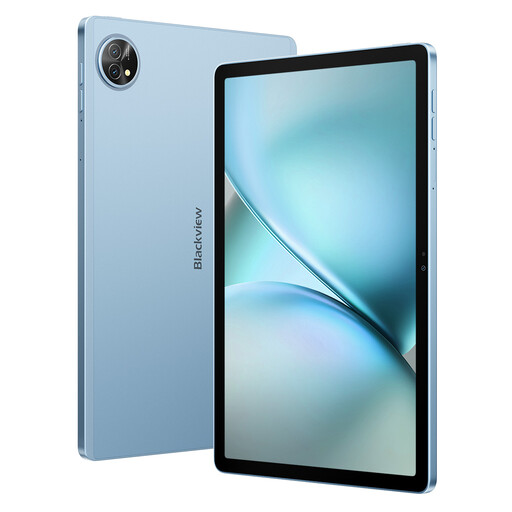
Why It Stands Out: The Blackview Zeno 10 is a true all-rounder, bundling a stylus and keyboard in the box. Its PC Mode transforms the interface into a familiar desktop-like environment, boosting productivity. The combination of Dual SIM 4G and 5G Wi-Fi provides excellent connectivity options, while the 11-inch 2K display with a 90Hz refresh rate makes for a smooth and vibrant viewing experience.
Pros:
Who is it for? This is an excellent choice for students and mobile professionals who need a versatile device that can seamlessly switch between work, study and entertainment.
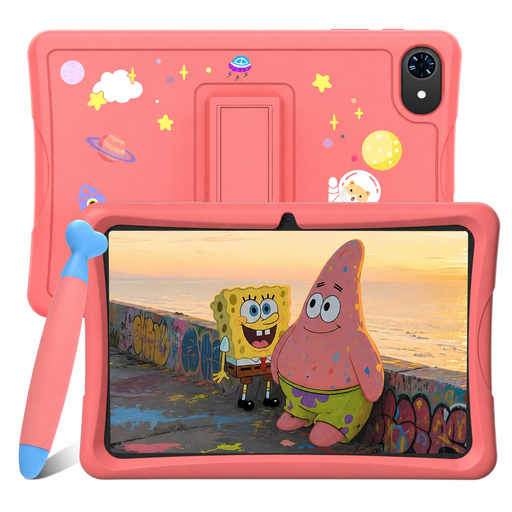
Why It Stands Out: As a highly accessible affordable Android tablet, the TABWEE K10 is designed with families in mind. It comes pre-loaded with Google Kids Space, offering a safe and curated environment for children to learn and play. The inclusion of a stylus encourages creativity and helps develop fine motor skills. Despite its low price point, it still features Widevine L1 support, making it a capable media player for family movie time.
Pros:
Who is it for? Parents seeking a first tablet for their children that is affordable, durable and packed with age-appropriate content and safety features.
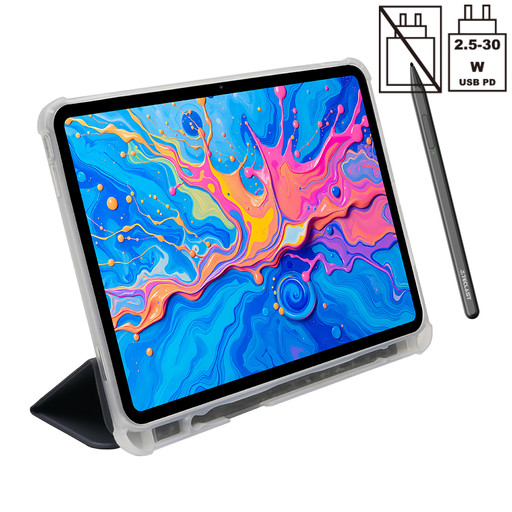
Why It Stands Out: The TECLAST ArtPad Pro is built for creators. Its expansive 12.7-inch 2K display provides a massive canvas for digital art, and its stylus supports 4096 levels of pressure sensitivity for nuanced and precise drawing. Powered by a capable Helio G99 processor and 20GB of RAM (8GB + 12GB virtual), it handles demanding creative apps with ease. The huge 10,000mAh battery ensures you can keep creating for hours on end.
Pros:
Who is it for? Aspiring digital artists, designers and dedicated note-takers who need a large screen tablet with high-precision stylus input without the high-end price.
If you already own a tablet and are simply looking to upgrade your pen, or if you want to explore more advanced options, a new stylus can make all the difference.
Browse our full range of tablet pens to find the perfect match for your device and creative needs.
Not all styluses are created equal. There are two main types: passive (which work like a finger on any touchscreen) and active (which contain electronics and offer features like pressure sensitivity and shortcut buttons). For drawing or precise note-taking, you'll need an active stylus that is compatible with your specific tablet model. The tablets recommended above all include a compatible active stylus.
Yes, many modern affordable tablets are surprisingly capable for drawing. The key is to look for models that specify stylus pressure sensitivity, like the TECLAST ArtPad Pro with its 4096 levels. A large, high-resolution screen and sufficient RAM are also important for a smooth experience in drawing applications.