
24/7 Customer Support

Free returns

Same-day & Next-day Delivery

Quality Guaranteed

Unlock Your Welcome Offers: FREE Delivery | Up to 80% OFF | Free 30-day JoyPlus trial
Download the APP
Choosing between Android tablets can be confusing when listings emphasise large RAM figures, AI features and impressive battery capacities. The right model depends less on a headline specification and more on how the tablet will be used in the UK: at home on Wi-Fi, on university transport, in a creative workspace or while travelling.
This guide from the Joybuy Product Recommendation Officer explains the main buying traps, the specifications worth checking and a selection of models matched to different users.
A listing may advertise “20GB” or “32GB” RAM, but part of this figure can be virtual memory allocated from internal storage. Physical RAM has a more direct effect on app switching, while virtual RAM may help in certain situations but is not equivalent to installed memory.
Before buying, check whether the listing separates physical and virtual RAM. For everyday streaming, browsing and study, a tablet with 6GB or 8GB of physical RAM may be more meaningful than a larger combined figure.
A large-screen tablet is useful for split-screen documents, films and drawing, but screen size alone does not indicate image quality. Check the resolution, panel type, brightness and refresh rate.
For example, a 12.7-inch 2K display provides a different viewing experience from a 10-inch panel with a 1280 × 800 resolution. A 120Hz tablet can offer smoother scrolling than a 60Hz model, although compatible content and processor performance also influence the result.
A tablet with a keyboard or stylus can offer better value than buying accessories separately, but bundled items vary between product versions. Some listings also specify “no charger”, meaning you may need to purchase a compatible USB-C charger separately.
Check the complete in-box list, charger specification, keyboard connection method and whether a stylus is included or merely supported.
The processor affects app opening, multitasking, gaming and video editing. Octa-core chips such as the MediaTek Helio G99 or Helio G100 are positioned for everyday productivity and entertainment, while higher-tier Qualcomm processors are intended for more demanding workloads.
Also check the storage technology and capacity. 256GB internal storage gives more room for downloads, games and offline films than 64GB or 128GB. A tablet with expandable storage can be useful, but confirm the maximum supported microSD capacity and whether the slot is shared with a SIM card.
A 4G LTE tablet with a SIM slot can connect through a mobile network when Wi-Fi is unavailable. Before purchasing, check:
A larger battery, such as 8,800mAh or 10,000mAh, can support longer use, but actual battery life depends on brightness, gaming, mobile data and background apps. Buyers should also check the seller’s returns policy and the manufacturer’s software-update information, which may not be clearly stated on every listing.
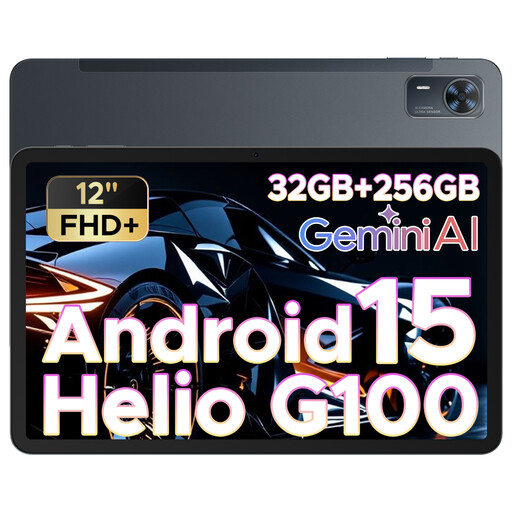
Why This Fits Their Persona: Its 12-inch display, SIM slot and 256GB storage suit users wanting one device for streaming, browsing, study and travel without moving to a smaller screen.
The listing identifies a 12-inch 2000 × 1200 display, 256GB ROM and an 8,800mAh battery, making the core specifications easier to compare than a headline RAM figure alone.
90Hz display, quad speakers, 13MP rear camera and face-unlock feature listed in the specification.

Why This Fits Their Persona: Suitable for buyers prioritising a high-resolution display, premium materials, stylus support and a compact form for work and entertainment.
Its specification clearly states 12GB RAM, 128GB storage expandable up to 2TB and an included S Pen, reducing uncertainty around accessory costs and storage expansion.
11-inch 120Hz Dynamic AMOLED 2X display, 8,400mAh battery and IP68 water and dust resistance listed by the retailer.

Why This Fits Their Persona: The combination of a large display, keyboard, case, stylus support and dual-SIM 4G LTE suits coursework, remote work and digital drawing.
The listing distinguishes 8GB physical RAM plus 12GB virtual memory and specifies the included accessories, so buyers can assess the package accurately.
2K display, 4,096-level pressure sensitivity support, 256GB storage, 10,000mAh battery and Widevine L1 are specified.
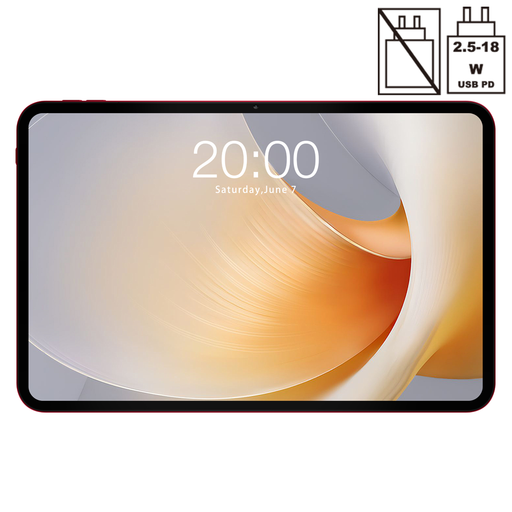
Why This Fits Their Persona: Its 13.4-inch display and 120Hz refresh rate are suited to users who want a spacious screen for films, games, reading and multitasking.
The specification identifies the 1920 × 1200 resolution, 128GB storage and dual-SIM 4G connectivity, allowing buyers to weigh screen size against pixel density and capacity.
120Hz display, Helio G99 octa-core processor, GPS and dual-SIM 4G LTE are listed features.
We have compiled a complete, real-time list of products that fully satisfy these strict selection criteria and UK safety regulations.
Use this short checklist before paying:
They can be suitable for reading, note-taking, video calls, research and document editing. A tablet with a keyboard is more practical for extended typing, while a tablet with a stylus can support handwritten notes and diagrams. Check app compatibility and cloud-storage requirements before replacing a laptop.
It may be worthwhile for commuters, travellers and users who regularly work away from reliable Wi-Fi. You will need a compatible SIM and mobile-data plan. Check supported network bands and whether the model accepts the SIM format used by your provider.
Lifespan depends on battery care, physical handling, app requirements and software support. Choosing sufficient storage, a capable processor and a protective case can help the tablet remain useful for longer. Avoid heat, liquid exposure and unapproved chargers, and check the manufacturer’s update information before purchase.